Helios Rust Console Bot Documentation
Auto In-Game Giveaways
Admin reference for /auto giveaway-in-game in Helios. Run recurring in-game kit giveaways on a schedule.
- Last reviewed
- Maintained by
- Helios RCE
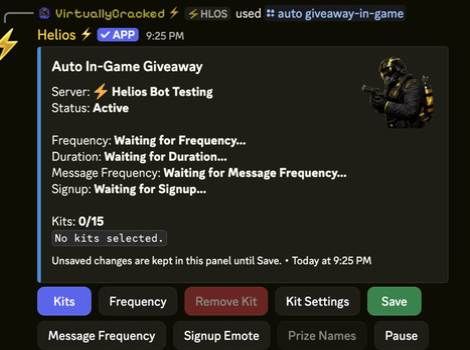
Auto In-Game Giveaways
Overview
Set up an in-game kit giveaway that starts itself on a schedule and repeats automatically. Players sign up in game with a quick-chat emote and a random entrant wins a kit from your prize pool. Premium only.
Commands Covered
| Command | What It Does |
|---|---|
/auto giveaway-in-game server:<server> | Open the auto in-game giveaway admin panel |
Panel Controls
| Button | What It Does |
|---|---|
| Kits | Pick the kits given away (up to 15 in the prize pool) |
| Prize Names | Set the display name shown in-game for each kit |
| Frequency | Set the schedule the giveaway auto-starts on |
| Kit Settings | Set how long each giveaway runs (duration) |
| Message Frequency | How often the in-game signup message repeats |
| Signup Emote | The quick-chat emote players use to enter |
| Save | Save the current setup for this server |
| Pause / Resume | Turn the auto giveaway on or off without deleting it |
Setup Flow
- Run
/auto giveaway-in-game server:<server>to open the panel. - Add one or more Kits to the prize pool. Use Prize Names when players should see a friendlier name than the kit's saved name.
- Set the Frequency (when it starts), Duration (how long it runs), Message Frequency, and Signup Emote.
- Choose Save. Your changes are not live until you save them.
- Leave the giveaway active. Helios starts it on schedule, collects sign-ups, and creates the winner's claim.
Easy schedule examples
Use Frequency for a repeating delay or a calendar-style schedule. For example, 30m starts every 30 minutes, 5h starts every five hours, and 1d starts once a day. Advanced owners can also use a five-part cron schedule such as */30 * * * * for every 30 minutes.
Choose a signup emote that players do not already use for another popular feature. Test one full giveaway after saving: start it, enter with the chosen quick chat, and confirm that the winner can claim the prize.
Example
/auto giveaway-in-game server:"EU Main"
Notes
- Premium only. Requires Manage Server to open the panel.
- The prize pool holds up to 15 kits. Linked winners receive the selected reward in
/bag. - Unlinked winners, or winners with a full bag, can use Here Take This for 30 minutes.
- Active giveaways and entries recover after a bot restart. Duplicate signup responses are throttled.
- Use Pause to stop the schedule temporarily and keep all your settings.
- For a single, manually-started giveaway instead of a recurring one, use
/giveaway in-game.