Helios Rust Console Bot Documentation
/bind add, edit, remove, list
Create, edit, remove, and list custom Helios binds for Rust Console servers.
- Last updated
- Maintained by
- Helios RCE
Overview
The /bind commands let server owners and admins create, edit, remove, and list custom in-game binds for Helios.
Binds let players do a specific quick chat in Rust Console chat, then Helios can respond or run commands for you.
Want the simpler setup? Use
/easy bindsinstead.
The commands on this page are more customizable, but they are also a little harder to set up correctly.
When To Use /easy binds
Use /easy binds if you want the fastest and easiest way to manage common bind setups.
/easy binds
/easy binds is best for:
- Quick setup
- Simple bind management
- Common server owner workflows
- Admins who do not want to manually configure every bind option
- Making changes from a cleaner panel
When To Use Manual /bind Commands
Use the manual /bind commands if you want more control over your bind setup.
Manual binds are better when you need to:
- Tie a bind to an in game Auth Group (ex. VIP)
- Create more custom bind phrases
- Edit specific bind details
- Remove only one exact bind
- View all current binds
- Fine-tune behavior beyond the easy panel
Choose the access rules before you save
When you create or edit a bind, start with the player experience:
- Choose the quick-chat phrase and what the bind should do.
- Pick the chat type Helios should listen to. Use All chat unless the phrase should only work in a specific chat type.
- Set a player cooldown when each player needs their own wait time.
- Set a server cooldown when the whole server should share one wait time.
- Choose one access rule: an in-game auth group or a required Discord role. Do not use both for the same bind.
- Add a cooldown or claim message if players need a clear answer in chat.
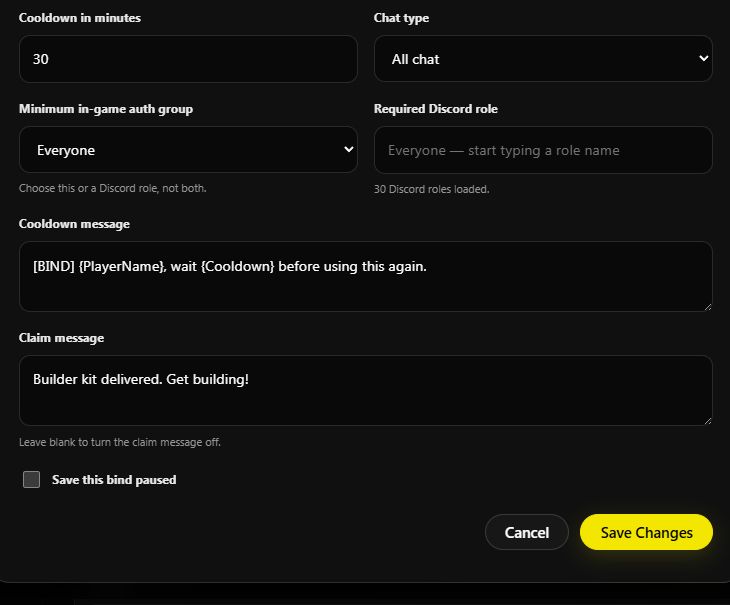
- Save the bind paused if you are still testing it.
INFONote
The screenshots below use the Easy Binds dashboard because it shows the same choices in one place. In Discord, set these choices in /bind add or /bind edit instead.
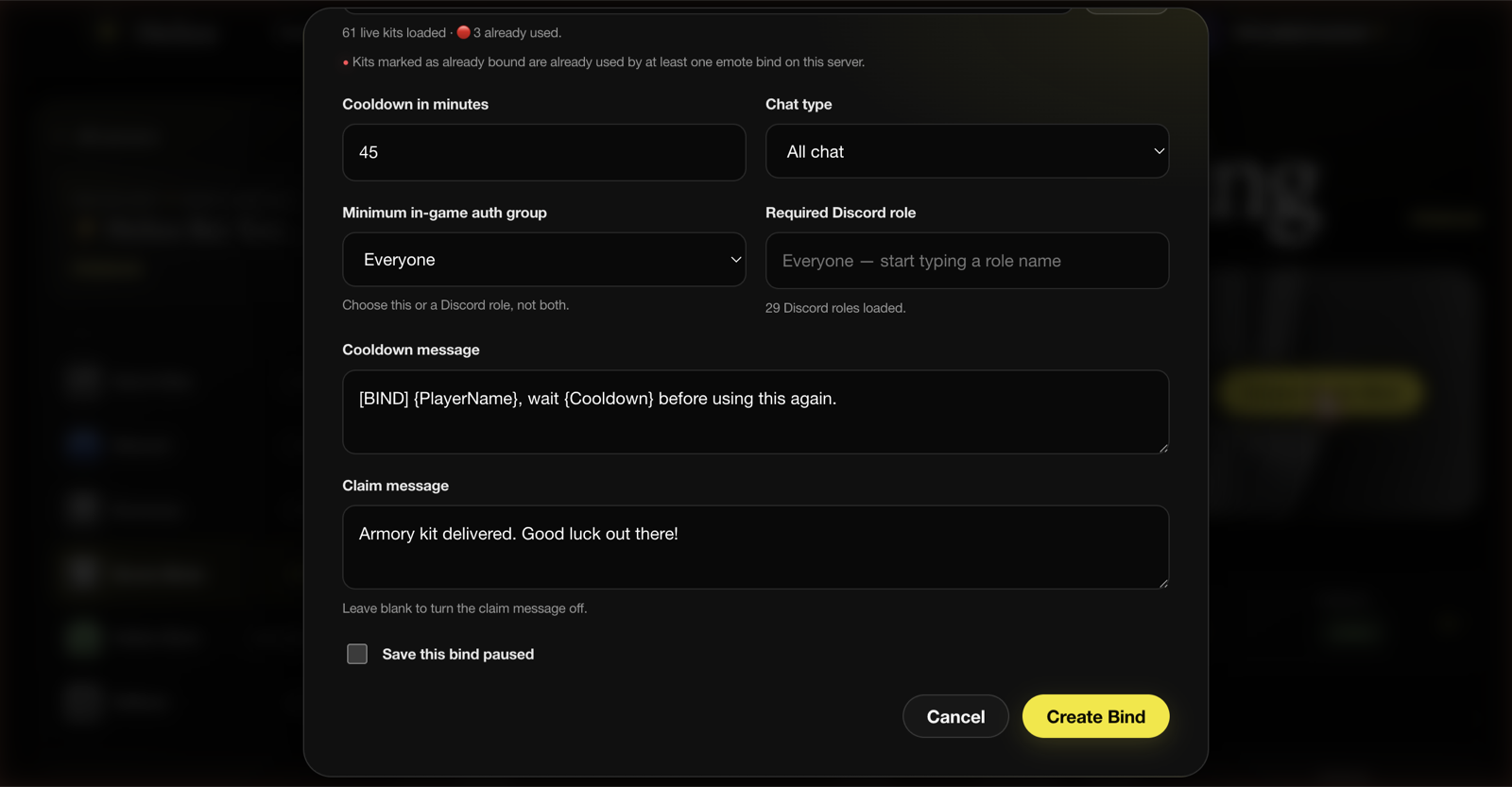
INFONote
The dashboard calls the player wait time Cooldown in minutes. In the Discord command, this is the player cooldown. A server cooldown is separate: it blocks everybody from using that bind until its timer ends.
Keep a bind paused while you test
Use Save this bind paused when you want to build the bind now but prevent players from using it. Edit the bind later and turn the pause off when the wording, access rule, and cooldown all look right.
Setup
- Run
/bind addto create a new bind - Fill in the required bind fields
- Use
/bind editto update only the fields that changed - Use
/bind removecarefully when deleting a bind - Use
/bind listto verify your final bind setup
Commands Covered
| Command | What It Does |
|---|---|
/bind add | Creates a new bind |
/bind edit | Edits an existing bind |
/bind remove | Deletes an existing bind |
/bind list | Shows current binds |
Example
/bind add
Run the command, choose the server and bind details, then use /bind list to confirm the saved phrase and settings. Keep the first version simple and add access rules or cooldowns after the basic trigger works.
Recommended Setup Flow
If you are new to binds, use this order:
- Try
/easy bindsfirst - Use
/bind listto review existing binds - Use
/bind addonly if you need a custom bind - Use
/bind editif one bind needs changes - Use
/bind removeonly after confirming the bind is no longer needed - Test the bind in game with one controlled player
/bind cooldown
The /bind cooldown command lets server owners and admins clear cooldowns for binds.
You can clear cooldowns for:
- All servers
- One specific server
- One specific bind
- One specific player
- One specific Discord role
Example
/bind cooldown
Use the command in a testing channel first, then repeat it in your live server only when you are sure of the scope.
How It Works
Run /bind cooldown and choose what cooldowns you want to clear.
You can also narrow it down by server, bind, player, or Discord role.
WARNImportant
If you send this without a server, bind, player, or role, it can clear bind cooldowns across all servers. Always choose the smallest target that fixes the problem.
Common Uses
Use /bind cooldown when:
- A player needs their bind cooldown reset
- A role group should get cooldowns cleared
- One bind needs to be reset for testing
- You want to clear all bind cooldowns after an event
- You changed bind settings and want a clean reset
Requirements
Before using these commands, make sure:
- Helios is connected to at least one server in this Discord
- You have permission to run admin commands
- You selected the correct server when using commands with a
server:option
Notes
- Most admin commands require Manage Server permission
- Panel-based commands are user-scoped, so each admin should open their own panel
- Use
/easy bindsif you want the simpler setup - Manual
/bindcommands give you more control, but they are easier to misconfigure - Always use
/bind listafter changes to verify the final state - Test new binds before announcing them to players