Helios Rust Console Bot Documentation
/whoson
See who is online on a selected game server and understand empty lists or connection errors.
- Last reviewed
- Maintained by
- Helios RCE
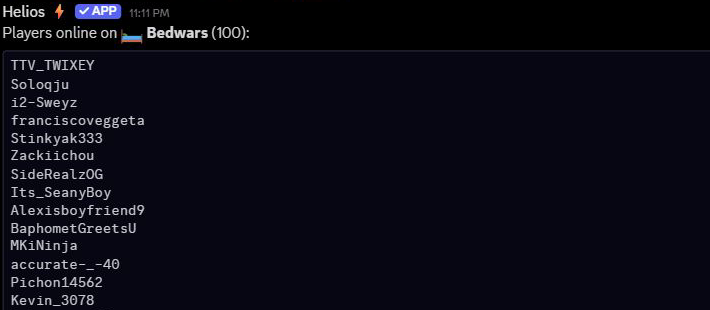
Example from Utopia's Bedwars server: this check returned 100 players. The screenshot shows only the start of the long list. No game settings were changed.
/whoson
/whoson is a quick lookup for checking whether Helios can see your online players. Select the required server option from Discord's suggestions before sending it. The result is posted in the channel, so choose where you want the list to appear.
It is useful during first setup, host troubleshooting, and day-to-day staff checks.
When To Use It
- After adding or editing a server connection
- After host-side changes in G-Portal or Nitrado
- When checking whether Helios polling is working
- When staff need a quick online-player list
Command
/whoson server:"<SERVER>"
Examples
/whoson server:"<SERVER>"
For example, choose Bedwars from the server suggestions to get a result headed Players online on Bedwars (100) when 100 players are online. Your count will depend on who is playing when you run it.
Read the result
- Players online on …: check the server name, count, and gamertags. Scroll through a long result to see the rest.
- No players online on …: Helios returned an empty player list for that server. Check the selection before assuming it refers to every game server in the community.
- Failed to fetch players: Helios could not get a usable player list. This is a connection or lookup problem, not proof that nobody is playing.
- Server not found: the saved connection is no longer available under that selection. Choose a current connected server.
Helios tries a fresh player check first. If that fails, it can use a recent saved player snapshot, so a returned list alone is not absolute proof that the live connection is healthy. Run the command again after reconnecting if you are investigating a connection problem. Old Discord results do not update continuously.
This command does not publish an automatically refreshing player panel or rename a population channel. Those are separate setup options.
Validation Checklist
- The command returns players for the expected server
- The server name matches the server you intended to check
- If the list is empty unexpectedly, re-check your server connection and host setup