Invite the bot
Add Helios to your Discord in one click. No hosting, no server files, no scripts to maintain.
Home / Best Rust Console Bot
All-in-one Rust Console Edition bot
Helios gives your PlayStation or Xbox server killfeeds, raid alerts, teleports, zones, shops, economy, events and offline raid protection — all from one Discord bot and one web dashboard. Free to start. Premium unlocks the rest for $10.99 a month, per server.
No card needed to start. Premium is per game server, billed through Stripe, and cancellable at any time.
You can also find us on Top.gg
Setup
Three steps. The only thing you need from your host is your WebRCON IP, port and password.
Add Helios to your Discord in one click. No hosting, no server files, no scripts to maintain.
Paste the WebRCON details from G-Portal or Nitrado. Helios connects straight to your Rust Console server.
Every system is a toggle on one settings panel — in Discord or in the browser. Test each one in chat as you go.
Not sure yet? Add Helios free, connect your server, and run the free feature set for a wipe. Upgrade when your community outgrows it.
Read the setup guideWhat you get
Feeds, player tools, economy, progression and automation from the same connection and the same setup.
The real thing
Unedited captures of the shipping panels, so you can judge the interface before you commit a wipe to it.
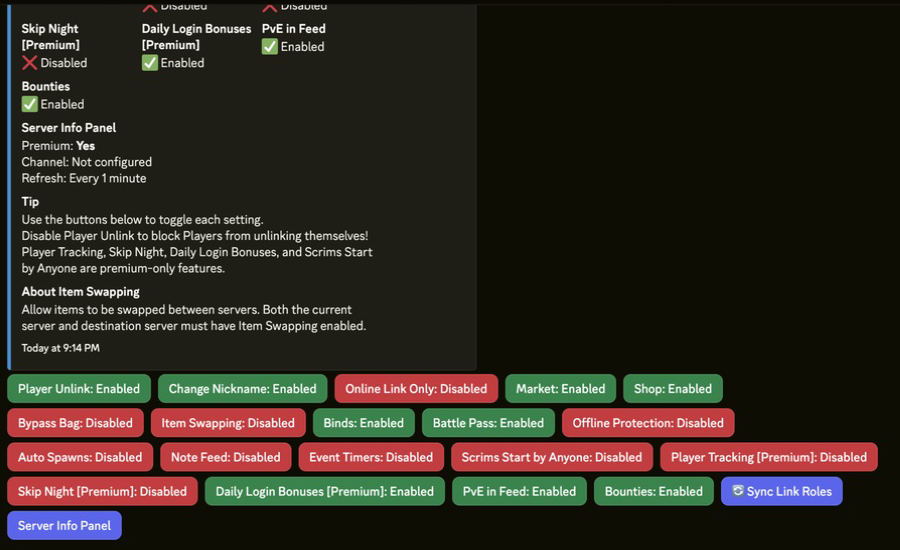
One settings panel per server. Turn killfeeds, teleports, zones, economy and the rest on and off without touching a config file — and hand the panel to a staff member you trust with it.
See the setup docs →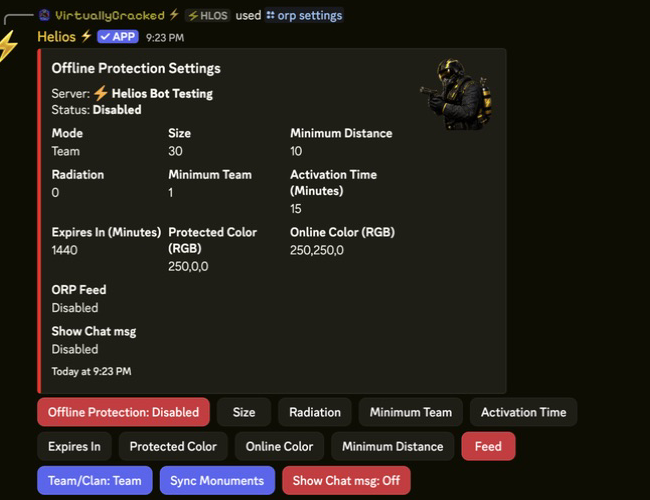
Set the rules once — mode, zone size, activation delay, expiry, scheduled raid hours — and players create their own protection zones in game. The single biggest reason owners upgrade.
How ORP works →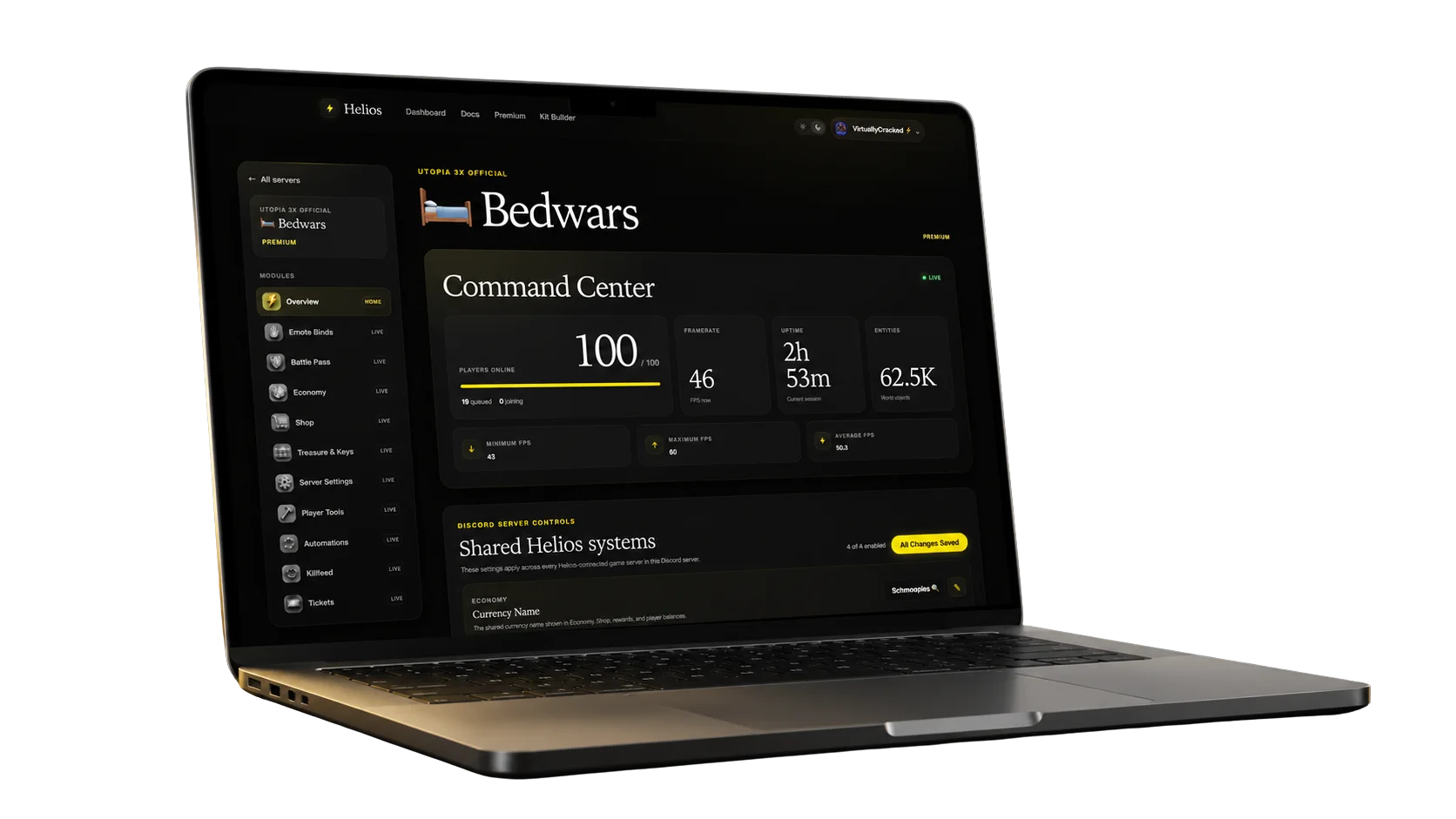
Sign in with Discord and run every connected server from the web dashboard — live player counts, server health, module settings and scheduled automation. Free for every connected server.
Open the dashboard →Pricing
The free tier is permanent and genuinely usable. Premium is for servers that want the automation and progression systems doing the work for them.
| System | Free | Premium |
|---|---|---|
| Killfeeds, player activity feeds and raid alerts | Included | Included |
| TP/home, zones, kits and autokits | Included | Included |
| Economy, shop, battle pass, leaderboards and bounties | Included | Included |
| Web dashboard and Discord role-based staff permissions | Included | Included |
| Easy Binds | 3 binds per server | Unlimited |
| Shop categories and products | Free-tier limits apply | Unlimited |
| Offline raid protection (ORP/ZORP) and scheduled raid hours | Not included | Included |
| Timed commands, automated events and auto messages | Not included | Included |
| Random item drops, treasure and chest reward pools | Not included | Included |
| Clans, portals and the Community Market | Not included | Included |
| Daily rewards, killstreaks and premium casino games | Not included | Included |
| Support ticket panel, giveaways and the admin action feed | Not included | Included |
| Temp bans, server copy and self-updating PvP panels | Not included | Included |
| Price | Free, permanently | $10.99 / server / month |
Scroll the table sideways on a phone. Premium is billed per connected game server.
Monthly
Month-to-month billing with no long commitment.
Annual
Twelve months for the equivalent of $9.34 per month.
Before you buy
Helios, for most servers — because one install covers the feeds, player tools, economy, progression and automation you would otherwise stitch together from several bots. Whatever you pick, judge it on five things: whether it connects to your host over WebRCON, what stops working when the free tier ends, how much you rebuild after every wipe, whether staff permissions are granular enough to trust your team with, and whether the documentation matches the shipping product. The checklist below documents Helios against all five so you can run the same test on anything else.
Free to start, and the free tier does not expire. Killfeeds, player activity feeds, TP/home, zones, kits, binds, shop, economy, battle pass, leaderboards and the web dashboard are all included at no cost. Premium unlocks the advanced systems in the table above, billed per game server.
$10.99 per month or $112.10 per year for one connected Rust Console game server — the annual plan saves 15%, about $9.34 a month. Checkout is hosted by Stripe, premium activates automatically after payment, and it covers every premium system for that server. See the premium page.
Cancel any time from Stripe and you keep access to the end of the paid billing period. Refunds are available within 48 hours of a purchase or renewal. After that, free-tier features keep working, and premium settings stay saved — turning premium back on restores them rather than making you rebuild. Ask any bot you are evaluating the same question before you commit a season to it.
No — premium is billed per connected game server, so a second server needs its own subscription.
Premium does include /server copy, which clones all settings and kits from a server you have
already configured onto another one, so the second setup is fast.
If your host exposes WebRCON, yes. G-Portal and Nitrado both do — see the G-Portal and Nitrado setup guides. Helios connects over WebRCON rather than through the console platform, so PlayStation and Xbox servers behave the same; the requirement is on your host, not your platform. Helios is Rust Console Edition only — it does not support Rust PC.
No. Helios connects over WebRCON and runs everything through Discord and a web dashboard. Rust Console Edition does not support server plugins the way Rust on PC does, which is why every console bot works this way.
Connecting a server takes a few minutes once you have the WebRCON details from your host. Configuring the features you actually want takes longer — and is the part worth testing the week before wipe day rather than during it. Start at Start Here.
Map-placed content such as zones is re-set per map, because the map changes. Everything else persists.
The /wipe controls let you choose exactly what resets — stats, hours, bags, TP/home,
battle pass — so you decide what carries over between seasons.
Your configuration and player data stay tied to your Discord server and your Helios account, and you can reach both from the dashboard. If you need an export, ask in the support Discord.
Do your own homework
We wrote this page, so use this checklist on Helios and on every other bot you are weighing up. These are the questions that decide whether a bot survives a live wipe.
| What to check | How to check it | Where Helios stands |
|---|---|---|
| Host compatibility | Confirm your host allows WebRCON before you pay for anything. | Connects over WebRCON on G-Portal and Nitrado. No server files to edit, nothing to self-host. |
| Free-tier limits | Ask exactly which features stop working once a free tier or trial runs out. | The free tier is permanent, not a trial. The split above is the whole of it. |
| Wipe-day workload | Ask what has to be rebuilt after every map wipe. | Map-placed content such as zones is re-set per map. /wipe controls let you choose what resets: stats, hours, bags, TP/home, battle pass. |
| Staff permissions | Check whether admin actions are gated by role, not by trust. | Commands map to Discord roles — Manage Server for admins, Administrator for destructive actions. |
| Docs and support | Read the setup guide for one feature you need, then ask a real question in the support Discord. | Every feature has a setup page in the Helios docs, plus an active support Discord. |
We do not publish rankings of competing bots. We cannot test other products often enough to keep those claims accurate, and a vendor scoring its own rivals is not evidence. The one comparison we do publish is against Mr. Bandit, G-Portal's first-party bot, sourced from G-Portal's own documentation. If anything on this page is wrong or out of date, tell us in the Helios Discord and we will fix it.
Free to start, live the same evening, and every premium system ready the moment your community grows into it.
More for owners