
Custom zones (/zone)
- Created by staff, placed anywhere on the map
- Apply to everyone who walks in
- Permanent until you remove them
- Free
- For safe areas, arenas, no-build rings, events
Home / Rust Console Zones
Rust Console Zone BotLast updated · Verified against Helios 2026.8
A zone is a piece of your map with its own rules. Helios lets you draw one from Discord in about two minutes — stand where you want it, capture your position, pick what is allowed inside, done. No server files, no plugins.
To create a zone in Rust Console, run /zone server:"<SERVER>" in Discord and click Add. Stand where the zone should be, click Position to capture your coordinates, name it, pick Sphere or Box and a size, then toggle the rules you want — PvP, PvE, building, building damage, radiation, a visible outline, and enter/leave messages. Click Create Zone and it is live. Zones are free on the Helios free tier.
Every zone below is the same panel with different toggles. These are the six that come up most often.
| What you want | How you set it up |
|---|---|
| A safe trading area Somewhere players can meet without being shot | Allow PvP off, Allow Building off, Building Dmg off, Show Area on, enter message explaining the rules |
| A PvP arena on a PvE server One place fighting is allowed | Allow PvP on, visible outline in a bright colour, enter message warning players |
| A no-build ring around a monument Stop players walling off Launch Site | Allow Building off, leave every other rule alone |
| A newbie / spawn protection area Give fresh spawns a chance | Allow PvP off, Allow Building off, enter and leave messages |
| A radiation deterrent Push players out of an area without a wall | Radiation above 0, Show Area on so it is not a surprise |
| A temporary event ground An arena for one night only | Whatever the event needs, then Remove the zone afterwards |
/zone opens a panel in Discord listing every zone on the selected server, with Add, Edit, Remove, List and Manage All.
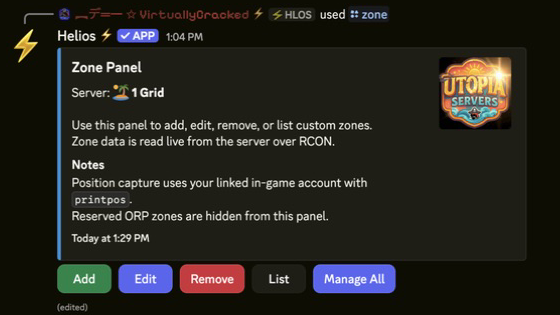
/zone panel. Every zone on the server, and the controls to change them.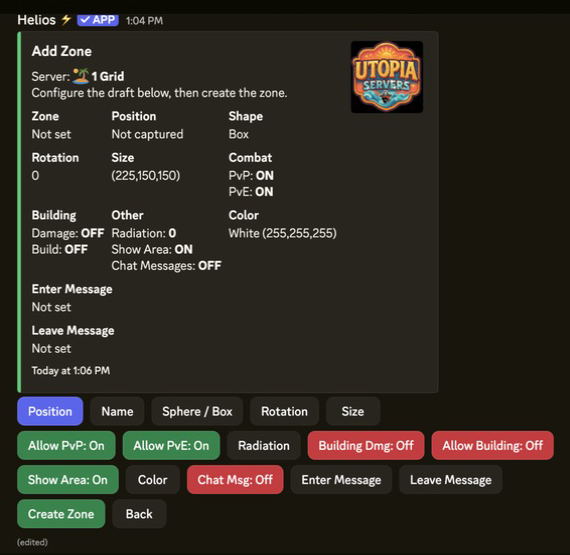
/zone server:"US Main" and click Add.Permissions: /zone is an admin command — it needs Manage Server in Discord. Players cannot create these zones themselves.
| Rule | What it controls |
|---|---|
| Allow PvP | Player vs player damage inside the zone |
| Allow PvE | NPC damage inside the zone |
| Radiation | Radiation level inside the zone. 0 for none |
| Building Dmg | Whether buildings can take damage |
| Allow Building | Whether players can build inside the zone |
| Show Area | Draw the zone outline in game |
| Color | The colour of that outline |
| Chat Msg | Announce in chat when players enter or leave |
| Enter / Leave Message | The exact wording players see at the boundary |
Manage All on the /zone panel bulk-edits every non-ORP custom zone in one action: Show Area, Color, Show Chat Message, Allow PvP, Allow PvE and Radiation. Changes apply immediately.
This is how you flip a whole server to PvP for an event evening and put it back afterwards, without opening every zone one at a time. The online dashboard has the same control as a Manage All Zones card.
Two different systems that both create zones. Owners mix them up constantly, so here is the split.
/zone)/orp)| Problem | Likely cause | Fix |
|---|---|---|
/zone is not in Discord | Missing Manage Server permission | Zones are admin-only. Check your Discord role. |
| The rules do nothing | The zone ended up somewhere else on the map | Re-check the captured position, or re-place it while standing inside. |
| Nobody can see the zone | Show Area is off | Turn it on and pick a colour that contrasts with the terrain. |
| Zones stopped making sense after a wipe | Positions are map-specific | Re-check and re-place zones after every map wipe. |
| Players still take damage in a safe zone | Allow PvP is still on, or the shot came from outside the boundary | Confirm the toggle, then make the zone large enough to cover the whole area. |
| Radiation where you did not want it | It was applied through Manage All | Run Manage All again and set radiation to 0. |
/zone panel is on the free tier — there is no premium requirement for custom zones./zone panel in Discord. Nothing is installed on the server itself.Connect your server, run /zone, and walk the boundary before you announce it to players.