
Players stop losing everything overnight
A solo who logs off at midnight and comes back to a stripped base usually does not come back again. Protection while offline means progress survives the night, and players keep playing.
Home / Rust Console Offline Raid Protection
Rust Console ORP BotLast updated · Verified against Helios 2026.8
Offline raid protection stops a base being raided while everyone who lives in it is logged off. You set the rules once — how long a base has to be empty, how long protection lasts, how big the zone is — and after that players protect their own bases without asking staff for anything.
Important: Staff configure ORP with /orp settings. Players use the server's ORP quick-chat trigger in game, normally Can I Build Here. ORP is a premium feature.
To set up Rust Console offline raid protection, run /orp settings server:"<SERVER>", turn Offline Protection on, choose Team or Clan tracking, then set the zone Size, the Activation Time (how long a base must be empty before protection starts, default 15 minutes) and Expires In (how long protection lasts, default 24 hours). Team leaders then create their own ORP zone in game with the quick-chat trigger. ORP requires premium.
Offline raiding is the single most common reason console players quit a server. ORP is how you take that off the table without turning the server PvE.
A solo who logs off at midnight and comes back to a stripped base usually does not come back again. Protection while offline means progress survives the night, and players keep playing.
The moment anyone on the team is online, the zone goes back to Online and the base can be raided normally. ORP removes offline raiding, not raiding.
You configure the rules once. Players create their own zones in game with a quick chat, inside the size and team limits you set, so nobody has to open a ticket to get protected.
Manage Server permission for staff setup/orp settings.At least one tracked team or clan member is online. The zone exists but does not protect the base.
No tracked members are online and the configured activation countdown is running.
Protection is active. Helios applies the protected color and disables building, building damage, and base damage inside the zone.
/orp settings server:"<SERVER>".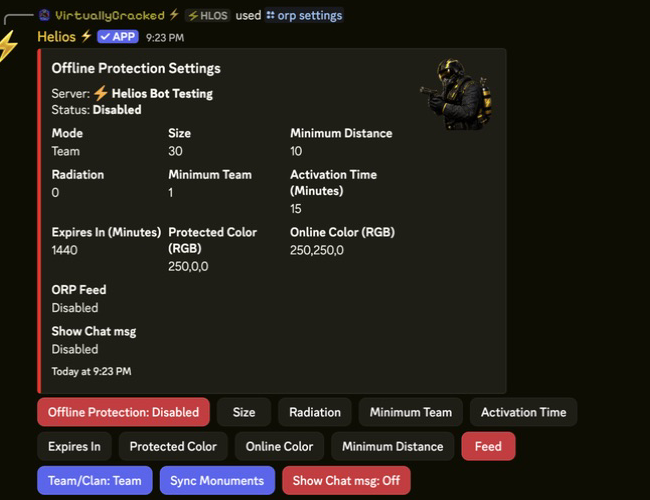
/orp settings panel. Every rule on one screen — set it once and players take it from there.ORP protects individual bases. If you would rather control raiding for the whole server, Helios can put raiding on a weekly timetable instead — or alongside.
/settings srp sets weekly raiding hours in your chosen timezone. Outside the window, building damage is off server-wide, so bases can only be raided during the hours you announced. The schedule repeats every week and is reapplied automatically, including after the server reconnects.
/orp timers — block new ORP zones during a weekly window. Existing zones keep working./orp scheduled-zorp — schedule a recurring ORP pause, optionally wiping zones./orp scheduled-raids-remove — drop a saved schedule and go back to normal raiding.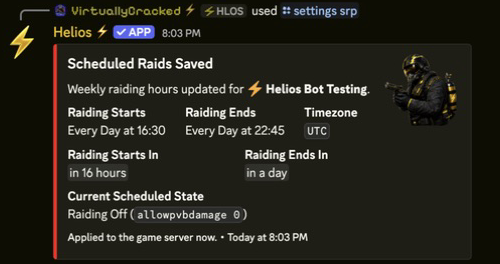
/settings srp. Premium, like ORP itself.| Setting | Default | What it controls |
|---|---|---|
| Offline Protection | Off until enabled | Whether players can create and use ORP zones. |
| Mode | Team | Tracks in-game Rust teams or Helios clans. |
| Size | 30 | ORP zone radius. Changes also update existing zones. |
| Minimum Distance | 10 | Required spacing between ORP zones. |
| Minimum Team | 1 | Minimum team or clan members required to create a zone. |
| Activation Time | 15 minutes | Offline delay before protection activates. |
| Expires In | 1440 minutes | Protection duration before the zone is removed. |
| Radiation | 0 | Radiation applied only while the zone is Protected. |
| Protected Color | 250,0,0 | RGB color used during protection. |
| Online Color | 250,250,0 | RGB color used while members are online. |
| Show Chat msg | On | Whether the zone chat-message flag is enabled. |
| Feed | Not set | Discord channel for ORP creation, status, and activity messages. |
/orp settings server:"<SERVER>"/orp list server:"<SERVER>"The list shows the leader, tracked group, member count, current state, and timing.
/orp wipe server:"<SERVER>"/orp wipe server:"<SERVER>" user:"<DISCORD USER>"/orp wipe server:"<SERVER>" gamertag:"<LEADER NAME>"Helios confirms the wipe, removes records and live zones, then verifies the result.
If a leader already has a zone, Helios warns them first. After confirmation, it deletes the old zone and creates the replacement at the new position instead of creating a duplicate.
Publish your server's actual ORP quick-chat mapping in the player rules.

/orp list — who has a zone, who is tracked, and which state each zone is in right now.| Problem | Likely cause | Fix |
|---|---|---|
| The quick-chat trigger does nothing | ORP is disabled, Premium is inactive, or the wrong trigger is used. | Check /orp settings, Premium, and the configured trigger. |
| A player cannot create a zone | They are not leader, do not meet Minimum Team, or are too close to another zone. | Confirm mode, leadership, group size, position, and spacing. |
| Clan ORP will not create | One or more clan members are not linked. | Link every clan member before trying again. |
| Protection never turns on | A member is still online or Activation Time has not finished. | Check /orp list and the ORP feed for Online or Pending status. |
| Protection ends too soon | Expires In is lower than intended. | Increase Expires In and publish the duration in server rules. |
/orp settings. Staff never have to place one by hand./settings srp) sets weekly raiding hours server-wide; outside that window building damage is off for everyone. It is premium and can run alongside ORP./orp wipe server:"..." — you can clear everything or target one player’s zones.Configure the server settings first, then test the full player creation and protection cycle before announcing ORP.