Helios Rust Console Bot Documentation
Event Feed Settings (/events)
Choose Discord event alerts and in-game messages for cargo, helicopters, airdrops, and Bradley.
- Last reviewed
- Maintained by
- Helios RCE
Use this page to announce events that happen on your Rust server. These settings do not spawn events or create a schedule. For that, use Auto Events.
Two separate choices
- Discord Event Feed posts event alerts in one Discord channel for the selected Rust server.
- In-game announcements let you turn each event's chat message on or off and change its wording.
Turning off Cargo Ship's in-game message does not stop its Discord alert. The Discord feed covers all seven supported events while it is enabled.
Set up on the dashboard
Open the dashboard, choose Manage Server, then Server Settings. Expand Events.
- Check that you selected the right Rust server.
- Choose the Discord channel and turn on Discord Event Feed if you want Discord alerts.
- Turn on the individual in-game announcements you want.
- Edit each In-game message if needed.
- Click Save Changes. Wait for the saved confirmation.
Changes on this page need Save Changes; simply switching a control does not save them.
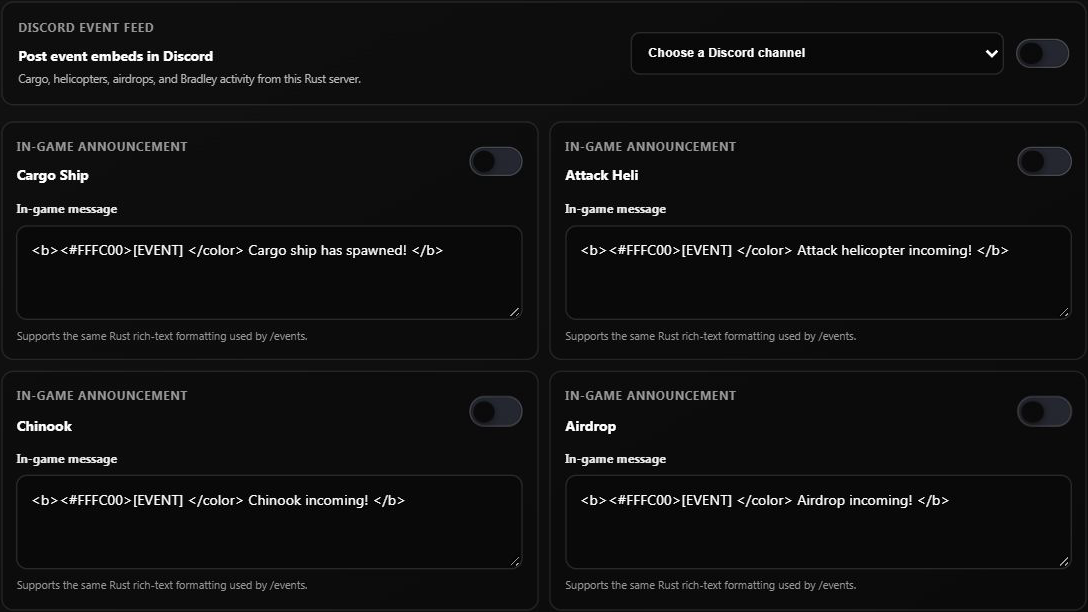
The screenshots show the testing server's controls with announcements off. They are examples of where to configure the feature, not proof that an event was triggered.
Which events can be announced?
| Setting | What it announces | Name for the Discord message editor |
|---|---|---|
| Cargo Ship | Cargo ship spawning | cargo_ship |
| Attack Heli | Attack helicopter spawning | attack_heli |
| Chinook | Chinook incoming | chinook |
| Airdrop | Airdrop incoming | airdrop |
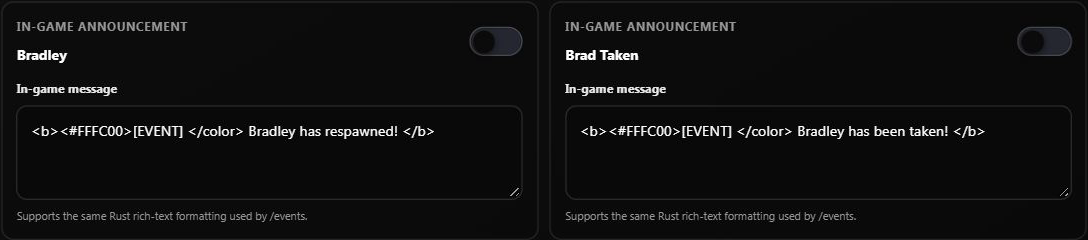
| Bradley | Bradley respawning | bradley |
| Brad Taken | Bradley being destroyed | brad_watcher |
| Heli Taken | Attack helicopter being destroyed | heli_watcher |
Bradley and Brad Taken are different announcements. You can enable either, both, or neither in game.
Change only the Discord destination
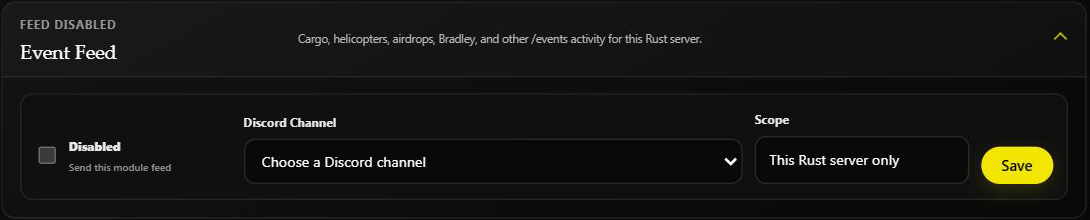
You can also open Discord → Feeds → Event Feed.
- Choose a Discord channel.
- Enable the feed.
- Click Save.
The destination applies to this Rust server only. Repeat for other Rust servers if you want their events posted too. This is the same Discord event-feed setting shown in Server Settings, not a second feed.
Use Discord instead
You need Manage Server permission. Run:
/events server:"US Main"
Select your connected server from Discord's suggestions. The command is /events, not /events settings.
- Click an event button to turn its in-game announcement on or off. This saves immediately.
- Click Discord Feed to configure Discord delivery. If it is off, choose a channel to enable it. If it is already on, clicking the button turns it off immediately.
- Use the channel picker to change the destination; choosing a channel saves immediately.
- Click Feed Message to change an in-game message. Enter the event name from the table and your message, then submit the form.
The panel belongs to the person who opened it. Other admins should open their own panel.
Write a simple message
For example, enter this for cargo_ship:
Cargo ship has arrived! Get your team ready.
Messages must not be blank and can be up to 500 characters. Plain text works; you do not need the color or bold formatting shown in the defaults. Keep a message in every event field, even when that announcement is off.
These edits change Rust chat messages only. Discord uses Helios's built-in event alerts, including the server name.
If messages are missing
- Check the Rust server is connected and Helios is running for it.
- For Rust chat, check that particular event's in-game announcement is on.
- For Discord, check the feed is enabled, a channel is selected, and Helios can view the channel, send messages, and embed links.
- On the dashboard, check that you saved your changes.
- Wait for a new supported event. Enabling a feed is not a request to spawn an event or replay old announcements.
Some event checks happen periodically, so an alert may arrive after the event rather than instantly.
Related guides
- Auto Events — schedule events.
- Automation and Events — choose the right tool.
- Killfeed and Alerts — other game feeds.