Helios Rust Console Bot Documentation
/tc (Timed Commands / Cron)
Schedule a saved Command Group from the Helios dashboard with cron, a timezone, and an optional minimum population.
- Last reviewed
- Tested on
- Helios Bot Testing dashboard
- Maintained by
- Helios RCE
Overview
Timed Commands run a saved Command Group on one game server at the times you choose. Use them for event reminders, recurring admin commands, or server setup routines.
First create a Command Group and add its commands. An empty group has nothing to run. For recurring chat messages with a color picker, Auto Messages is a simpler option.
Setup Flow
- Open the dashboard and choose Manage Server on the target server.
- Open Automations → Timed Commands → Create Timed Command.
- Name the schedule and select the Command Group to run.
- Enter a 5-field cron, choose the Timezone, and optionally set Minimum population.
- Check Timed Command is active when ready, choose Create, and wait for the success message.
Example: Friday event reminder
Use the Event reminder group from the Command Groups walkthrough. Its message announces an event starting in 10 minutes.
| Setting | Value |
|---|---|
| Timed command name | Friday event reminder |
| Command Group | Event reminder |
| 5-field cron | 50 19 * * 5 |
| Timezone | America/New_York |
| Minimum population | 10 |
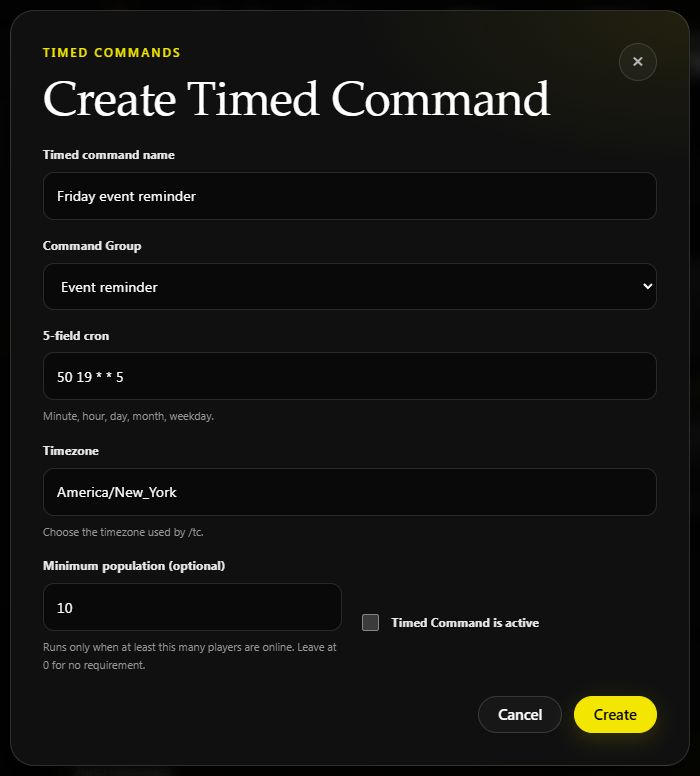
Example draft on Helios Bot Testing. The active box is unchecked; enable it when you want the schedule to run.
When active, this sends the reminder on Fridays at 7:50 PM New York time, ready for an 8 PM event, if at least 10 players are online. It sends the reminder only; it does not start the event itself.
Minimum population
Set 0 for no player-count requirement. If the population is below your minimum when the task is checked, Helios skips that occurrence and waits for the next scheduled one. It does not hold that reminder until more players join.
TIPTip
Timed Commands have no triggering player. Use commands that work without player placeholders; {PlayerName} and player-position placeholders are not filled in by a timed run.
Check, edit, or pause
The saved row shows the group, cron schedule, minimum population, and Active or Paused status. Expand it to check the Timezone and Last run.
Use Edit to change the schedule, Pause to stop future runs, Resume to enable it again, or Remove to delete it. A last-run timestamp alone does not prove the command succeeded; low-population skips also advance it.
Use /tc list with the same server selected to review the next scheduled time.
Cron Help
Five fields, separated by spaces:
minute hour day-of-month month weekday
Use numeric weekdays: 0 is Sunday, 1 is Monday, through 6 for Saturday. Use 5 for Friday, rather than FRI. Times follow the selected timezone; the editor defaults to UTC.
Cron Examples
| Schedule | Cron |
|---|---|
| Daily at 9 AM | 0 9 * * * |
| Daily at 2:30 PM | 30 14 * * * |
| At midnight, 6 AM, noon, and 6 PM | 0 */6 * * * |
| Every Friday at 8 PM | 0 20 * * 5 |
Commands Covered
| Discord command | Purpose |
|---|---|
/tc add | Choose the server, name, group, cron, optional timezone, and optional minimum-pop |
/tc list | Review the selected server's timed commands and next runs |
/tc remove | Remove a timed command from the selected server |
Requirements
You need permission to manage the selected server. Helios must be connected, the task must be active, and the selected group must contain valid server commands.
If a run is missing, check those items first, then verify the timezone and population minimum. Test the group's commands on the target server before relying on its schedule.