Helios Rust Console Bot Documentation
Feed and Alert Routing Commands
Helios owner and admin commands for killfeed, playerfeed, raid alerts, and incident routing, with tier labels.
- Last reviewed
- Maintained by
- Helios RCE
Command Matrix
| Command | Tier | Access | Purpose |
|---|---|---|---|
/dcfeed add | Free | Owner/Admin | Add killfeed channel route. |
/dcfeed remove | Free | Owner/Admin | Remove killfeed channel route. |
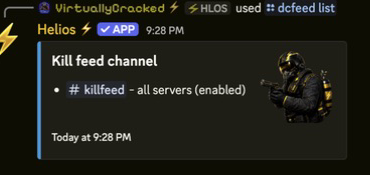
/dcfeed list | Free | Manage Server | Review channels, server scope, and enabled status without changing them. |
/dcplayerfeed add | Free | Owner/Admin | Add join/leave feed route. |
/dcplayerfeed remove | Free | Owner/Admin | Remove join/leave feed route. |
/dcplayerfeed list | Free | Manage Server | Review join/leave feed destinations without changing them. |
/adminfeed add | Premium | Owner/Admin | Add staff-action feed route. |
/adminfeed remove | Premium | Owner/Admin | Remove staff-action feed route. |
/adminfeed list | Premium | Owner/Admin | Audit staff-action feed routes. |
/gamefeed add, /gamefeed edit, /gamefeed remove, /gamefeed list, /gamefeed help | Free | Manage Server | Configure or review in-game message templates. |
/set online-channel | Premium | Owner/Admin | Set online-status channel. |
/set raid-channel | Free | Owner/Admin | Set raid alert channel. |
/set reward-channel | Free | Owner/Admin | Set reward parse channel. |
/raid link | Free | Player/Staff | Generate and link raid broadcaster code. |
/events | Free | Manage Server | Open the event feed settings panel. |
/whoson | Free | Player | View players currently online on a selected server. |
/stats | Free | Player | View player stats. |
Owner/Admin here means a member with Discord's Manage Server permission; a moderator title alone does not grant it. Player viewing commands can still be restricted by your Discord command permissions.
Useful examples
/dcfeed list
/dcplayerfeed list
/gamefeed list
/gamefeed help
/dcfeed add channel:#killfeed server:"<SERVER>"
/dcplayerfeed add channel:#player-feed server:"<SERVER>"
/gamefeed add message:"{KillerPlayerName} killed {VictimPlayerName}" server:"<SERVER>"
Choose your actual channels and a server from the suggestions. The first four commands only review existing setup; the last three save changes. Leaving server: blank in these add commands creates a shared entry for all connected servers in this Discord community.
Removing safely
/dcfeed remove channel:#killfeed server:"<SERVER>"removes that server's destination./dcfeed remove channel:#killfeedremoves all killfeed configurations for that channel, including server-only destinations./dcplayerfeed remove channel:#player-feedremoves the shared player-feed destination only; its server-only destinations remain./gamefeed remove id:"<TEMPLATE_ID>"deletes the chosen template. Use dashboard Pause if the stop should be temporary.
None of these feed-removal commands deletes the Discord channel or its old messages.
Check without disturbing a live server
- Review the saved entries and their scope/status first.
- Check the server connection and Helios's channel permissions.
- Watch the next normal event after allowing about a minute for changes.
- Keep controlled tests on a separate testing server. Do not create kills, purchases, or staff actions on a live server just for a screenshot.
See Discord killfeed setup, in-game templates, and killfeed troubleshooting.