Helios Rust Console Bot Documentation
Rust Console In-Game Killfeed Templates
Build in-game Rust Console killfeed templates from the Helios dashboard or with /gamefeed.
- Last reviewed
- Maintained by
- Helios RCE
This page is only for in-game chat output — the kill and death messages players see in Rust chat. For sending kills to a Discord channel instead, see Killfeed in Discord.
The fastest way to build templates is the Killfeed module in the Helios dashboard. Everything here can still be done with /gamefeed in Discord, covered at the bottom of this page.
Open the in-game feed
- Go to the Helios dashboard and sign in with Discord.
- Find your server under Connected game servers and click Manage Server.
- In the Modules sidebar, choose Killfeed, then select the In-game Feed tab.
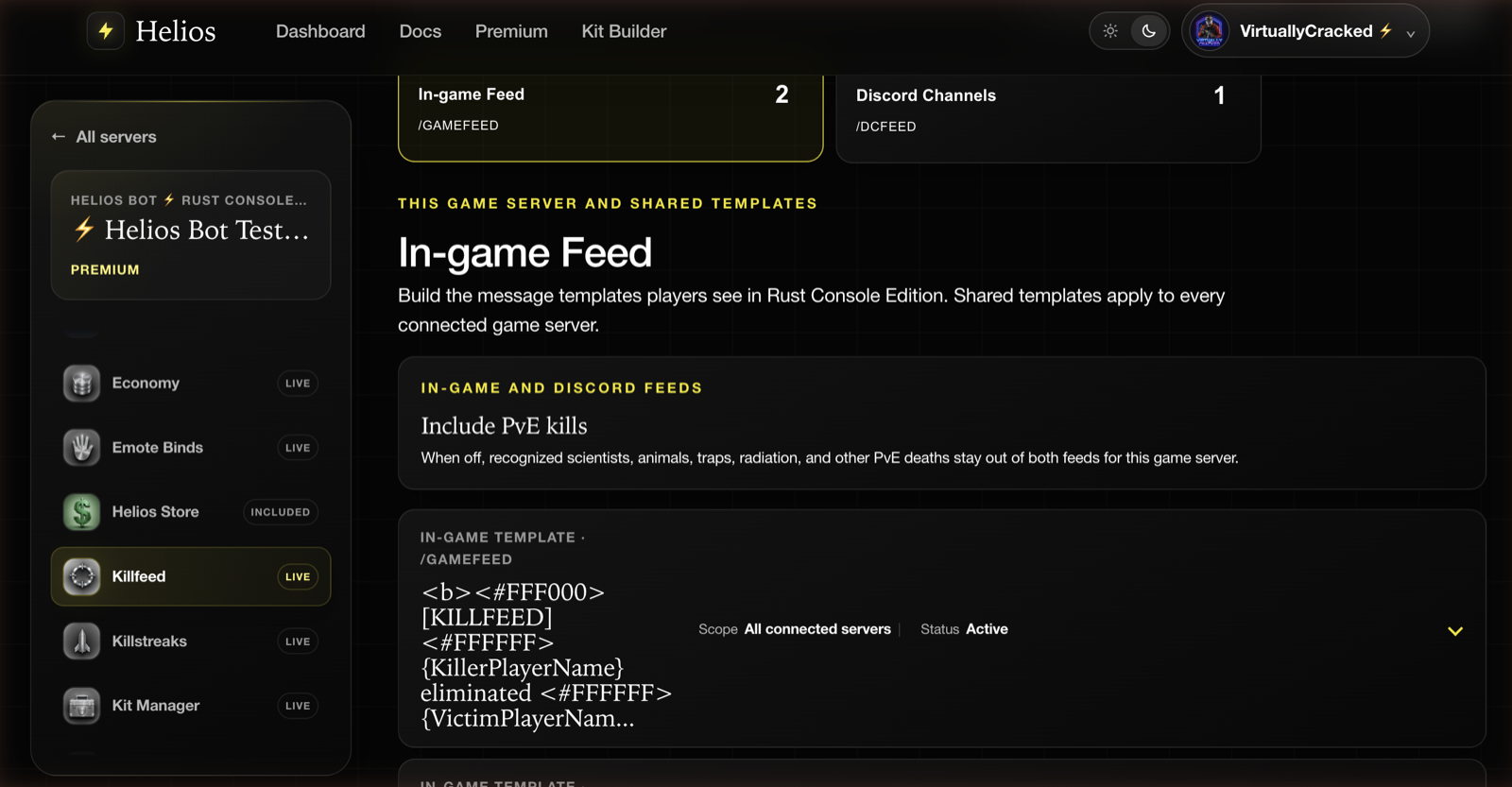
The Killfeed Manager has two tabs — In-game Feed (/gamefeed) and Discord Channels (/dcfeed) — with a live count on each, so you can tell at a glance where kills are currently going.
Each saved template shows its Scope and Status. Scope is the important one: a template set to All connected servers is shared, and editing it changes the feed on every server you have connected. This game server keeps it local.
Include PvE kills applies to both feeds for this game server. Turning it off hides recognized non-player kills and deaths. Turning it on does not automatically show every animal or environmental death; see PvE and environmental deaths below.
Shared and server-only templates
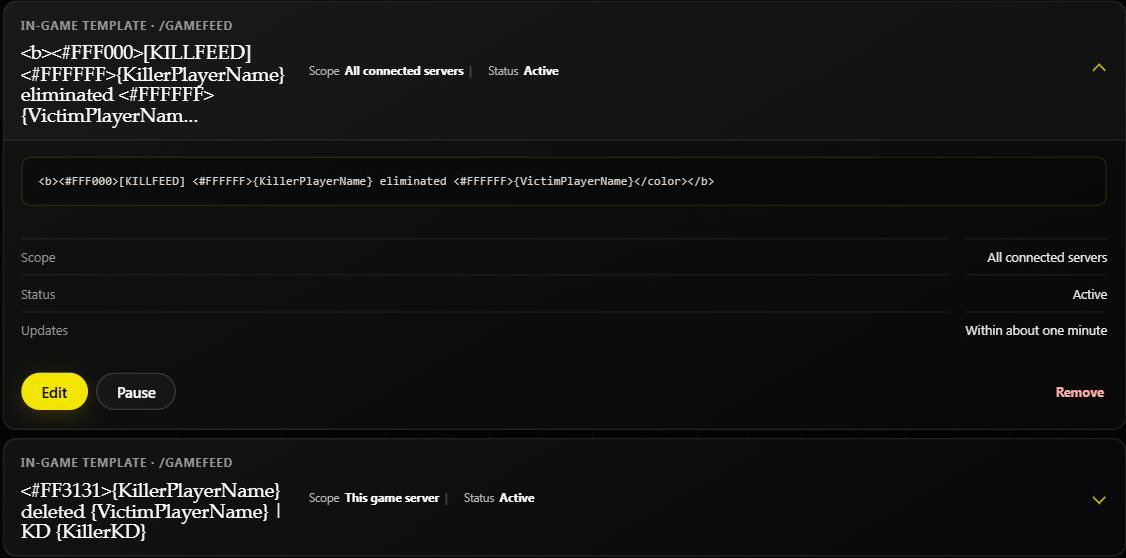
Helios chooses one eligible template at random for each kill. Shared templates and this server's templates are both eligible: a server-only template does not replace shared templates. Paused templates are not chosen.
Before pausing or editing a shared template, remember that the change affects every connected game server in this Discord community.
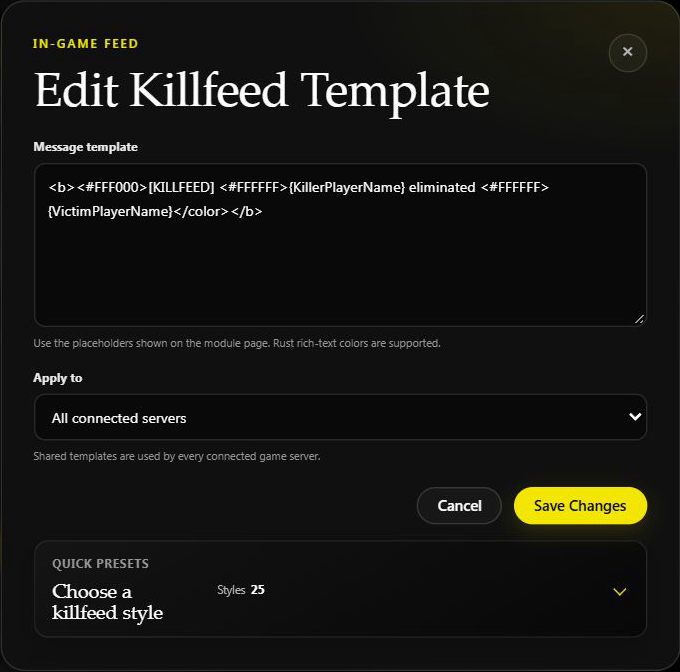
To update a saved line, expand its card and click Edit. Check Apply to, then save your changes. Cancel closes the editor without saving.
Add a template
Click Add Template in the module header.
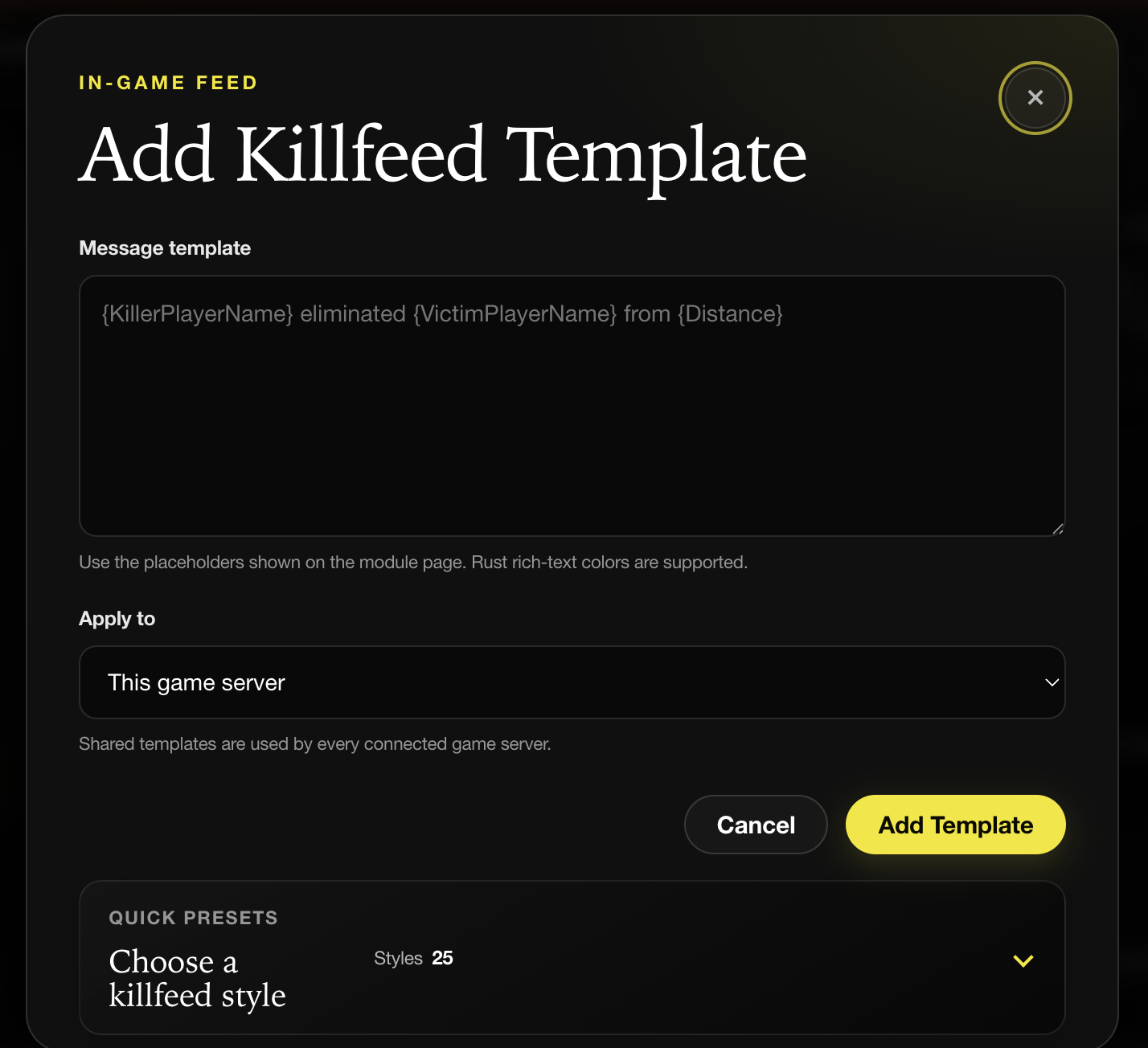
- Message template — the line players see. Placeholders and Rust rich-text colors both work.
- Apply to — This game server or a shared template used by every connected server.
After saving, the template normally starts applying within about a minute. You do not need a separate publish button.
Start from a preset
Expand Quick presets at the bottom of the dialog rather than writing colors by hand.
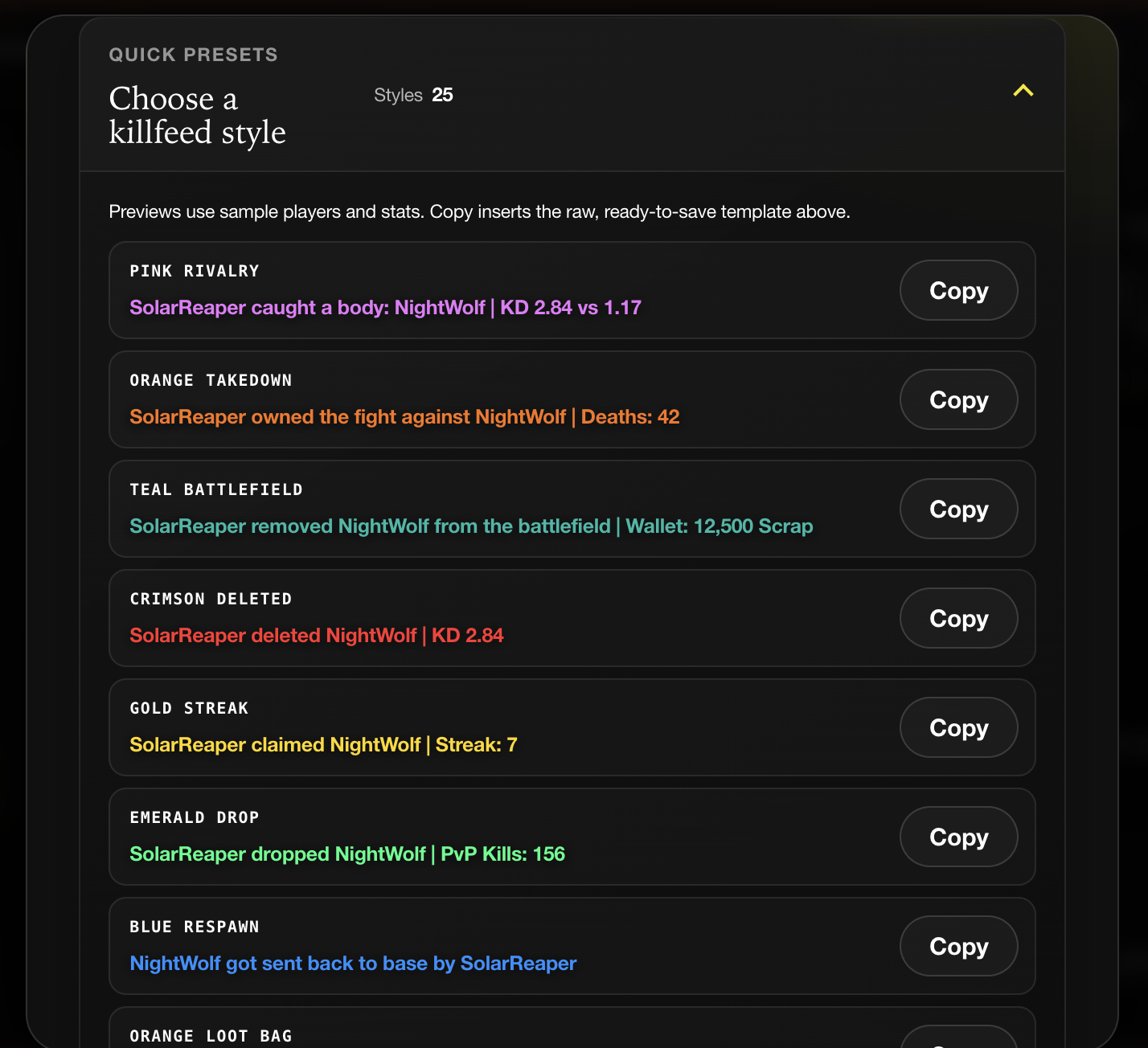
Each preset renders in its real colors with sample players and stats, so you can see the finished line before you commit. Copy drops the raw template — color codes and all — into the message field above, where you can edit it.
Placeholders
The module page lists every placeholder Helios supports, grouped and clickable.
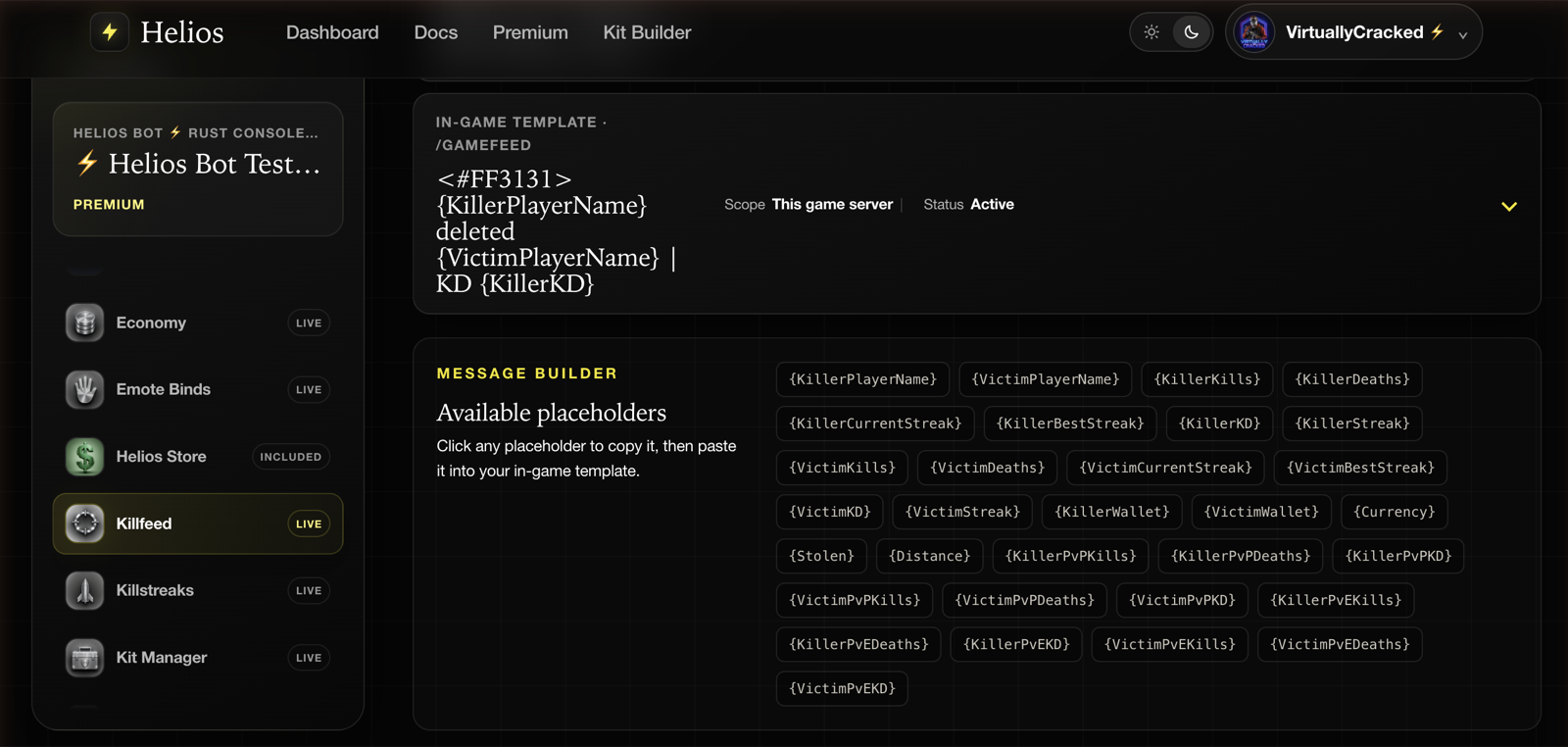
Click any placeholder to copy it, then paste it into your template. The palette is the authoritative list — it reflects what your build actually supports, which a written list here cannot promise to.
The main groups:
- Names —
{KillerPlayerName},{VictimPlayerName} - Distance —
{Distance}uses tracked player positions. Enable Player Tracking (Premium); unavailable positions, including non-player causes, show a mystery-box icon rather than an invented distance. - Killer stats — kills, deaths, PvP/PvE splits, current and best streak, and KD variants
- Victim stats — the same set for the victim
- Economy —
{KillerWallet},{VictimWallet},{Currency},{Stolen}
Formatting notes
- Ratios like
{KillerKD}are rounded to two decimals. - Economy placeholders only produce something useful if you have an economy configured.
- Eligible animal and environmental events use built-in themed messages unless a matching template contains a PvE stat placeholder, such as
{VictimPvEDeaths}. Scientist events can use your normal templates too. - Deaths with a generic or unidentified cause are skipped rather than posting a vague message.
PvE and environmental deaths
Open /settings server server:"<SERVER>" in Discord to check both switches:
| PvE in Feed | EvE in Feed | What appears in both feeds |
|---|---|---|
| Off | Either | Player-vs-player kills only. |
| On | Off | Player-vs-player kills and players killing recognized scientists. |
| On | On | Those events plus recognized animal, scientist-caused, trap, and environmental deaths. |
PvE is on by default; EvE is off by default. Unknown causes remain hidden. In-game output still needs at least one active template that applies to the server, even when built-in themed messages are used.
If clan prefixes are enabled in Clan Settings, Helios adds a clan tag before linked clan members' name placeholders. You do not need to type a tag into every template.
Example templates
{KillerPlayerName} (KD {KillerKD}) deleted {VictimPlayerName} (KD {VictimKD})
{KillerPlayerName} is on a {KillerCurrentStreak} streak after dropping {VictimPlayerName}
{KillerPlayerName} [{KillerPvPKills} PvP] outgunned {VictimPlayerName} [{VictimPvPKills} PvP]
{KillerPlayerName} reset {VictimPlayerName}'s streak at {VictimCurrentStreak}
{KillerPlayerName} now has {KillerWallet}{Currency}; {VictimPlayerName} has {VictimWallet}{Currency}
Tips
- Keep templates short. Long lines push other chat off screen and read as spam.
- Pick one style and use it across every template — mixing color schemes looks broken in game.
- Use Pause rather than Remove for a template you only want off for a wipe.
- Check the Scope on a template before editing it if you run more than one server.
- Use Resume to turn a paused template back on. Remove permanently takes that template out of the feed.
Common issues
Templates are saved but nothing appears in game
Check the scope on each template. A template saved to a different game server will not fire on this one.
{Distance} shows nothing useful
Enable Player Tracking (Premium). Helios needs a position for both players; if either is unavailable, it shows a mystery-box icon. Non-player causes normally have no tracked player position.
PvE deaths are missing from the feed
Check both PvE in Feed and EvE in Feed using the table above. The dashboard's Include PvE kills switch controls PvE, not the separate EvE setting.
Doing the same thing in Discord
/gamefeed list
/gamefeed help
/gamefeed add message:"{KillerPlayerName} killed {VictimPlayerName}" server:"<SERVER>"
/gamefeed edit id:"<TEMPLATE_ID>"
/gamefeed remove id:"<TEMPLATE_ID>"
/gamefeed help lists the supported placeholders, the same set shown in the dashboard palette. Requirements are the same either way: a connected server and Manage Server permission in Discord.
Choose the server from Discord's suggestions. Leaving server: out of add creates a shared template. Edit opens a form; remove deletes the selected template. Use Pause on the dashboard if you may want it back later.
TIPTip
The dashboard and /gamefeed read and write the same templates. Create one in Discord and restyle it on the dashboard, or the other way around.