Helios Rust Console Bot Documentation

Online Counter Channel Setup (/set online-channel)

Owner and admin guide for Online Counter Channel Setup (/set online-channel) in Helios.

Online Counter Channel Setup (/set online-channel)

Overview

This page covers how to use Online Counter Channel Setup (/set online-channel) in Helios for server owners and admins.

Requirements

  • Helios bot connected to at least one server in this guild.
  • Discord permissions to run admin commands for this category.
  • Correct server selected when the command supports server:.

Setup Flow

  1. Run /set online-channel with channel and server.
  2. Optional: set prefix/suffix naming.
  3. Confirm periodic rename updates player counts correctly.

Commands Covered

  • /set online-channel channel:#channel server:"<SERVER>"
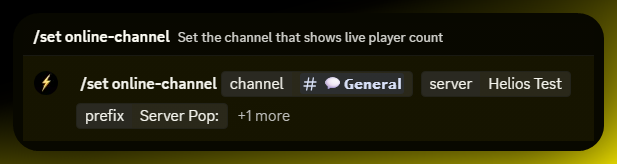
Example

/set online-channel channel:#channel server:"<SERVER>"

Notes

  • Most admin commands require Manage Server (ManageGuild).
  • Panel-based commands are user-scoped; each admin should open their own panel session.