Helios Rust Console Bot Documentation
Server Thumbnail
Change the shared default image used by Helios embeds, with direct-link and save guidance.
- Last reviewed
- Maintained by
- Helios RCE
Choose the small default image used by Helios embeds in your Discord community. Despite this page's name, the setting is community-wide, not limited to one Rust game server.
You need Manage Server and Premium access. Dashboard editing requires Premium on the open game server.
Choose a direct image link
Use an HTTP or HTTPS URL that opens the image itself, rather than an image-hosting page, album, or local file.
Open it in a browser to check it displays without signing in. Links ending in .png, .jpg, or .gif are common examples, but the extension alone does not prove the link works.
Use a public logo or other appropriate image. Do not use private file links, temporary signed links, or URLs containing passwords or secret access codes.
Use the dashboard
- Open your game server in the dashboard.
- Choose Overview → Shared setup and admin tools → Embed Thumbnail → Submit.
- Enter the direct image URL.
- Choose Save Thumbnail.
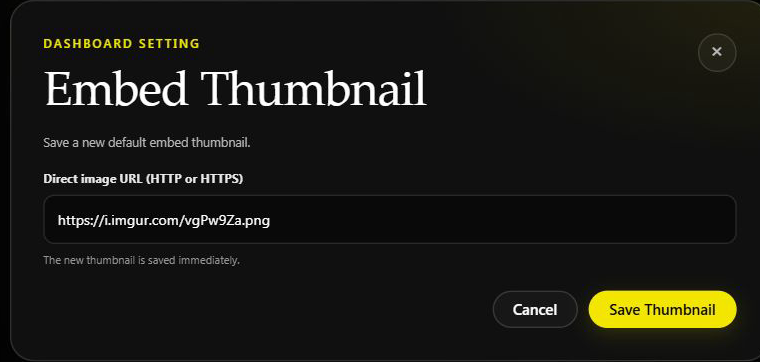
The existing form on Helios Bot Testing, closed without saving.
Save Thumbnail saves the image immediately. The entry button is called Submit, but opening the form does not change the thumbnail. There is no approval wait in this thumbnail flow.
Use Discord
/set thumbnail url:"<DIRECT_IMAGE_URL>"
The command saves immediately and returns Thumbnail Updated with an image preview. A valid URL can still point to an unavailable image; check the preview.
Where it appears
The default is used where a Helios embed does not already specify its own thumbnail. It does not replace every image, edit all old messages, change your Discord server icon, or change a player's avatar.
The custom default is used while the Discord community has Premium access. Without it, Helios falls back to its standard thumbnail.
Giveaway images and Nuke images have their own controls. This command is not a substitute for changing those images, and their review or save steps may differ.
If the image does not show
- Check the URL opens the image itself without a login.
- Check it begins with HTTP or HTTPS.
- Avoid links that expire or block Discord from loading the image.
- Look at a new Helios embed that uses the default; an embed with its own thumbnail will keep that image.
- Confirm Premium is still available.
Changing the thumbnail does not change rewards, kit contents, or gameplay.