Helios Rust Console Bot Documentation
/wipe battle-pass
Start a new Battle Pass season for one player or your whole Discord community without deleting the reward setup.
- Last reviewed
- Tested on
- Command and reset source review; Helios Bot Testing dashboard preview only
- Maintained by
- Helios RCE
Reset Battle Pass challenges, XP progress, and claimed-reward records for a fresh season.
Your configured levels and rewards stay in place. This does not reset /stats, clear saved /bag items, or take back rewards already delivered.
Choose one player or everyone
| What you want | Command |
|---|---|
| One person | /wipe battle-pass user:@Player |
| The whole Discord community | /wipe battle-pass |
There is no server option: Battle Pass progress is shared across the game servers in this Discord community.
The whole-community reset also clears saved Battle Pass profiles that are no longer linked. It is not limited to the currently linked names shown in the confirmation.
Confirm in Discord
You need Manage Server permission.
- Run the command, adding
userif you only want one person. - Read Confirm Battle Pass Wipe and check the named target.
- Choose Yes, Wipe to reset that progress permanently.
- Choose No, Cancel if the target or timing is wrong.
There is no undo. Leave the user option blank only when you intend a community-wide reset.
Clearing claimed-reward records lets players work through the new season and claim its rewards again. Keep that in mind before resetting one player as a support action.
Use the dashboard
Open Wipe Center → Targeted Player Wipes. Choose Battle Pass progress and claims, keep User selected, and enter the person's Discord user ID.
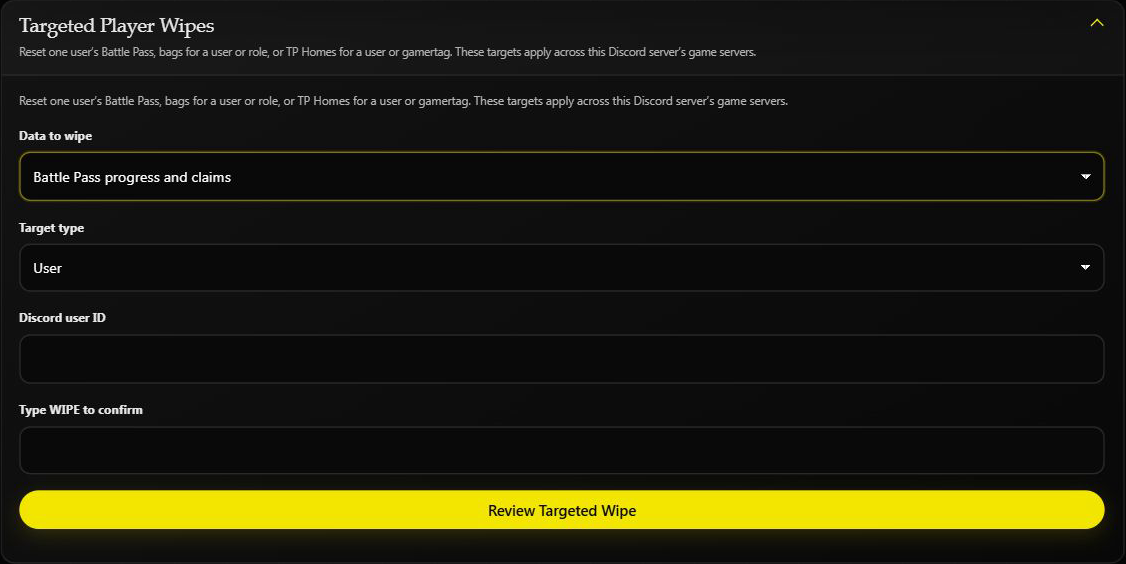
Enter WIPE only when you want to continue, then choose Review Targeted Wipe. Check the final warning before running the reset.
This screenshot is an unsubmitted preview on Helios Bot Testing. No progress was reset.
The separate Battle Pass card is for the whole Discord community. Opening it through one Rust server does not limit it to that server. Dashboard Wipe Center requires Premium on the selected game server.
After the reset
Have the player open /bp and /challenges to check their fresh progress. If you need to clear saved bag items too, that is a separate Bag reset.
Use Wipe Center for scheduled season resets. If Helios cannot confirm a reset, check the progress before submitting it again.