Helios Rust Console Bot Documentation
Premium Setup
Buy, activate, transfer, and manage Premium for a connected game server.
- Last reviewed
- Maintained by
- Helios RCE
Premium is assigned to a connected Rust Console game server. Sign in with the Discord account that should own the subscription.
Buy Premium
- Open the Premium page.
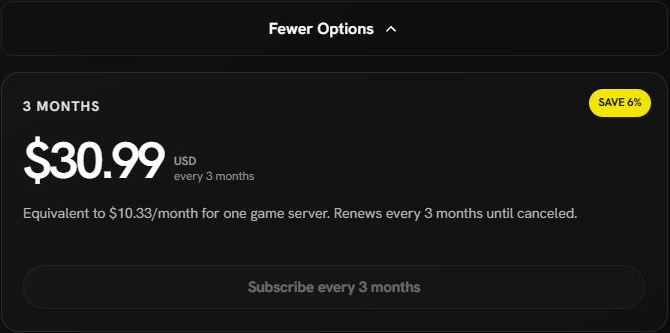
- Choose monthly or annual billing. Open More Options for the 3-month plan.
- Select the connected game server.
- Check the destination, billing period, currency, and any wallet/card split, then complete Stripe checkout.
- Wait for confirmation, then check Premium on the dashboard or with
/premium status.
Current USD plans are $10.99 monthly, $30.99 every 3 months, and $112.10 annually. Review the final amount and billing period in checkout before paying.
If your server is missing, choose Add Server and follow Start Here. Connecting a server does not buy Premium.
Use an existing token
Run /premium activate and select the server. If your account has an available Premium token, choose Activate Now to assign it without another checkout. Otherwise, use Buy Premium.
If you remove a game server with an eligible Stripe Premium subscription, Helios releases that paid subscription back to the purchaser as an available token. Removing the server does not cancel billing. The token keeps its existing paid period, price, and renewal setting. The purchaser can assign it to a connected server they administer, including a re-added server or one in another Discord community. The destination must not already have Premium.
An unassigned token is useful while moving servers, but check its billing in your Account Settings: an active subscription can still renew while no server is using it. If renewal was already cancelled, activation is possible only while the current paid period is still eligible. An expired subscription cannot be reactivated as a paid token.
Manage an existing subscription
Use the billing control on a server you purchased Premium for to open Stripe's billing portal and update your payment method. The purchaser can also manage billing for an unassigned subscription from Account Settings, even after its former game server was removed.
To stop renewal in Discord, run /premium cancel for the server and complete the cancellation confirmation. Stripe-backed Premium stays active until the end of the paid period.
Old subscriptions still use their original provider. Follow the instructions shown for your Premium source; do not assume a website sign-out or server disable cancels billing.
Transfer Premium
Run /premium transfer from:<server> to:<server>. The Premium owner can move eligible Premium between connected servers in the same Discord community. The destination must not already have Premium.
This supports eligible Stripe-backed and legacy-token Premium. It moves the allocation; it does not buy another subscription.
Preload renewals
Premium Credit lets you add a balance for eligible renewals. Existing Stripe subscriptions use eligible same-currency credit first and charge the saved card for any shortfall. Old Premium has a separate renewal preference.
Open Account Settings → Manage credit to check Estimated next payments. It estimates eligible bills in renewal-date order, so one wallet balance is not counted in full against every server. Read the final invoice or receipt for the actual amount used.
For a new purchase, read the wallet availability notice first. If it says wallet-funded new subscription checkout is not enabled yet, contact support before expecting your existing credit to cover that purchase. A top-up alone does not activate Premium, and even a fully credit-covered checkout may request a backup payment method for later renewals.
If access is missing
Check the selected game server and the Discord account that owns Premium. Use /premium status to see its source and status. If payment completed but activation is still missing, keep the receipt and contact support before paying again.
If Helios says a checkout is already open, use the existing checkout or the wallet's Resume checkout control. If payment is still activating or billing needs review, wait for that result instead of buying a second subscription. Canceling an unfinished wallet checkout returns only unused credit; it does not cancel or refund an active subscription.