Helios Rust Console Bot Documentation
Account & Billing Settings
Refresh Discord access, manage Premium credit, find subscription billing, and change your website theme.
- Last reviewed
- Maintained by
- Helios RCE
Open the menu beside your name and choose Settings, or open Account Settings.
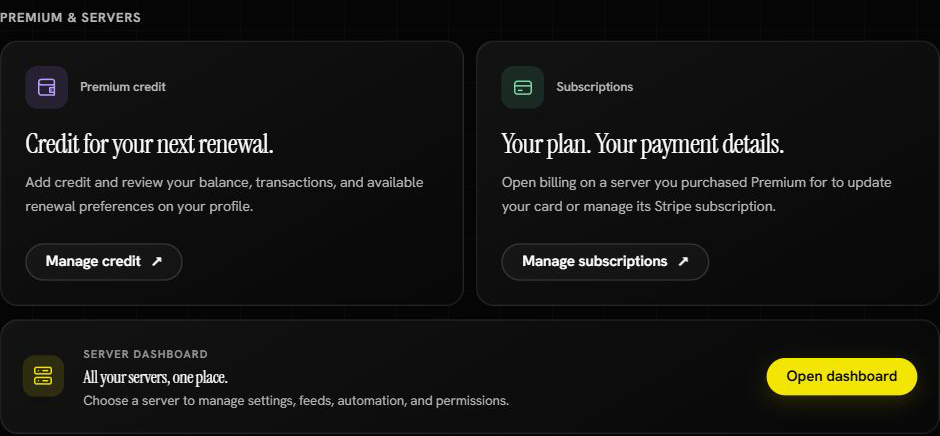
Find the right control
| Control | Use it for |
|---|---|
| Manage credit | View your Premium balance, add credit, and review renewal preferences and transactions. |
| Manage subscriptions | Find a server you purchased Premium for, then open its billing controls. |
| Open dashboard | Manage your connected game servers. |
| Refresh Discord | Reload your Discord access after permissions or managed servers change. |
| Light / Dark | Save a website theme in this browser. |
| Sign out | End the Helios website session in this browser. |
Signing out does not disable the bot or cancel subscriptions.
Check the next payment
Choose Manage credit to open the wallet on your profile. Review Your Helios subscriptions, Estimated next payments, and Recent transactions there. The estimate separates the bill, wallet credit, and card remainder; it is not a completed payment receipt.
Use Refresh balance if you have just returned from a top-up. Read any checkout or billing-review message before trying again. See Premium Credit for reserved credit, unfinished checkouts, and the difference between renewals and new purchases.
Change a payment method
Open the dashboard, find the server whose Premium you purchased, and use its billing control to open Stripe's secure billing portal. Update the payment method there.
Use the Discord account that owns the subscription. Being an admin on the server does not make you the purchaser.
Manage subscriptions takes you to the dashboard; it does not itself change a card or cancel renewal. Select the right purchased subscription before opening its billing controls. Removing a connected game server can leave a paid subscription available as an unassigned Premium token, with billing still active. See Premium Setup before removing or moving a server.
For preloaded renewals, see Premium Credit. For purchases and transfers, see Premium Setup.