Helios Rust Console Bot Documentation
Daily Login Rewards
Build a daily reward streak and show players how to claim it.
- Last reviewed
- Maintained by
- Helios RCE
Daily Login Bonuses reward players who return to your server. They require Premium and are separate from the daily coins configured in Economy.
Set up a reward cycle
- Run
/settings serverand choose the game server. - Open Daily Login Bonuses.
- Click Day 1, choose Kit, Item, XP, or Coins, and enter its reward.
- Add the remaining days in order, up to 14 days.
- Enable Login Bonuses for the game server.
The reward list is shared across your Discord community. The enabled toggle applies to the selected game server. Remove Last Day shortens the cycle.
Example: Day 1: 100 coins. Day 2: 250 XP. Day 3: your saved Starter kit. Use an actual kit name that exists on the server.
How players claim
- Link their account and join an enabled game server.
- Run
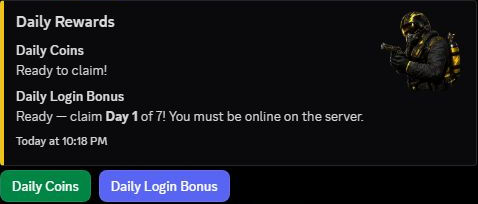
/dailyin Discord. - Choose Daily Login Bonus and follow the claim controls.
Players claim one day every 24 hours, measured from the last successful claim—not at midnight. Going more than 48 hours without a claim resets the streak to Day 1. After the final configured day, the cycle starts again. A login alone does not claim a reward or preserve the streak.
Progress is shared across the community. Joining a second enabled game server does not give a second claim for the same day. Even a coin or XP login-day reward requires the player to be linked and online in an enabled game server.
Where the reward goes
- Coins: added to the community Wallet.
- XP: added directly to Battle Pass progress. Login-day XP is a direct grant, so XP-event and personal multipliers do not increase it.
- Kit or Item: normally added to
/bagfor later use. If Bypass Bag is enabled for the game server where the player is online, Helios attempts to deliver it directly in-game instead.
When a kit or item goes into the bag, the claim and the in-game redemption are separate steps. See Bag and Items. A full bag can block that delivery; free a slot and retry when Helios says the daily progress has not advanced.
If Helios says the command was sent but delivery could not be confirmed, check the in-game inventory and ask staff for help if it is missing. The claim may already be used to avoid giving the same reward twice; do not assume a second bag copy is waiting.
Daily coins are separate
See Daily Coins and Begging for Wallet payout rules, owner timing settings, and /beg result delays.
The same /daily panel also offers daily coins. Their amount and cooldown come from Economy and do not configure the login streak above.
Daily Coins add a random whole-number amount between the configured minimum and maximum to the Wallet. Equal minimum and maximum give a fixed payout. Their cooldown starts after a successful coin claim and is separate from the login-bonus timer. The Daily Coins claim does not use the login bonus's in-game online check.
Daily Coins claims money immediately. Daily Login Bonus opens the day list; its day-specific claim controls deliver the reward. Open /daily to inspect the status, but leave the coin and day-claim controls untouched if you only want a preview. Controls belong to the person who opened the panel.
If a claim says the player's bag is full, free a slot in /bag and try again. If the player is shown as offline, confirm their linked gamertag and that Helios sees them online.