Helios Rust Console Bot Documentation
Auto & Sticky Roles
Assign roles on Discord joins and restore eligible saved roles when members return.
- Last reviewed
- Tested on
- Helios Bot Testing dashboard; existing disabled settings inspected without saving.
- Maintained by
- Helios RCE
Open Discord → Automation → Auto Roles in the dashboard. These settings affect the whole Discord community.
Auto Roles gives your selected roles to new members. Sticky Roles remembers eligible roles when someone leaves and restores them on rejoin. They are separate switches saved with the same button.
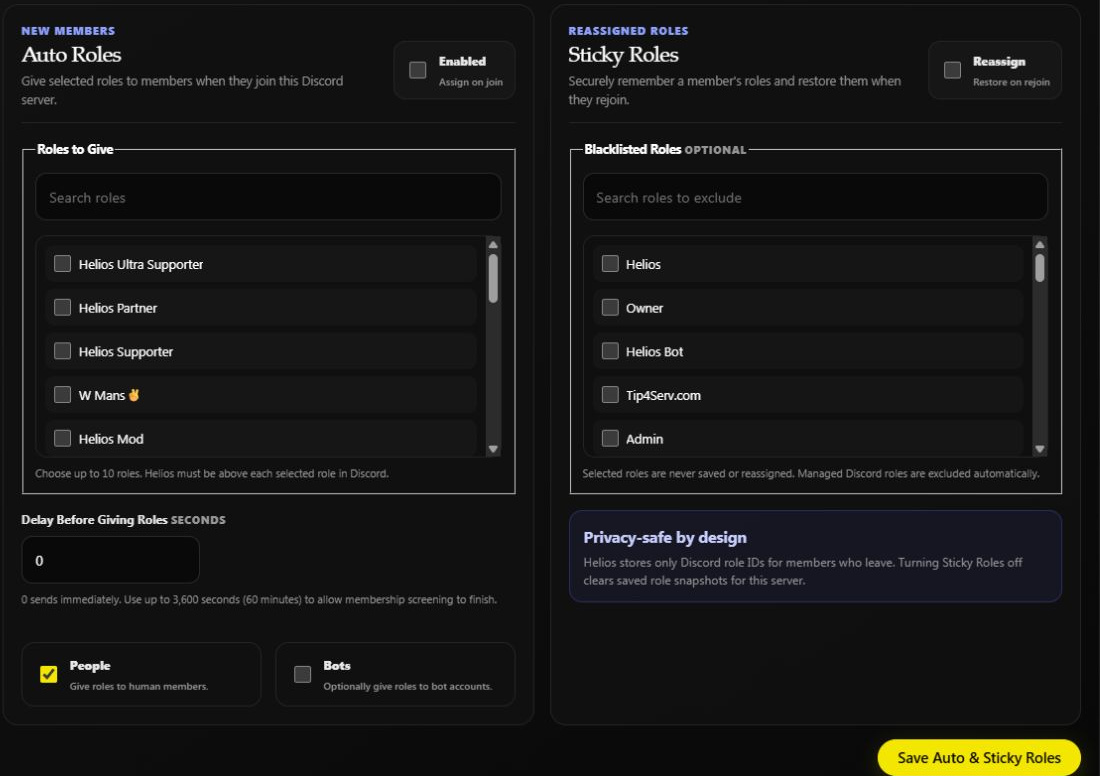
Both features are off in this unchanged example. The screenshot shows the controls, not a completed role assignment.
Give new members a role
- Turn on Enabled → Assign on join.
- Search Roles to Give and tick up to 10 roles.
- Set Delay Before Giving Roles in seconds, from
0to3600.60means one minute;3600means one hour. A delay can give members time to finish membership screening. - Choose People, Bots, or both, according to who should receive those roles.
- Review Sticky Roles too, then choose Save Auto & Sticky Roles.
Helios needs Manage Roles, with its highest role above every role it gives. Choose ordinary member roles. Auto Roles responds to joins; saving it does not mean every existing member has received the selected roles.
Restore roles when a member returns
- Turn on Sticky Roles → Reassign.
- Under Blacklisted Roles, select roles that should never be remembered or restored by this feature.
- Choose Save Auto & Sticky Roles.
Managed Discord roles are excluded automatically. Use the blacklist for other roles that should not survive leaving, such as temporary access. Do not rely on Sticky Roles as your subscription or in-game VIP system.
Turning Sticky Roles off clears saved role snapshots. Re-enabling it does not reconstruct the snapshots you cleared. Review the switch before saving changes to Auto Roles on the same form.
Check the result
Inspect the member's actual Discord roles after the relevant join or rejoin. The delay, Discord permissions, role hierarchy, and background processing can affect timing. A saved form alone is not proof of assignment.
If a role is not applied, check whether it is still selected and below Helios, whether People/Bots matches the account, and whether the configured delay has elapsed. A blacklisted or managed role will not be restored by Sticky Roles.
For roles tied to linking, use Link Roles. For game ranks, use Custom Auth Roles. Return to Discord Tools.