Helios Rust Console Bot Documentation
Embeds & Information Panels
Publish editable Discord announcements or choose automatically updating leaderboard and player panels.
- Last reviewed
- Tested on
- Helios Bot Testing dashboard; example editors cancelled without publishing.
- Maintained by
- Helios RCE
Use Embeds for a message you write and maintain. Use Panels for Helios data that updates automatically, such as a leaderboard or live-player list.
Both live in the Discord module of the dashboard. Check the destination channel and Helios's permissions before publishing.
Publish an editable announcement
Open General → Embeds → Create Embed:
- Enter an Embed Name. It is a staff label shown only in the dashboard.
- Choose the Discord Channel.
- Leave Role to Ping at No role ping, or choose the intended role.
- Add an optional Embed Title, write the Message, and choose its color.
- Add optional Text Above Embed or a direct HTTPS Embed Image URL.
- Read the live preview. When ready, choose Publish Embed.
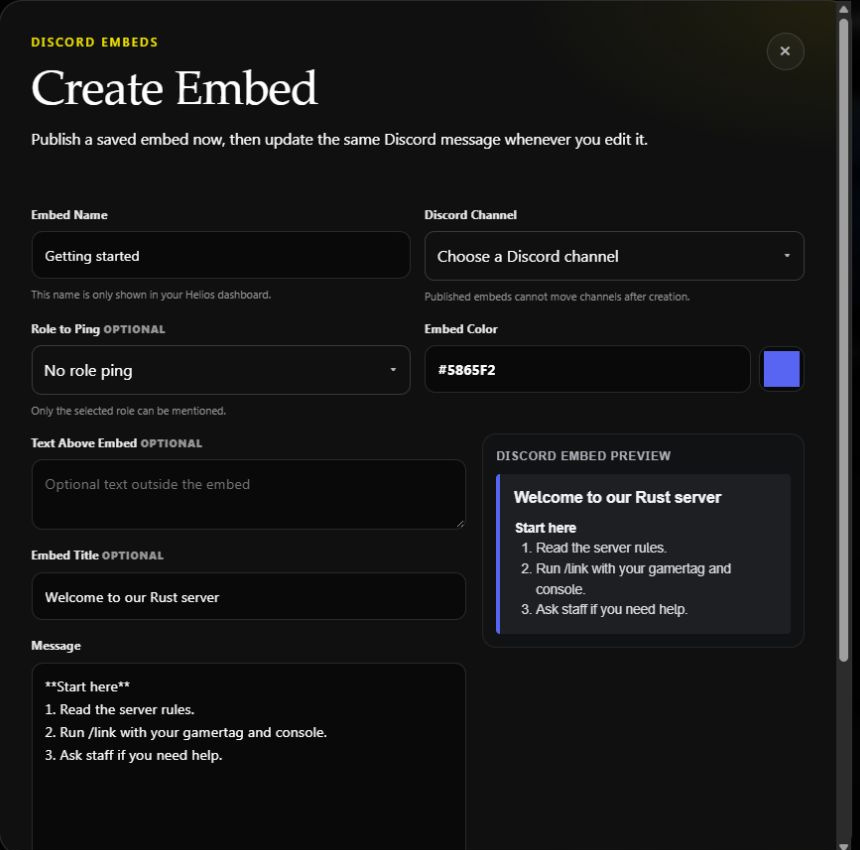
This is an unsent draft. The channel is unselected, and the right-hand panel is a browser preview.
Publish Embed creates a real message and saves it in Helios. Later Edit changes that original Discord message. Published embeds cannot move channels; create a new one when the destination must change. If there are many saved embeds, use the list's page controls to find older ones.
Send Test also sends an actual message. Check its destination and role ping before using it. Helios needs channel visibility, Send Messages, and Embed Links for rich content.
Publish an automatically updating panel
Open Panels → Panel Manager → Create Panel:
- Choose Panel Type: PvP Leaderboard, Online Hours Leaderboard, Nuke Leaderboard, or Live Players.
- Choose the Discord Channel.
- Review Server Scope and Daily / Weekly Time Zone where offered.
- Read the panel description, then choose Create & Publish Panel.
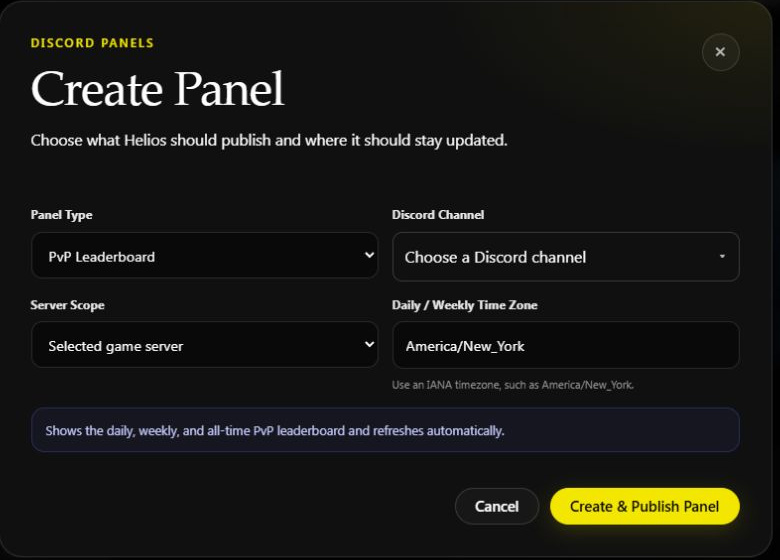
Unpublished PvP panel example. The fields available depend on panel type; choose a real destination before publishing.
The saved list provides View Panel to open its actual Discord message. Verify that members can see it and that its data has the intended scope. A panel refresh is separate from new gameplay being recorded.
Choose the right player display
| Goal | Tool |
|---|---|
| Check names once | /whoson. |
| Update a count in the Discord sidebar | Live Player Count Channel. |
| Keep an updating message in a channel | Panels → Live Players. |
Publishing one does not configure the others. PvP Events and Scrims use their own PvP Games controls.
If a post is missing or stale, check the saved destination, the actual message, Helios's channel permissions, and the selected server's connection. Refresh the list before publishing a duplicate. Return to Discord Tools.