Helios Rust Console Bot Documentation
Premium Credit
Preload your account and use credit for eligible Premium and Store Pro subscription payments.
- Last reviewed
- Maintained by
- Helios RCE
Premium credit belongs to your signed-in Helios account. Open your Profile or click the balance beside your name to view your credit, renewal preferences, and recent transactions.
Add credit
- Choose an amount between 11 and 500 and its Billing currency.
- Read and check the renewal consent.
- Click Add Credits and complete the secure Stripe checkout.
- Return to your profile and check the balance and Recent transactions.
You can add credit without an active subscription. Credit becomes available after payment confirmation; returning from checkout alone does not confirm payment.
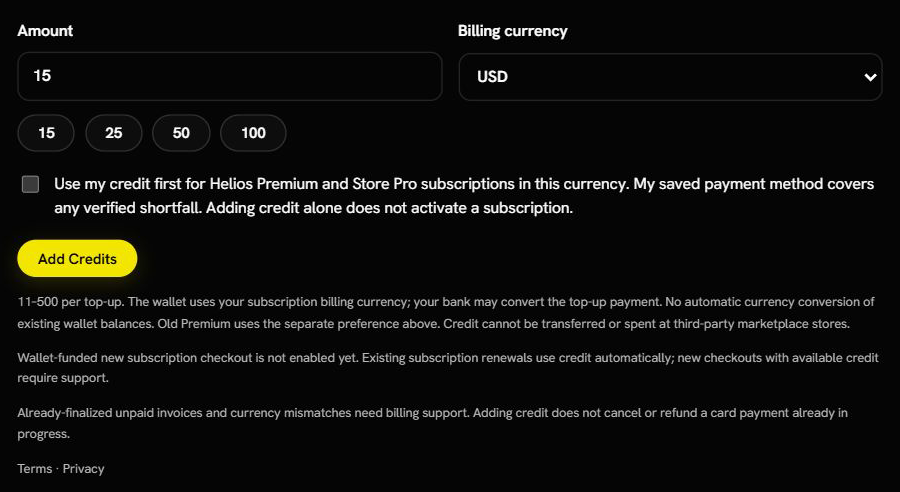
The screenshot shows the default 15 USD amount before checkout. No consent was checked and no payment was made. The availability notice was captured on September 25, 2026; read the notice on your own profile before starting a purchase.
Adding credit does not activate Premium or Store Pro. You still need an eligible subscription. Choose the subscription's Billing currency, not simply the currency your bank displays. Existing credit is not automatically converted between currencies.
Available credit and reserved credit
Available is credit ready to use. Reserved for billing confirmation means Helios has set that portion aside while it checks a payment or checkout; it is not extra money available for another bill.
Use Refresh balance after returning from checkout. Check Recent transactions for the confirmed top-up or credit use. A loading message, an open checkout, or a held invoice is not proof that a bill has been paid.
Existing Stripe subscriptions
Eligible Premium renewals use credit in the same currency first. Your saved card pays any shortfall.
Example: A $10.99 USD renewal uses $10.99 from a $20 USD balance, leaving $9.01. If a later $10.99 renewal has only $9.01 credit available, the remaining $1.98 is charged to the saved payment method.
Add credit before the renewal invoice is finalized. Credit cannot change an invoice that Stripe has already finalized.
Read Estimated next payments
Your profile may show Estimated next payments beneath Your Helios subscriptions. Each row shows the renewal date and an estimated split: the bill, the amount from your wallet, and the amount from your card.
Helios works through eligible renewals in date order using your current available credit. The same credit is not promised to every subscription at once. For example, if two $10.99 USD bills renew on different dates and you have $15 credit, the earlier bill uses $10.99. The later bill is estimated to use the remaining $4.01 and $6.98 from the card.
These are estimates, not receipts or a promise that payment will succeed. New purchases, taxes, discounts, held invoices, and billing adjustments can change the final amounts. Subscriptions set to end instead of renewing, or subscriptions needing billing review, may not appear here.
Paying with credit at checkout
Eligible Helios Premium and Store Pro subscription checkouts can use your credit immediately. Helios uses the balance in the same currency first. If it does not cover the full price, Stripe collects the remainder from the payment method shown at checkout.
Always check the payment summary before you pay. It tells you whether the order is using Credit, Stripe, or both.
Check availability first. If your profile says Wallet-funded new subscription checkout is not enabled yet, existing eligible renewals can still use credit, but a new purchase with available credit needs support. Do not assume the top-up button means new wallet-funded subscriptions are available.
Even when credit covers the first bill, Stripe may still ask you to save a payment method for future shortfalls. A fully wallet-covered bill does not make a new card charge.
Finish or cancel an unfinished checkout
If a subscription checkout is still open, the wallet may show Resume checkout and Cancel checkout & return unused credit. Resume the existing checkout instead of starting another one.
The cancel option returns unused checkout credit only after Helios confirms it was not spent. Unused credit also returns after checkout expiry. It does not cancel an active subscription or refund a payment already completed. If the message says payment is being confirmed or billing review is needed, refresh and contact support instead of paying again. Top-ups can be paused while this checkout is unfinished.
Understand a payment receipt
When Helios can confirm wallet use, its subscription receipt separates Wallet used from Backup payment. Wallet • No new card charge means that bill was covered by credit. Wallet + backup payment via Stripe means credit covered part and Stripe collected the rest.
Wallet remaining (current) is the balance when the receipt was prepared; it can differ from the balance immediately after that payment if another transaction happened meanwhile. Payment recorded; ledger confirmation pending means the credit record is still being confirmed—ask support if it remains stuck. A receipt saying No Helios wallet credit used should not be treated as a wallet payment just because the account has credit.
Old Premium subscriptions
If your account shows Keep old Premium active with credit, review the displayed monthly price, enable the renewal preference, and click Save renewal preference. If this option is missing, contact support before relying on credit to renew old Premium.
For the current $10.99 USD per-server terms, a $20 balance covers one month's renewal for one affected server and leaves $9.01.
When eligible old Premium ends, Helios uses available credit to keep the affected allocation active, then renews monthly while enabled and funded. If several servers need coverage, the oldest affected allocations are covered first. No card is charged for old Premium; uncovered servers move to the free tier when credit runs out.
Adding credit or enabling this preference does not cancel your old store subscription or restore a server that already expired. Turning the preference off keeps time already paid for.
What credit can pay for
Premium credit is for eligible Helios Premium and Store Pro subscription checkouts and renewals. It does not buy products in a community's Helios Store, transfer to another person, or turn into in-game coins. Balances in different currencies remain separate.
To buy or transfer Premium, see Premium Setup.
If a top-up is unavailable
Check the message below Add Credits. A temporary top-up pause does not stop existing billing. If payment completed but credit is missing, check recent transactions before paying again and contact support with the payment reference.
If the account says Top-ups and new credit use are paused, or an invoice is held for wallet review, contact support. Adding more credit does not release a hold, cancel a card payment already in progress, or refund a previous charge. Keep payment references private and share them only with support—not in a public Discord channel.