Helios Rust Console Bot Documentation
Automatic Replies: Triggers
Answer common Discord questions with matching phrases, channel scope, cooldowns, and a response preview.
- Last reviewed
- Tested on
- Helios Bot Testing dashboard; example draft cancelled without saving.
- Maintained by
- Helios RCE
Open Discord → Automation → Triggers → Create Trigger in the dashboard. Triggers answer matching member messages in your Discord community; they do not execute Rust commands.
Choose what activates the reply
- Enter a Trigger Name such as
How to link. - In Trigger Text, enter one or more phrases separated by commas, for example
how to link, link account. Any one can match. - Choose a Match Type.
- Choose a specific Discord Channel, or leave All text channels selected.
- Set Per-Member Cooldown in seconds.
30limits repeat replies to that member;0disables the cooldown.
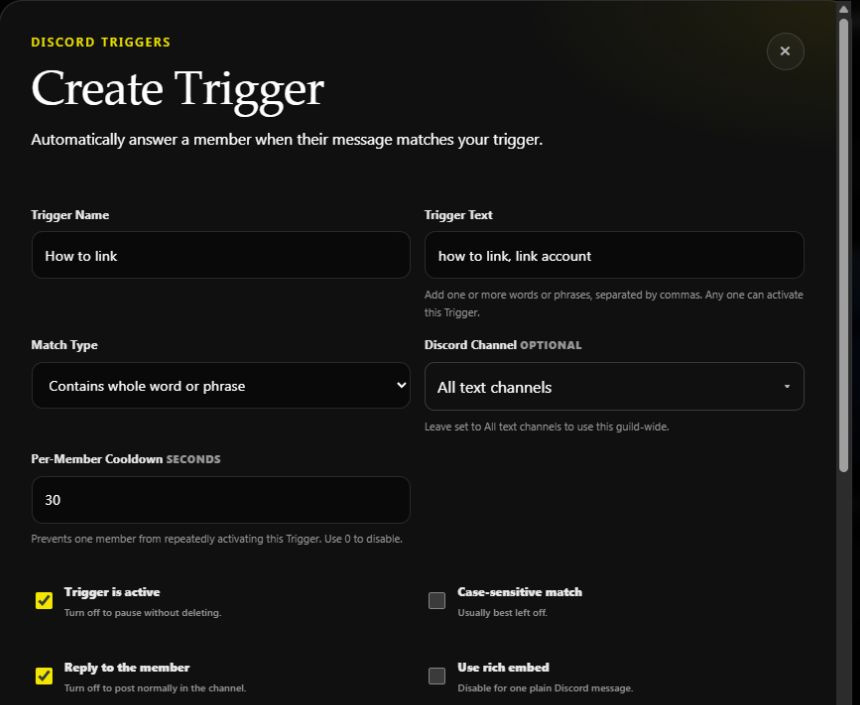
Unsaved example. Start with a single test channel if you do not want the reply across the community.
| Match type | Use it when |
|---|---|
| Contains this text | The phrase can appear anywhere, including inside longer text. |
| Exactly matches | The message should match the trigger text exactly. |
| Starts with this text | The member's message must begin with the phrase. |
| Contains whole word or phrase | Match words or phrases without matching inside a larger word. |
Leave Case-sensitive match off unless letter case matters. Keep Trigger is active on when ready, or save it off to keep the setup paused.
Write the response
Use Response Message for the reply. For example:
{mention}, run /link in Discord and choose your gamertag and console.
Keep Reply to the member on to reply directly; turn it off to post normally in the channel. Use rich embed adds optional title, color, image, and text above the embed. Leave it off for one plain message.
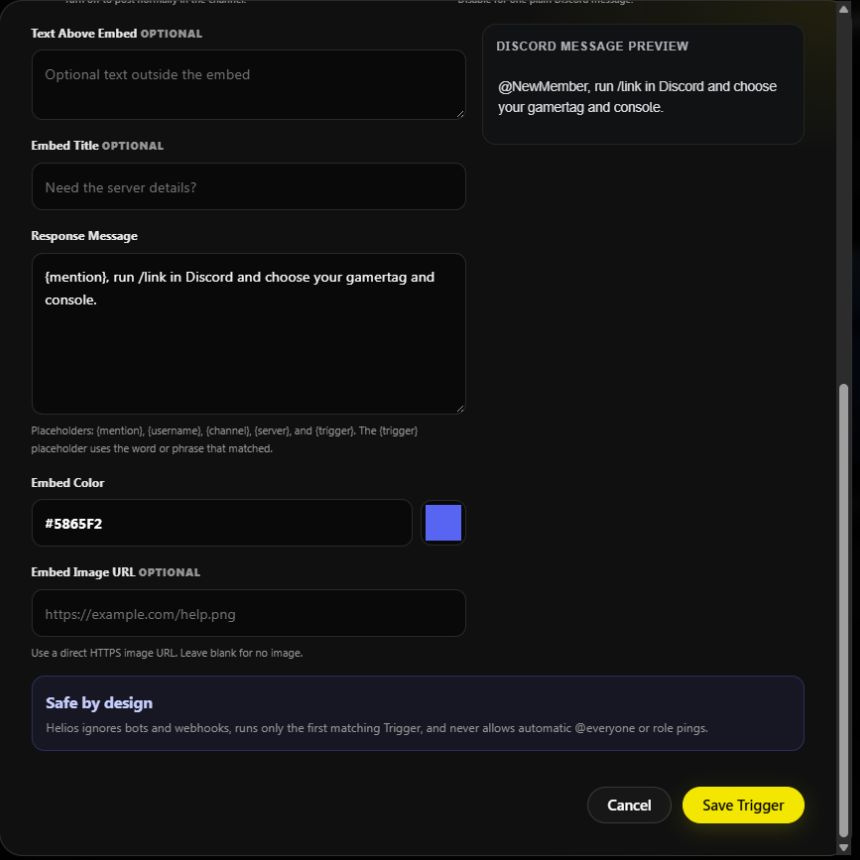
Available placeholders are {mention}, {username}, {channel}, {server}, and {trigger}. The last uses the phrase that matched. Check the preview, then choose Save Trigger to enable the saved configuration.
Helios ignores bots and webhooks, runs only the first matching trigger, and does not allow automatic @everyone or role pings. If two replies could match, make their phrases more specific rather than expecting both to run.
Test and troubleshoot
After saving, send a matching message as a normal member in the chosen channel. Check the response and cooldown. If nothing appears, check active status, channel scope, spelling, case sensitivity, the selected match mode, and Helios's permissions. The editor preview does not prove a live message matched.
Edit the saved trigger to adjust it, or turn its active switch off to pause it. For scheduled messages, use Autofeeds. Return to Discord Tools.