Helios Rust Console Bot Documentation
Battle Pass and Progression Hub
Setup hub for Helios battle pass progression, reward balancing, and rollout checks for Rust Console servers.
- Last reviewed
- Maintained by
- Helios RCE
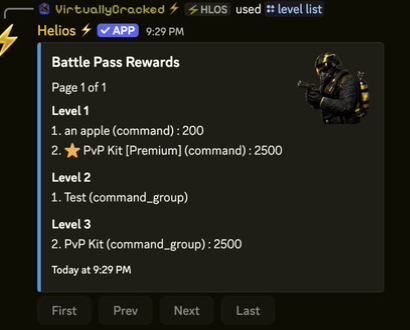
Use this hub to set up levels, rewards, challenges, and bonus XP before players begin working through your Battle Pass.
Video Tutorial
Setup Path
- Configure progression tracks in Battle Pass Setup.
- Choose goals in Battle Pass Challenges.
- Check reward prices and payouts in Economy and Rewards.
- Set the community's premium Battle Pass role if some rewards are for that role only. This is separate from buying Helios Premium for the game server.
- Set up level-up announcements.
- Check the player view using Player Commands.
Run a bonus XP weekend
Use Battle Pass XP Events to set a start, end, multiplier, and optional announcement channel. The schedule applies across the community's connected game servers.
For Sunday night, enter Monday at 12:00 AM. The dashboard's date fields use your local timezone; Discord displays the saved times in each viewer's timezone.
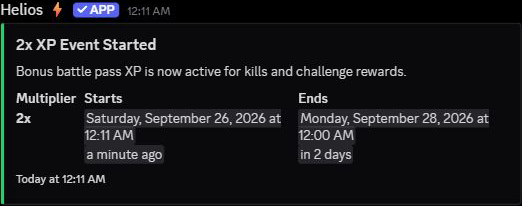
Personal XP Boost Products are for one player. A personal 2x boost and a community 2x event combine to give that player 4x earned kill, challenge, and playtime XP. A second personal boost replaces the first; it does not add more time to it.
Read-only player checks
/lb battle-passcompares linked players by level, then total XP across the community. See Leaderboards./statsshows recorded combat and online time, with separate game-server pages. See Viewing Player Stats.- Viewing a ranking does not claim rewards. On
/bp, avoid Claim Rewards and Claim All if you only want to look.