Helios Rust Console Bot Documentation
Viewing Player Stats
Check kills, deaths, playtime, streaks, and separate game-server stats without changing anything.
- Last reviewed
- Maintained by
- Helios RCE
Open a player's stats
Run /stats to look up your linked gamertag. You do not need to be online in Rust just to view saved stats.
/stats
To look up a gamertag instead, use player. To look up a Discord member's linked gamertag, use user. If both are supplied, user takes priority.
/stats player:"<GAMERTAG>"
/stats user:@Player
Select the Helios command if Discord offers similarly named commands from other bots.
Start with the totals
The first page combines the player's recorded stats across this community's connected game servers.
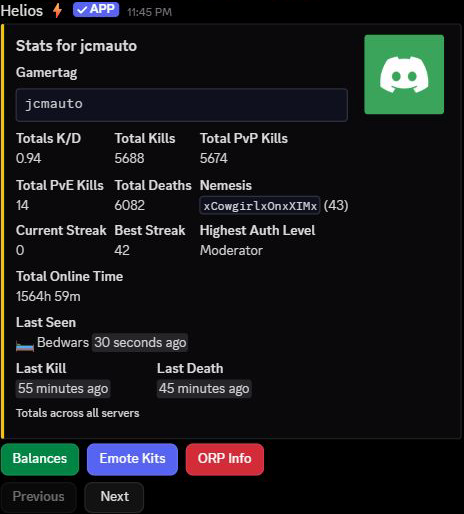
- Total Kills includes the recorded PvP and PvE kills. The PvP leaderboard uses PvP kills, so those numbers can differ.
- K/D compares recorded kills with deaths.
- Nemesis is the player or tracked attacker recorded as killing this player most often; the number beside the name is that count.
- Current Streak and Best Streak show the highest corresponding streak from the server pages, not all streaks added together.
- Total Online Time combines recorded time on the servers. It is not the length of the current session.
- Last Seen, Last Kill, and Last Death show how recently those events were recorded. N/A means no value is available.
- Highest Auth Level is the highest recorded game-server access level, not a new Discord permission being granted.
Read the Bedwars page, not just the totals
Use Next to browse the separate server pages. Look for the server name in the card and its footer. Use Previous to go back to the totals.
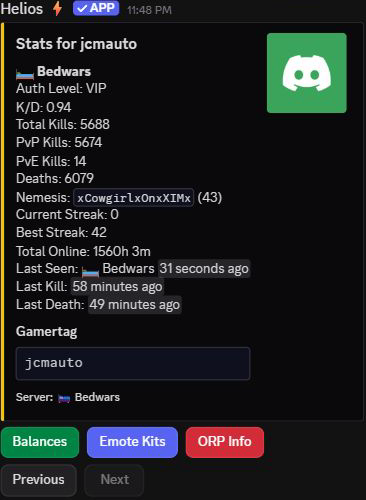
There is no server: option on /stats; choose the server by paging through the result. A server page can show zeroes even when the community totals are high.
The screenshots are read-only examples from Utopia's command channel. No balances, rewards, game settings, or player stats were changed to produce them.
Buttons and common questions
Open your own /stats result to use its page controls. Balances, Emote Kits, and ORP Info are detail shortcuts for a linked player; they can be unavailable when no Discord account is linked. Paging through stats does not redeem a kit or claim a reward.
If the buttons stop responding, run /stats again for a fresh result.
No linked gamertag: use /link for your own account, or enter the exact gamertag with player.
Stats are different from a leaderboard: first check the server scope and whether you are comparing all kills with PvP-only kills. Stats reflect what Helios has recorded and may change during play or after staff resets; they are not a guaranteed lifetime history.
See Leaderboards to compare players, or Player Tools for staff support tools.