Helios Rust Console Bot Documentation
Your Wallet, Safe Pocket and Player Payments
Check your currency, move it between balances, and send a player payment in Discord.
- Last reviewed
- Maintained by
- Helios RCE
Your Helios currency belongs to the Discord community. Connected Rust servers in that same community share it. It is not real money, actual Rust Scrap, or the separate Helios account credit used for Premium billing.
Check your balance
Run /bank in the community's Discord server. Link your game account with /link first.
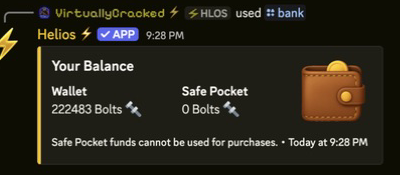
| Balance | What it is for |
|---|---|
| Wallet | Spending currency, including shop purchases and player payments |
| Safe Pocket | Keeping currency out of the spending wallet; withdraw it before buying |
The currency name may be Coins, Bolts, Scrap, or another name chosen by staff. Changing the label does not change how the two balances work. /bank posts its result in the channel, so use an appropriate bot-command channel if you do not want to show your balances elsewhere.
Move money into your Safe Pocket
/deposit amount:500
This moves 500 from your Wallet to your Safe Pocket. It does not earn or spend new currency. Leaving amount out moves your whole wallet.
You need a linked account and enough in your Wallet for the full requested amount. If you request more than you hold, the deposit fails rather than moving only part of it.
Move money back to your Wallet
/withdraw amount:500
This moves 500 from your Safe Pocket to your Wallet. Leaving amount out moves your whole Safe Pocket. You must have the full requested amount in the Safe Pocket.
For example, if your Wallet holds 100 and your Safe Pocket holds 900, a 500 shop purchase still needs more wallet funds. Withdraw 400 or more first; the shop does not automatically pull the difference from the Safe Pocket.
Deposits and withdrawals change where your money is kept, not your combined total. These commands do not require you to be online in Rust.
Send currency to another player
/pay user:@player amount:250
Choose the Discord member and a positive whole-number amount. Check the recipient before submitting: /pay sends immediately without a separate confirmation screen.
- The full amount comes from your Wallet, not your Safe Pocket.
- It goes to the recipient's Wallet in this Discord community.
- You cannot pay yourself or a bot.
- If your Wallet is too small, the payment fails. Withdraw first if needed.
- The command does not require either player to be online in Rust and does not check account links itself.
Payment Sent shows the amount and updated wallet balances publicly in the channel. If Helios reports that the transfer failed and the funds were returned, check /bank before trying again. If there is no clear result, ask staff to review it rather than sending the same payment twice.
Common questions
I have enough overall, but a purchase fails. Check the Wallet amount, not the Wallet plus Safe Pocket total. Also check the product's total price and any purchase limits in Buying from the In-Game Shop.
My balance is different in another Discord server. Each Discord community has its own economy. A shared balance only applies to connected game servers within the same community.
Can staff change my Safe Pocket? Yes. Safe Pocket is separate from everyday spending, not protected from staff balance corrections. Staff can take currency or set an exact balance.
Are these Premium commands? /bank, /deposit, /withdraw, and /pay have no Premium check. Shop, market, and some other economy features have their own access rules.
For earning currency, see Daily Login Rewards and your community's reward rules. For saved rewards rather than money, see Your Bag and Items.