Helios Rust Console Bot Documentation
Taking Currency and Battle Pass XP
Remove currency from the correct balance or correct a player's Battle Pass XP.
- Last reviewed
- Maintained by
- Helios RCE
Use /take money or /take xp to correct a reward or apply an agreed penalty. /take does not remove kits or bag items. For a stored bag item, use the separate trash control in Player Tools; it does not remove items from a live Rust backpack.
You need Manage Server, or a configured moderator role allowed to use /take. Money removal requires community Premium; XP removal has no Premium check on this command. See staff permissions.
Remove currency from the right balance
- Check the player's current balances using
/bankor Player Tools. - Choose
/take moneyand enter the positive whole-number amount to remove. - Choose the required destination: Wallet or Safe Pocket.
- Choose one user or one role, not both.
- Add a clear reason, check the target and destination, then submit.
/take money amount:500 destination:Wallet user:@player reason:"Correction for duplicate reward"
Pick the destination from Discord's choices. Helios removes up to that amount from the selected balance; it does not take the remainder from the other balance. For example, removing 500 from a wallet holding 200 leaves the wallet at 0, while the Safe Pocket stays unchanged.
Balances belong to the whole Discord community. Running the command in a Bedwars channel does not make it Bedwars-only. An individual money target is not checked for an account link; verify the member yourself.
Role targets need extra care
The amount applies to each linked member of the chosen role. @everyone means every linked player in the community, not just online players or people on one game server. Role membership can take about a minute to refresh after a change.
Check the reported recipient count. If the command times out partway through, inspect affected balances before repeating it; players already processed could lose money again.
Remove Battle Pass XP
/take xp amount:2500 user:@player reason:"Correction for duplicate XP reward"
Use lowercase xp. Enter a positive amount between 1 and 1,000,000,000; Helios subtracts it for you. Choose one user or one role, with role targets limited to linked members.
This changes community-wide Battle Pass progress, recalculates the level, and does not take total XP below zero. It is not a command to undo rewards the player already received. Ask them to check /bp after the adjustment.
Dashboard alternative
Open Player Tools, find the linked player, then expand Player Management → Take From Player → Money. Enter the amount, choose Wallet or Safe Pocket, and add the reason. Check the confirmation before choosing Confirm Action. Use Battle Pass XP in the same section for XP corrections.
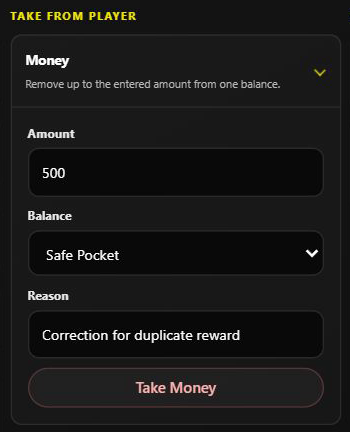
A form example on Helios Bot Testing. No currency was removed for this screenshot.
The Discord slash command applies when submitted; it does not have the dashboard's extra confirmation step.
Remove an amount or set an exact total?
/take money amount:500subtracts up to500from the chosen balance.- Set Player Balances replaces a balance with the exact total entered.
- Give rewards adds money or XP instead.
Check Account Progress and the available Balance Logs afterward. Do not rely only on a requested amount as proof of how much was actually removed.