Helios Rust Console Bot Documentation
Giving Coins, XP, Kits and Bag Rewards
Give one player or a linked Discord role a reward, and understand when it arrives.
- Last reviewed
- Maintained by
- Helios RCE
Use /give for staff rewards or support replacements. Check the player and the amount before sending: a Discord slash command applies the grant when you submit it. It does not use the dashboard's extra confirmation screen.
Choose the right reward
| Command | Where the reward goes | Premium needed? |
|---|---|---|
/give money | Adds currency to the community wallet | Community Premium |
/give xp | Adds community-wide Battle Pass XP | No Premium check on this command |
/give bag | Stores one item in the Helios bag for later use | Community Premium |
/give kit | Sends a live kit to a gamertag on the chosen game server | No Premium check on this command |
/give killstreak | Grants an existing Killstreak reward | Premium on the selected game server |
You need Manage Server, or a configured moderator role with access to /give. Having any moderator role is not enough if that role has not been allowed to use this command. See staff command permissions.
Give currency
- Choose
/give money. - Enter a positive whole-number amount. Always enter it deliberately; leaving it out grants
1. - Choose user for one Discord member, or role for linked members with that role. Do not choose both.
- Add a short reason, then check the target before submitting.
/give money amount:500 user:@player reason:"Replacement for cancelled event reward"
This adds 500 to the wallet. It does not replace the balance, touch the Safe Pocket, or give actual Rust Scrap. Wallets are shared across the Discord community, not separate for each connected game server.
For role grants, the amount is per linked player, not a pot split between them. Choosing @everyone targets all linked players in this Discord community. Individual money grants do not check whether the member is linked; check their account yourself before granting.
To replace a balance with an exact total, use Set Player Balances instead.
Give Battle Pass XP
/give xp amount:2500 user:@player reason:"Event participation"
Choose one user or one role, just as with money. Role targets only include linked players. The amount must be between 1 and 1,000,000,000 XP.
Staff XP grants use the entered amount; a personal boost or community XP Event does not multiply them. Progress is community-wide. Ask the player to check /bp afterward.
Store a reward in a player's bag
Use /give bag when the player should receive a saved reward rather than a kit right now. They do not need to be online just to receive the bag entry.
- Enter name, choose server, and choose one user or role.
- Choose the item type deliberately. Without a type, an entered command makes it a Command item; otherwise it becomes Misc.
- Fill in the extra fields that match the type.
| Type | What to supply |
|---|---|
| Command | A reward command; use {PlayerName} for the player's gamertag |
| Role | Choose the Discord role in grant_role |
| Key | A name matching the configured treasure key, such as Gold Key |
| Chest | A name matching the configured treasure chest, such as Gold Chest |
| Collectible | A keepsake with an optional trader value; not a live Rust item |
| Misc | A general bag entry; the name alone does not deliver an in-game item |
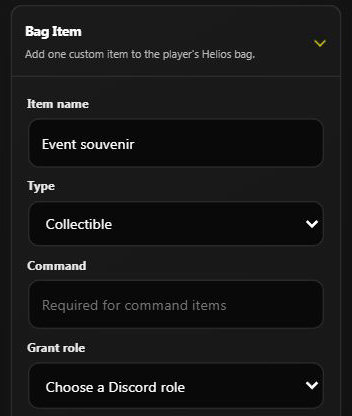
The dashboard's equivalent form on Helios Bot Testing. This example was not submitted.
Worth is the trader-sale value. Price records the item's price; this staff grant does not charge the recipient. Both default to 0. Untradable prevents market listing; it is not a promise that every other bag action is blocked. The Discord option is spelled untradable.
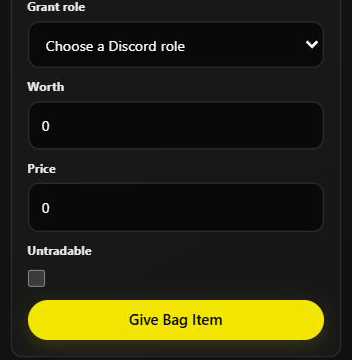
/give bag name:"Event souvenir" server:"US Main" user:@player type:Collectible worth:0
Choose your actual connected server from autocomplete. Each successful recipient receives one bag item. A full bag can cause a grant to fail for that player; check the reported success and failure counts before retrying a role grant. See Your Bag and Items and Treasure & Keys for collection and matching names.
Give a kit immediately
/give kit server:"US Main" kit_name:"PvP" gamertag:"PlayerName"
Choose an existing kit and the correct enabled game server. Enter gamertag, or choose user to use their linked gamertag. If both are supplied, the entered gamertag wins, so use just one to avoid confusion.
The player should be online on that game server. This sends the kit command directly; it does not save a bag reward for later. Read the Server Response as well as the heading. A command being sent is not proof that the kit reached the player's inventory. Check delivery before sending it again.
Grant an existing Killstreak reward
Choose /give killstreak, then the server, the configured killstreak reward from autocomplete, and the linked user.
- Coins are credited immediately.
- Other reward types are saved for the player to claim with Here Take This or
/bag.
This grants the reward; it does not require the player to earn that streak first. See Killstreaks for setup and collection.
Dashboard alternative and checks
Open Player Tools, find the linked player, and expand Player Management → Give Player. Choose the reward, review the confirmation, and confirm only when you intend to grant it. The selected dashboard game server is used for server-specific rewards.
Afterward, check the wallet with /bank, XP with /bp, or stored items with /bag. If a request times out or only some recipients succeed, check the result before trying again. Repeating the whole grant may reward successful players twice.