Helios Rust Console Bot Documentation
Killstreaks
Admin reference for the premium Killstreak reward system in Helios.
Overview
Reward players for chaining PvP kills without dying. Set a kill count, pick a reward, and players earn it in-game the moment they hit the streak. Premium only.
Commands Covered
| Command | What It Does |
|---|---|
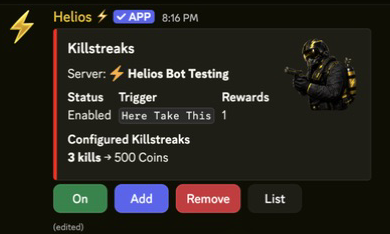
/set killstreaks | Open the Killstreaks panel to enable the system and manage rewards |
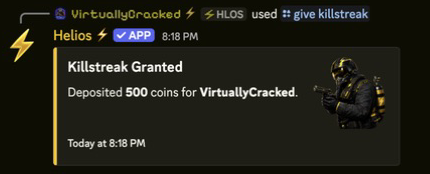
/give killstreak | Manually grant a configured killstreak reward to a linked player |
Setup
- Run
/set killstreaks server:"<SERVER>". - Click On to enable Killstreaks for that server.
- Click Add to create a reward.
- Click Killstreak and set the number of kills needed, the claim window (minutes), and a cooldown (minutes).
- Choose a Reward type from the dropdown, then click Settings to fill in that reward's fields.
- Click Save.
- Use List to review configured rewards and Remove to delete one.
Panel Controls
| Button | What It Does |
|---|---|
| On / Off | Enable or disable Killstreaks for the server |
| Add | Create a new killstreak reward |
| Remove | Delete an existing reward |
| List | Show every configured reward and its kill threshold |
Each reward has three shared settings:
| Field | Meaning |
|---|---|
| Killstreak | Kills-in-a-row needed to earn the reward (1–100000) |
| Claim Within Minutes | How long a banked reward stays claimable before it expires (default 30) |
| Cooldown in Minutes | Minimum time before the same player can earn this reward again (default 0 = no cooldown) |
Reward Types
| Type | What Happens | Settings |
|---|---|---|
| Kit | Delivers a kit to the player | Kit Name, Name in /bag, Value |
| Item | Delivers an item | Item Shortname, Name in /bag, Quantity, Value |
| Coins | Adds currency to the player's wallet instantly | Value |
| Spawn | Spawns a vehicle/object at the player's position (same presets as Easy Binds) | Spawn preset |
| UAV | Reports how many enemies are within 75m, pinging on a timer | Expires After (seconds), Ping Every (seconds), Cooldown (seconds) |
| Atom Bomb | Counts down in chat, then kills everyone on the server | Countdown Time (seconds), Countdown message |
How Players Earn & Claim
- Earn — a player reaches the configured number of kills in a row. Dying resets their streak to 0.
- Coins are credited to the wallet immediately (the player must be linked with
/link). - All other rewards are banked as a pending claim (up to 7 at once).
- Claim — the player opens Rust's Quick Chat and picks Here Take This. Helios replies with a numbered list of their banked rewards, each mapped to a Quick Chat order (Follow Me, Go Away, Repair This, and so on). The player selects the matching order to activate that reward.
- Kit and Item rewards also drop into
/bag, so players can claim those from Discord instead of Quick Chat. - Banked rewards expire after the Claim Within window.
Manual Grant
Use /give killstreak to hand a configured reward to a linked player without them earning it:
/give killstreak server:"<SERVER>" killstreak:"<REWARD>" user:@player
Coins are credited instantly; every other type is banked for the player to claim in-game.
Example
/set killstreaks server:"<SERVER>"
Add a 5-kill → Coins (500) reward and a 10-kill → UAV reward. A player who gets 5 kills without dying is paid 500 coins on the spot; at 10 kills they bank a UAV and pop it from Quick Chat to scan for nearby enemies.
Requirements
- Helios bot connected to at least one server in this guild.
- Premium active on the server.
Manage Serverpermission to open/set killstreaksand/give killstreak.- Players linked with
/linkto receive Coins and/bagdeliveries.
Notes
- Only PvP kills count. Self-kills, suicides, and environmental deaths are ignored.
- Players inside an active minigame or event do not earn or claim killstreaks.
- Atom Bomb kills every player on the server, including teammates — use a clear countdown message so players know it is coming.
- Spawn rewards use the same preset list as Easy Binds (Attack Heli, Mini, Rhib, nodes, cars, and more).