Helios Rust Console Bot Documentation
Set Player Balances
Set a linked player's Wallet or Safe Pocket to an exact amount.
- Last reviewed
- Maintained by
- Helios RCE
Use /set bank to replace a linked player's Wallet or Safe Pocket balance with an exact amount. Despite its name, the command can change either balance. It requires Manage Server and Premium in the Discord community.
This sets the final balance; it does not add money. Setting 500 changes a balance of 2,000 to 500. Setting 0 clears the selected balance. The other balance stays unchanged.
From the dashboard
- Open Manage Server → Overview.
- Find Player Balances and choose Configure.
- Choose Discord member or Discord role as the target type, then select the intended member or role.
- Choose Wallet or Safe Pocket.
- Enter the New balance, check the target carefully, then choose Save Setting.
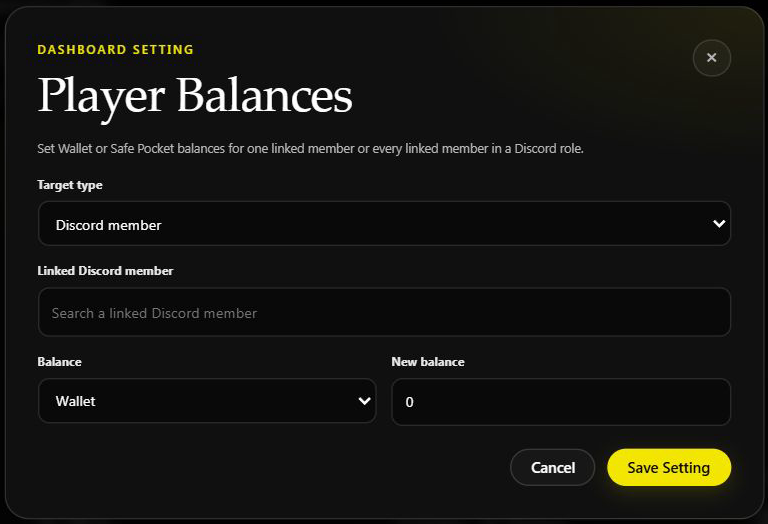
The form above was opened without selecting a player or saving. Its default 0 is not a recommended amount.
From Discord
/set bank amount:500 type:Wallet players:@Player
/set bank amount:500 type:Safe Pocket players:@Player
Select Wallet or Safe Pocket from Discord's choices. players can be a member or a role. The amount must be a whole number of 0 or more.
Balances are shared across this Discord community, not held separately for each connected game server. There is no server option on this command.
Be careful with role targets
A role target sets the chosen balance for every linked member with that role, not a shared pot split between them. Selecting @everyone targets all linked players. Unlinked members are not given a new linked account by this command.
Large role updates can take time. Read the progress and final success/failure counts. If the member lookup fails partway through, some players may already have changed—inspect the affected balances before retrying the whole role.
Choose the right kind of change
- To set an exact current total, use
/set bank. - To add or subtract an amount, use the relevant Give or Take command and check its balance choice.
- To set the allowance for new accounts when they link, use Economy → Starting Balance. That does not rewrite existing players' balances.
After a change, inspect the player's balance using the staff player tools or ask the player to check /bank. This is not a deposit or withdrawal: it does not move money from one pocket to the other.