Helios Rust Console Bot Documentation
Server Settings
Turn Helios features on or off for one Rust server and set up the server-only options in the dashboard.
- Last reviewed
- Maintained by
- Helios RCE
What this page controls
Server Settings lets you turn features on or off for one connected Rust server. It does not change settings that are shared by your whole Discord community.
Open the Helios dashboard, choose your game server, then choose Server Settings. You can also open the related Discord panel with:
/settings server server:"<SERVER>"
Change the controls you need, then use Save Changes. Helios picks up saved changes shortly after that.
Important difference: one server vs. your whole community
Use this page when you want a feature on one game server but not another. For example, you can turn on Shop and Binds for your main server while leaving them off on an event server.
Some setup is shared across your Discord community. Daily Login Rewards are one example: build the reward days once, then use the Daily Login Bonuses switch here to choose which game servers use them.
Main controls
| Setting | What it does |
|---|---|
| Auto Spawns | Runs your configured automatic entity spawns on this server. |
| Binds | Lets this server use its quick-chat binds. |
| Bounties | Lets players place and claim bounties here. |
| Bypass Bag | Delivers eligible Shop purchases right away instead of putting them in /bag. |
| Daily Login Bonuses | Turns on your shared daily-login reward sequence for this server. |
| Item Swapping | Lets players move eligible items between servers when both servers have it turned on. |
| Offline Protection | Turns Offline Raid Protection on for this game server. |
| Player Tracking | Tracks live player positions for Premium tools that need location data. |
| Shop | Lets players browse and buy through /shop. |
| Scrims Start by Anyone | Lets non-staff players start a configured Scrim. |
| Skip Night | Lets players vote with Wait Here in Quick Chat to move the server to daytime. Configure the vote and night hours in Skip Night. |
Feed and event controls
| Setting | What it does |
|---|---|
| PvE in Feed | Includes PvE kills and events in this server's game feed. |
| EvE in Feed | Includes non-scientist environment and PvE events. With it off, only player kills against scientists stay in that feed. |
| Note Feed | Sends configured note activity into the server feed. |
| Event Timers | Shows time remaining for supported server events. |
| Events | Lets you choose in-game event announcements and an optional Discord event feed. |
When you turn on the Discord event feed, select its Discord channel before saving. For in-game announcements, give each event a message so players know what happened.
Dynamic Pricing
Turn on Dynamic Pricing when you want popular /shop products to become more expensive and quiet products to become cheaper. Prices always stay inside the limits you choose.
- Max increase can be
0to1000%. - Max decrease can be
0to100%. - You can choose whether Easy Shop products are included.
- A price of
100with+200%and−50%can move between50and300. - Free products stay free.
- Turning the feature off returns prices to their saved starting prices. Turning it on again starts a fresh starting point.
Dynamic Pricing is a Premium feature.
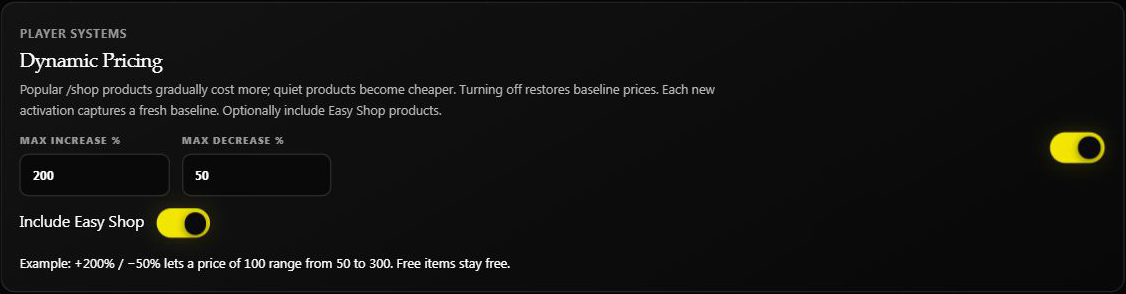
These are separate price rules for the selected game server. They do not change player Market asking prices or Helios Store prices. The limits are caps measured from the starting price, not an instant increase or discount. Paid products stay at least 1 even with a 100% decrease limit.
For demand timing, buyer price changes, trader-value limits, and safely changing a starting price, see Dynamic Shop Pricing.
Community Market is separate from Shop
The Market choice in Discord's /settings server panel controls the player Market for this whole Discord community. Opening the panel through one game server does not make that toggle server-only. Turning off Market does not mean the same thing as turning off that game server's Shop.
See Player Market for listing, buying, and cancellation rules.
Server Info Panel
Turn on Server Info Panel to post a live status panel in a Discord channel. Choose the channel first, then save. Helios updates the panel with the current reading for this game server.
This is a Premium feature. If you only need to change the connection, pause Helios, or remove a server, use Server Management instead.
Boom Banning
At the top of the page, Boom Banning lets an administrator choose explosive items and ban or unban them on this one server. Open Boom Controls for the item picker and step-by-step instructions in Ban and Unban Boom.
Quick checks
A feature is on but nothing happens
Make sure you saved the page, the server connection is enabled, and the feature has its own setup finished. For example, Auto Spawns need saved spawn points, and Events need event messages.
A player cannot move a server-specific bag item
Check Item Swapping on both source and destination game servers in this same Discord community. The player then uses Swap Item in /bag. This changes the saved item's server; it does not claim it, create a copy, or transfer items already inside Rust. Rewards marked All Servers use a redemption server picker instead and are not swap choices. See Your Bag and Items.
Shop rewards arrive immediately when you expected a bag item
Check bypass settings on the server, category, and product. Any enabled setting can activate immediate delivery for an eligible product. Turning off only one setting may not restore bag delivery. See Shop & Market Setup.
A location feature cannot find a player
Turn on Player Tracking, then confirm the player is linked and currently online on the selected server.