Helios Rust Console Bot Documentation
Dial & Ride
Offer vehicles through quick chat with fuel grants, per-vehicle cooldowns, and optional Discord role requirements.
- Last reviewed
- Tested on
- Helios Bot Testing dashboard
- Maintained by
- Helios RCE
Let players request a vehicle from Rust's quick-chat menu. Choose the available rides, how much fuel to give with each one, and how often players can request them. Requires Premium on the selected server.
Set up a ride
- Open the dashboard, choose Manage Server, then Dial & Ride.
- Open a vehicle and check Offer for that ride. You can offer up to 8 vehicles at once.
- Set Lowgrade Fuel, Cooldown (Minutes), and Required Discord Role.
- Choose Save for that vehicle, such as Save Minicopter.
- Turn Dial & Ride on if it is inactive. Allow about 15 seconds for saved changes to reach the in-game menu.
Attack Heli also has an HV Rocket Amount field. It defaults to 15 rockets given to the player with each ride. Enter a whole number from 0 to 100,000; 0 gives none.
Example: a Minicopter every 30 minutes
Offer Minicopter, give 150 lowgrade fuel, set a 30-minute cooldown, and leave the role as Everyone (no role required).
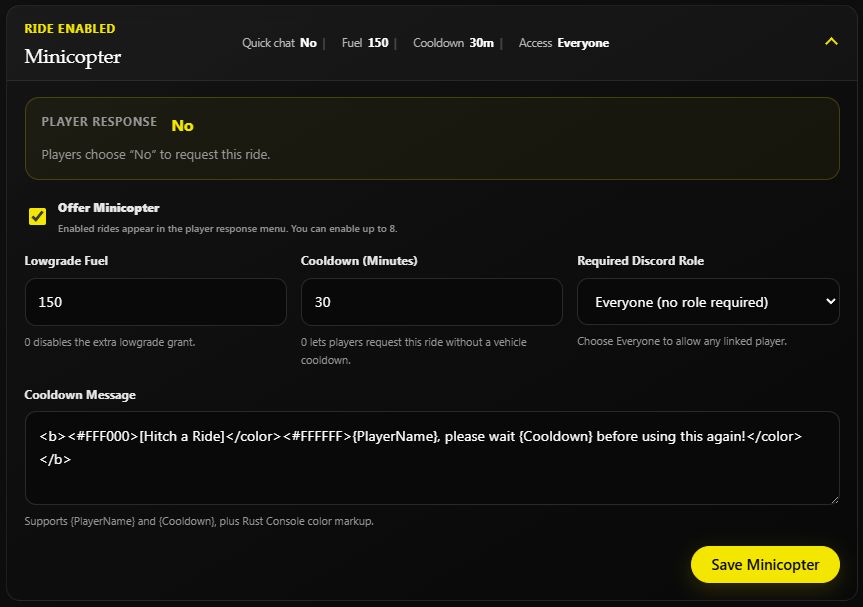
Saved settings on Helios Bot Testing.
Lowgrade Fuel is a grant to the player, not a price. Set it to 0 to skip the extra fuel grant. A cooldown of 0 removes that vehicle's cooldown; each ride has its own timer.
For a VIP-only ride, select your VIP Discord role. Players must link their account with /link and have that role to use the restricted vehicle.
How players request a ride
- In Rust, open Quick Chat → Orders and choose Lets Go!.
- Read Helios's ride menu.
- Within 30 seconds, send the quick-chat response shown beside the vehicle.
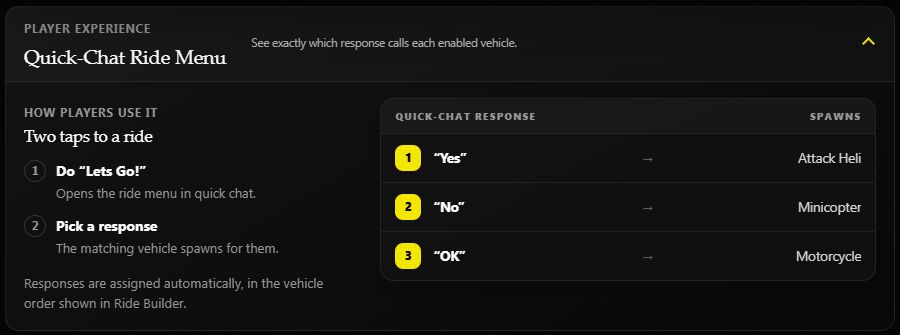
In this example, the player chooses Lets Go!, then No to request a Minicopter. Responses are assigned automatically from the enabled vehicle list, so players should follow the current menu. If it times out, send Lets Go! again.
Helios spawns the selected ride at the player's position. A remaining cooldown or missing required role prevents the request. Combat Lock can also block Dial & Ride while the player is locked.
Linked players can also open Player Actions in Discord and choose Dial & Ride. That menu lists their available vehicles and current cooldowns; they choose a vehicle by name instead of sending a quick-chat response.
Make the cooldown message clear
Each vehicle has its own Cooldown Message. Keep {PlayerName} and {Cooldown} so the message names the player and shows the remaining wait.
{PlayerName}, your Minicopter will be ready in {Cooldown}.
Available vehicles
2 Mod Car, 3 Mod Car, 4 Mod Car, Attack Heli, Horse, Minicopter, Motorcycle, RHIB, Rowboat, Scrap Heli, Magnet Crane, Hot Air Balloon, Snowmobile, Solo Submarine, and Duo Submarine.
Prefer Discord?
Admins with Manage Server can open the same feature using:
/settings dialaride server:"<SERVER>"
Enable the feature, choose the vehicles, and set each ride's fuel, cooldown, and optional role. Under Vehicles → Attack Heli, set HV Rocket Amount (0=None) to control its rocket grant.