Helios Rust Console Bot Documentation
Treasure & Keys
Create a chest, add weighted rewards, and give players its matching key.
- Last reviewed
- Maintained by
- Helios RCE
Open Dashboard → Treasure & Keys. This is a Premium feature and requires Manage Server permission. Chest types, matching keys, and rewards are shared across every Helios-connected game server in the same Discord community.
Build a chest
- Click Create Chest, give it a clear name, and save it.
- Expand the new chest. Its Matching Key is shown at the top.
- Click Add Kit or Add Rust Item and choose what a player can receive.
- Give the reward a friendly name, set the quantity when needed, choose a Drop weight, and save.
- Add the remaining rewards and check the displayed Chance before sharing keys with players.
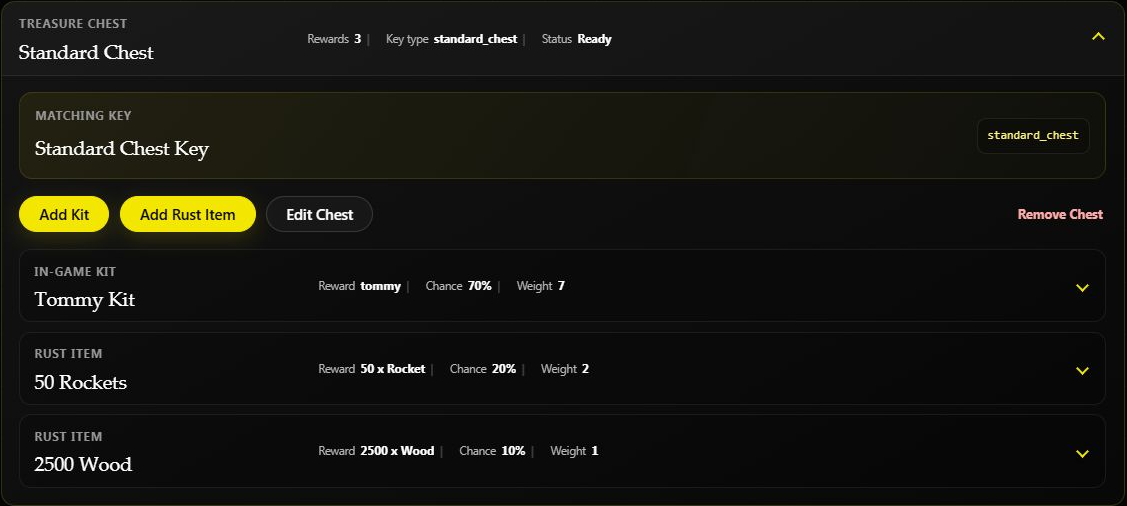
This testing-server chest has weights 7, 2, and 1, giving chances of 70%, 20%, and 10%. Weights are relative: a weight of 7 does not mean 7%. Adding, removing, or changing a reward changes all of the displayed chances.
Read the chest status
- Ready means the chest has at least one reward and can be given to players.
- Needs rewards means the chest exists but is empty. Add a kit or Rust item before giving out its key.
- Use Edit Chest to change its details. Use Remove Chest only when you no longer need that chest type.
Give players the matching key
Use the chest's displayed Matching Key when creating a key reward in Shop, Battle Pass, or another supported reward tool. The key type must match the chest exactly; the friendly name alone is not enough.
Players use their chest and matching key through /bag. Choose Open Chest, then select the chest and key if the bag asks. A chest that is not tied to one game server may also ask which connected server to use. Opening uses one chest and one matching key, chooses a reward from the saved pool, and places that reward in the player's bag.
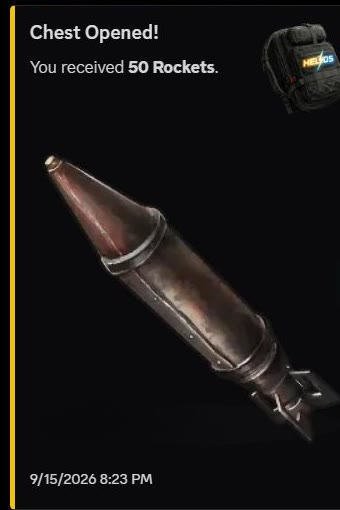
An actual test-server opening awarded 50 Rockets. The reward is random, so another opening may receive a different saved item.
Make sure the chest contains rewards and that any kit exists on the server where it will be claimed. The result message names the reward; open /bag again to use or manage it.
Example: Create an Event Chest with two common item rewards and one rare kit. Offer its matching key as an event prize. Check the displayed odds before announcing the chest.
If a chest will not open
Check that the player has both the chest and its matching key in /bag, the chest is marked Ready, Premium is active, and an eligible connected game server is available if Helios asks them to choose one. A chest marked Needs rewards is not ready to distribute.
For command-based setup, see Chest commands and Treasure commands.