Helios Rust Console Bot Documentation
Battle Pass Challenges
Choose built-in goals, create custom challenges, and show players where to see their progress.
- Last reviewed
- Tested on
- Helios Bot Testing dashboard challenge builder; creation form inspected but not saved
- Maintained by
- Helios RCE
Challenges give players goals to work toward and can award Battle Pass XP when completed. Players check their progress with /challenges. Owners manage the goal list under Manage Server → Battle Pass → Challenges in the dashboard.
Important: Challenge choices are shared by the whole Discord community, including its connected game servers. Opening the builder through one game server does not limit a new challenge to only that server. The selected server needs Helios Premium to manage challenges.
Start with the built-in goals
Expand Challenges to review the ready-made goals. Use Find Challenges to search by name, or Show to view built-in, custom, active, or paused goals. Built-in goals are grouped into Beginner, Daily, Combat, Progression, Mixed, and Elite.
You can turn one built-in goal on or off, or use its category control to pause or enable that whole group. This keeps the goal in the list; it does not change its target or XP reward. Check the group before using Disable all, especially for Daily goals.
Create a custom challenge
- Choose Create Challenge.
- Enter a short Challenge name and a Description that tells players exactly what to do.
- Pick a Goal type, such as player kills, PvE kills, a killstreak, a Battle Pass level, claimed rewards, consecutive login days, or play time.
- Enter the Required amount. A combined player-and-PvE goal asks for both amounts separately.
- Set the XP reward. Enter
0if you want a visible goal without an XP payout. - Set a Category for its page in
/challenges, and optionally a Display order. Lower numbers appear first among custom goals in that category. - Leave Challenge is active selected if players should see it now, then choose Create Challenge.
For example, a goal named Night Hunter could ask for 10 player kills and award 250 XP. This is an example of what to enter, not a challenge added to your server.
The builder can also track rapid kills, daily kills or XP, total XP, and completed challenges. Choose the goal type that matches the progress you want Helios to count; the description alone does not change what is tracked.
Understand the reset rules
| Goal type | When its progress starts over |
|---|---|
| Player kills in one day, PvE kills in one day, XP earned in one day | Daily |
| Other custom goal types | On the next Battle Pass wipe |
Custom challenge changes can take about one minute to appear in /challenges. A Discord community can hold up to 100 custom challenges, with up to 18 in one category. If a category is full, choose another page name or remove an old custom goal.
Check the player's view
Ask a player to run /challenges after the change appears. The menu shows goal descriptions, XP rewards, progress, completion status, and page controls.
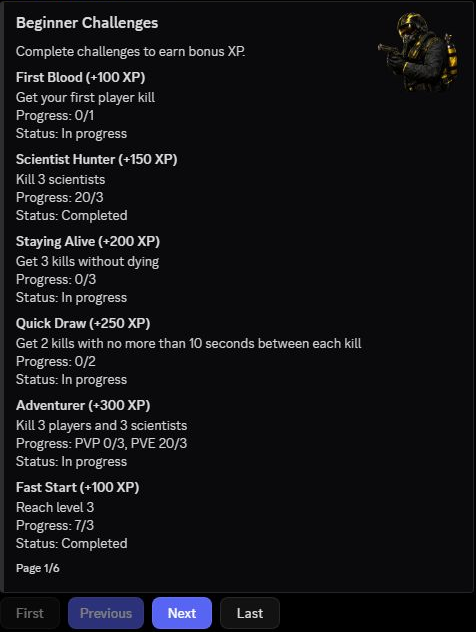
If a player cannot find a goal, check that it is active, look in the right category, and allow a minute for the menu to update. If progress seems wrong, check that the selected goal type matches the activity you intended and that the player's game account is linked.
To change a custom goal, find it in the builder and choose Edit. Pause a goal if you want to stop showing it without removing its setup. Removing a custom goal is a separate action; review it carefully before deleting. For levels, rewards, and XP settings beyond challenges, see Battle Pass Setup.