Helios Rust Console Bot Documentation
Battle Pass XP Events
Schedule a temporary XP boost for your Discord community.
- Last reviewed
- Maintained by
- Helios RCE
Give players a temporary Battle Pass XP boost. The event applies across your Discord community and its connected game servers—not just the game server open in the dashboard. There is one community event at a time; saving another replaces it.
From the dashboard
- Open your game server and choose Overview.
- Find 2× XP Events and click Configure.
- Enter Starts, Ends, and the XP multiplier. Enter
2for double XP. - Optionally choose an Announcement channel. Leave it as None if you do not want event posts.
- Review the dates, then choose Save Setting.
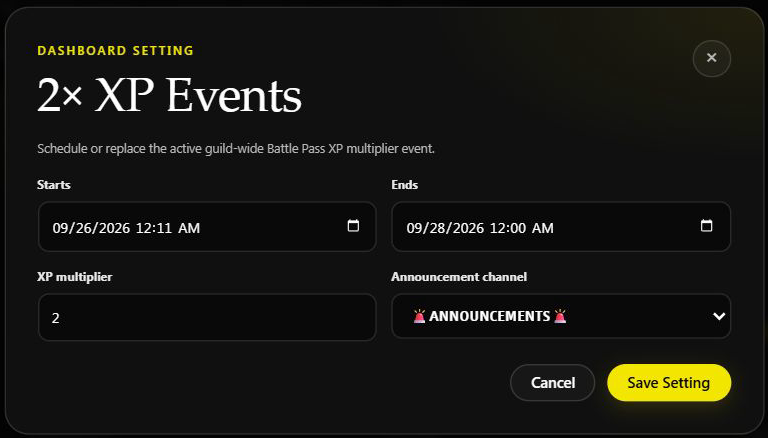
You can also open Battle Pass → 2× XP Events. That card shows whether the saved event is scheduled or active, and names the timezone used for the date fields. Start Now fills in the current start time; you still need to choose Save XP Event to apply it.
End on Sunday night
For an event that ends on Sunday night, choose Monday's date at 12:00 AM. Sunday at 12:00 AM is the beginning of Sunday, not the end. The dashboard uses your browser's local timezone; check the timezone shown in the Battle Pass card before entering a time requested in another timezone.
For example, the saved event above ends Monday, September 28, at 12:00 AM Eastern. These are example dates from an actual saved event; choose the dates for your own event rather than copying them.
From Discord
Start double XP now for two hours:
/set 2xp start_in:now end:2h multiplier:2x
Both times are measured from now. For example, start_in:1h end:3h starts in one hour and ends in three hours, giving players a two-hour event.
Use m for minutes, h for hours, or d for days. The end must be after the start. Add announce:#announcements to choose an announcement channel.
The Discord command takes a delay, not a calendar date. For an exact midnight deadline, use the dashboard instead of entering Monday or 12am in the command. You need Manage Server to use /set.
Announcements and the end of the event
With a channel selected, Helios posts event notices there. A future event is announced as scheduled; an event that begins immediately is announced as started. Helios also handles the start and end notices as the schedule runs.
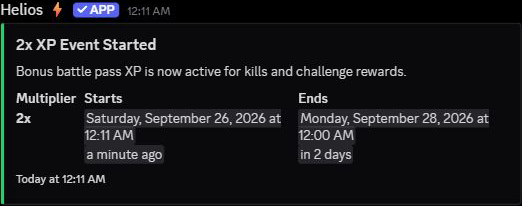
Discord shows dates in each viewer's local timezone. This example was captured in Eastern Time. It confirms the start announcement, not an already-completed end notice.
The event stops adding its multiplier at the saved end time. Already-earned XP stays with the player. A personal XP boost can remain active after the community event ends.
What gets boosted?
The multiplier applies to earned kill, challenge, and playtime XP. It does not double coins, items, or direct staff XP adjustments. A zero-XP activity does not start paying XP just because an event is running.
A personal 2x boost during a community 2x event gives that player 4x earned XP. See Personal XP Boost Products for activation and replacement rules.
If an announcement is missing, check the selected channel and Helios's ability to view it, send messages, and embed links. A missing post does not by itself mean the schedule failed: reopen the Battle Pass event card and check its saved status and dates before saving again.
See Battle Pass for rewards, levels, and challenges.