Helios Rust Console Bot Documentation
/wipe bags
Clear saved Helios bags for one person, a role, or everyone, with a clear warning before you confirm.
- Last reviewed
- Tested on
- Command and reset source review; Helios Bot Testing dashboard preview only
- Maintained by
- Helios RCE
This clears items saved in Helios /bag. Use it when you want a fresh start without players carrying saved bag items into the next wipe.
It does not wipe the Rust map, clear player stats, or remove items already delivered into the game. It is not a Battle Pass reset.
Choose who loses their bag items
These bags belong to the Discord community, not just one Rust server. There is no server option.
| What you want | Command |
|---|---|
| One person | /wipe bags user:@Player |
| Members of one role | /wipe bags role:@VIP |
| Everyone in this Discord community | /wipe bags |
Choose either user or role, not both. Selecting @everyone also clears every saved bag in the community.
Confirm in Discord
You need Manage Server permission.
- Run the command with the person or role you intend to reset.
- Read Confirm Bag Inventory Wipe and check the named target.
- Choose Yes, Wipe only when you are ready to permanently delete those bag items.
- Choose No, Cancel to keep the items.
There is no undo. Running the command without options prepares an everyone wipe, not a single-player wipe.
For a role, Helios loads its members before clearing their bags. If it cannot finish loading them, no bag inventories are changed. Fix the reported access problem before trying again. An empty role has nothing to wipe.
Use the dashboard
Open Wipe Center → Targeted Player Wipes. Choose Bag inventories, then User or Role.
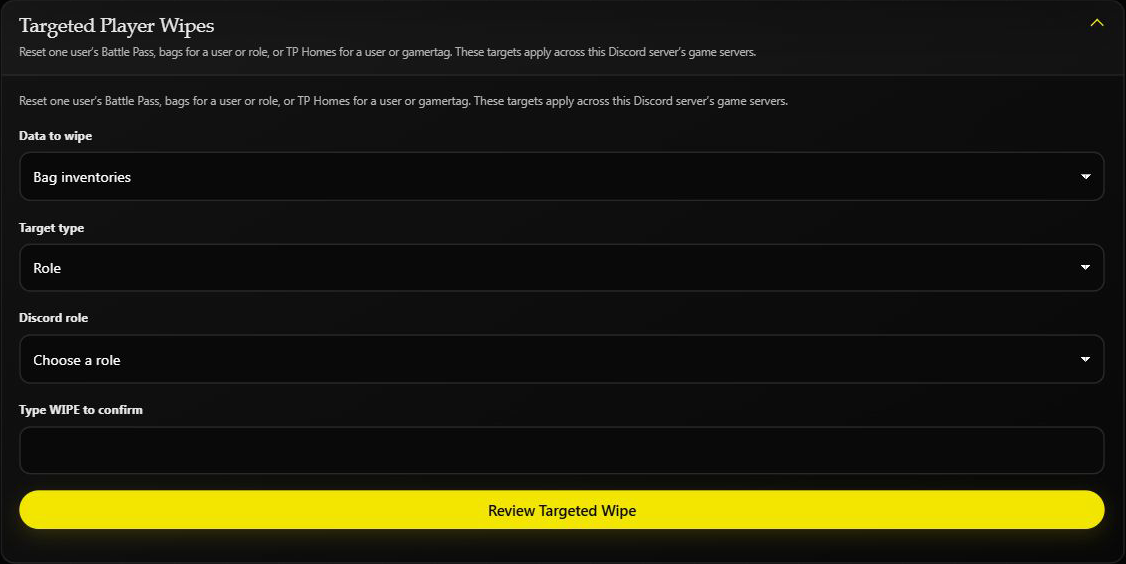
For User, enter the Discord user ID. For Role, choose the role from the list. Enter WIPE only when you want to continue, then choose Review Targeted Wipe and read the final confirmation.
This screenshot is an unsubmitted preview on Helios Bot Testing. No bag was cleared.
The separate Player Bags card resets everyone. It does not become a single-Rust-server reset because you opened the dashboard through that server. Dashboard Wipe Center requires Premium on the selected game server.
Check the result
Ask the affected player to open /bag again. Their saved bag should be empty. If Helios says it could not confirm the reset, check the bag before trying again.
See Wipe Center, Battle Pass resets, and TP Home resets.