Helios Rust Console Bot Documentation
/wipe stats
Reset tracked player stats, only the Weekly PvP panel column, or stats and panel history together.
- Last reviewed
- Tested on
- Helios Bot Testing dashboard; confirmation preview only
- Maintained by
- Helios RCE
Reset player stats for a fresh competition or season. Choose the reset mode before you confirm so you keep the history you still want.
From the dashboard
- Open the dashboard, choose Manage Server, then Wipe Center.
- Expand Player Stats.
- Choose a reset using the table below.
- Review the scope, check the acknowledgment, and choose Yes, Run Wipe only when ready.
- Wait for success, then check the affected stats or panel after its next update.
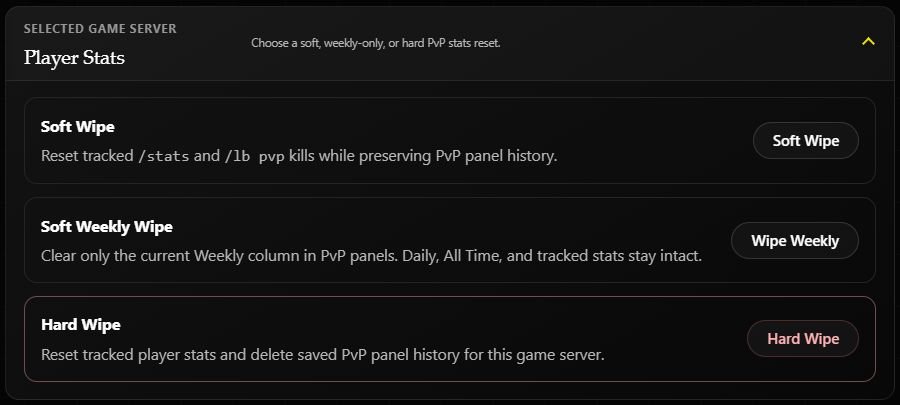
| Choice | Resets | Preserves |
|---|---|---|
| Soft Wipe | Tracked player stats, including kills, deaths, and online time | Saved PvP panel history |
| Wipe Weekly | Only the current Weekly PvP panel column | Tracked stats, Daily, and All Time |
| Hard Wipe | Tracked player stats and saved PvP panel history | Other game servers' data when one server is selected |
A full Player Stats wipe also resets playtime. Both Soft Wipe and Hard Wipe clear tracked online time and saved Hours panel history on the target server. Soft Wipe preserves PvP panel history only. Use Wipe Weekly if you only want the Weekly PvP column cleared.
Example: a new weekly competition
Choose Wipe Weekly to start the current Weekly column at zero while keeping All Time results. Follow the illustrated confirmation example.
For a fresh tracked kill count after a map wipe, choose Soft Wipe if you want to retain panel history. Choose Hard Wipe only when you also want that history cleared.
In Discord
/wipe stats server:"<SERVER>"
Select the server from autocomplete, then choose Soft Wipe, Soft Weekly Wipe, or Hard Wipe in the Discord prompt.
Omitting server targets all connected game servers in the Discord server. The dashboard's Player Stats reset targets only the selected game server.
You need Manage Server and Premium. Discord checks for Premium in the Discord server; the dashboard requires Premium on the selected game server. These resets have no undo button. If a request ends with an uncertain result, inspect the data before trying again.
Related: Wipe Center, Hours resets, and PvP panels.