Helios Rust Console Bot Documentation
/wipe tp-home
Delete old saved home locations for one player, one game server, or the whole Discord community.
- Last reviewed
- Tested on
- Command and reset source review; Helios Bot Testing dashboard preview only
- Maintained by
- Helios RCE
Delete saved TP Home locations after a map wipe, or clear one player's outdated homes.
TP Home settings and profiles stay in place. Players must set their home locations again. This does not wipe the Rust map or delete buildings.
Choose exactly one target
| Target | Command | What is cleared |
|---|---|---|
| One game server | /wipe tp-home server:"US Main" | Every player's saved homes on that server |
| One gamertag | /wipe tp-home gamertag:ExamplePlayer | That gamertag's homes across this community's game servers |
| One Discord user | /wipe tp-home user:@Player | Their linked gamertag's homes across this community's game servers |
| No options | /wipe tp-home | Everyone's saved homes on every connected game server in this Discord community |
Use the server suggestions in Discord to pick the correct game server.
Do not combine server, gamertag, and user. Choose only one. You cannot use server together with user to narrow a player reset to one game server.
For user, the person must have a linked gamertag in this Discord community. Use gamertag when you need to target a name directly.
Confirm in Discord
You need Manage Server permission.
- Run the command with the target you want.
- Read Confirm TP Home Wipe and check the player or server named in the warning.
- Choose Yes, Wipe only when you are ready to permanently delete those locations.
- Choose No, Cancel to keep the saved homes.
There is no undo. The no-options command affects all game servers, so always check the target before confirming.
Use the dashboard
Open Wipe Center → Targeted Player Wipes. Choose TP Home locations, then User or Gamertag.
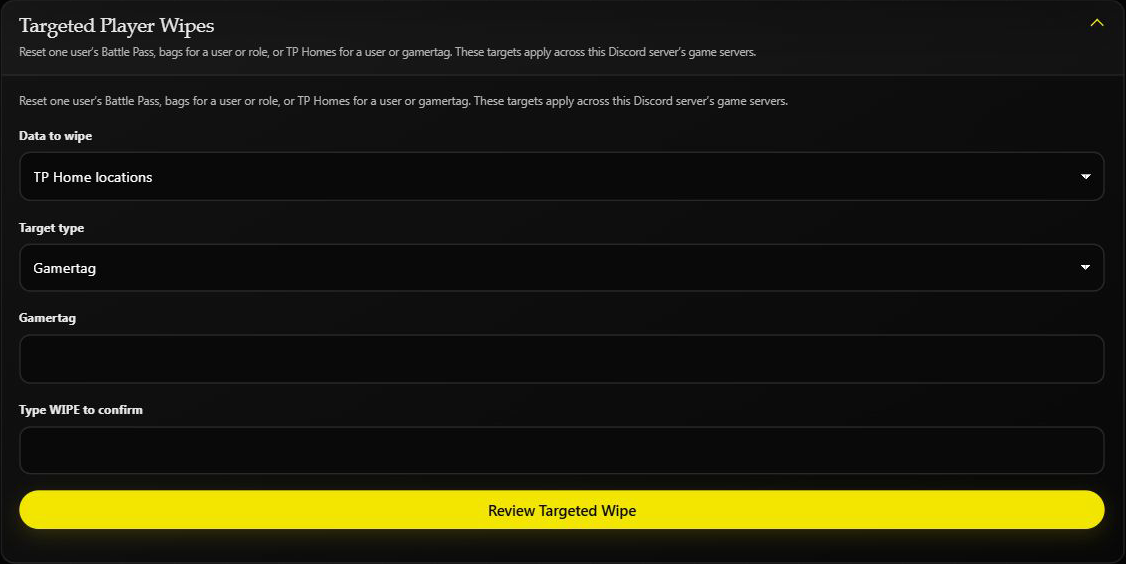
Enter the Discord user ID or gamertag. Enter WIPE only when you want to continue, then choose Review Targeted Wipe and read the final warning.
This screenshot is an unsubmitted preview on Helios Bot Testing. No home was deleted.
These targeted player resets apply across the Discord community's game servers. The separate TP Home Locations card clears every player's homes on only the game server currently selected in the dashboard.
That is different from Discord's no-options /wipe tp-home, which clears homes on every connected game server. Dashboard Wipe Center requires Premium on the selected game server.
After the reset
Tell affected players to set their home locations again before attempting to travel. Their TP Home configuration is unchanged; only saved destinations have been removed.
If Helios cannot confirm the reset, check the saved homes before trying again. See Wipe Center for scheduled map-wipe cleanup.