Helios Rust Console Bot Documentation
Killfeed Placeholders and Formatting
Owner setup guide for in-game /gamefeed kill message templates, placeholders, and formatting.
- Last reviewed
- Maintained by
- Helios RCE
For dashboard setup and screenshots, use In-Game Killfeed. Continue below for the detailed placeholder reference.
Overview
/gamefeed controls the kill messages sent into in-game chat when one player kills another. You can add multiple templates, scope them to one server or all servers, and use placeholders to show live names, stats, streaks, and economy values.
This page is the full setup guide. Use /gamefeed help in Discord if you just want the quick placeholder list.
Requirements
- At least one server connected to Helios
Manage Serverpermission in Discord- A target server chosen if you want a server-only template
- Optional:
/settings serveraccess if you want to toggle PvE in Feed - Player Tracking (Premium) enabled on the server if you want
{Distance}to populate
How Killfeeds Work
- A kill happens in-game.
- Helios detects the kill from server logs.
- Helios updates the killer and victim stats first.
- One matching template is selected.
- Placeholders inside that template are replaced with live values.
- The final message is sent into in-game chat.
INFOImportant behavior
- If you leave
server:blank when adding a template, that template becomes a global template for all servers. - Global templates and server-specific templates stack together. If both match, Helios can use either one.
- If you add multiple matching active templates, Helios picks one at random for each kill. Paused templates are excluded; a server-only template does not override shared ones.
- Messages are briefly buffered before sending, so fast back-to-back kills may appear together in chat.
- Unknown placeholders are not removed. They stay exactly as typed.
Setup
- Run
/gamefeed helponce to review the available placeholders. - Decide whether the template should be global or tied to one server.
- Write a short message template using the placeholders you want.
- Run
/gamefeed add message:"<YOUR TEMPLATE>"if the template should work on all servers. - Run
/gamefeed add message:"<YOUR TEMPLATE>" server:"<SERVER>"if the template should only work on one server. - Confirm the success message and save the returned template ID if needed later.
- Watch the next normal kill and verify the chat output. Use a separate testing server if you need a controlled example.
- If needed, run
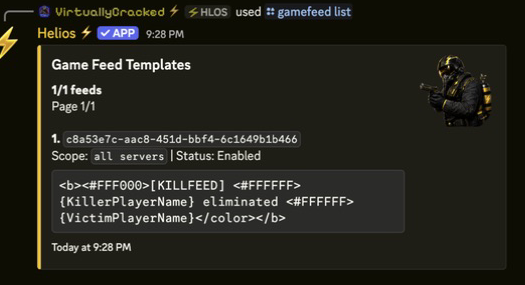
/gamefeed listto review all saved templates.
Commands or Controls
/gamefeed help
/gamefeed add message:"<TEMPLATE>"
/gamefeed add message:"<TEMPLATE>" server:"<SERVER>"
/gamefeed list
/gamefeed edit id:"<TEMPLATE_ID>"
/gamefeed remove id:"<TEMPLATE_ID>"
/settings server server:"<SERVER>"
Scope Rules
Use this rule set when planning templates:
- No
server:selected: template can fire on every connected server in that guild. server:selected: template only applies to that one server.- If a server has both global and server-specific templates, both are eligible.
- If you want one server to have a fully unique style, avoid leaving unwanted global templates active.
Placeholder Reference
All values below are filled in at send time. Stats reflect the post-kill state, not the pre-kill state.
Player Name Placeholders
| Placeholder | What it shows | Notes |
|---|---|---|
{KillerPlayerName} | Killer name | Best base placeholder for every template |
{VictimPlayerName} | Victim name | Best base placeholder for every template |
{Distance} | Distance from tracked player positions | Requires Premium Player Tracking and positions for both players; unavailable positions show a mystery-box icon |
Killer Stat Placeholders
| Placeholder | What it shows | Notes |
|---|---|---|
{KillerKills} | Killer total kills | Updated after the kill is recorded |
{KillerDeaths} | Killer total deaths | Current total deaths |
{KillerPvPKills} | Killer PvP kills | Player-vs-player kills only |
{KillerPvPDeaths} | Killer PvP deaths | Deaths to other players only |
{KillerPvEKills} | Killer PvE kills | Kills on animals, scientists, and other PvE targets |
{KillerPvEDeaths} | Killer PvE deaths | Deaths to PvE causes (bears, turrets, falls…) |
{KillerCurrentStreak} | Killer current streak | Active streak after this kill |
{KillerBestStreak} | Killer best streak | Highest streak saved for that player |
{KillerKD} | Killer total K/D | Rounded to 2 decimals |
{KillerPvPKD} | Killer PvP K/D | Rounded to 2 decimals |
{KillerPvEKD} | Killer PvE K/D | Rounded to 2 decimals |
{KillerStreak} | Killer current streak | Same value as {KillerCurrentStreak} |
Victim Stat Placeholders
| Placeholder | What it shows | Notes |
|---|---|---|
{VictimKills} | Victim total kills | Current total kills |
{VictimDeaths} | Victim total deaths | Updated after the death is recorded |
{VictimPvPKills} | Victim PvP kills | Player-vs-player kills only |
{VictimPvPDeaths} | Victim PvP deaths | Deaths to other players only |
{VictimPvEKills} | Victim PvE kills | Kills on animals, scientists, and other PvE targets |
{VictimPvEDeaths} | Victim PvE deaths | Deaths to PvE causes (bears, turrets, falls…) |
{VictimCurrentStreak} | Victim current streak | Usually reset by the death |
{VictimBestStreak} | Victim best streak | Highest streak saved for that player |
{VictimKD} | Victim total K/D | Rounded to 2 decimals |
{VictimPvPKD} | Victim PvP K/D | Rounded to 2 decimals |
{VictimPvEKD} | Victim PvE K/D | Rounded to 2 decimals |
{VictimStreak} | Victim current streak | Same value as {VictimCurrentStreak} |
Economy Placeholders
| Placeholder | What it shows | Notes |
|---|---|---|
{KillerWallet} | Killer wallet after the kill | Requires economy data to be useful |
{VictimWallet} | Victim wallet after the kill | Requires economy data to be useful |
{Currency} | Guild currency symbol or name | Example: $ |
{Stolen} | Amount stolen from the victim on that kill | If no money was taken, this is usually 0 |
Formatting Rules
- Keep templates short enough to read quickly in chat.
- Use player names first. They are the easiest part for players to scan.
- K/D values are automatically rounded to 2 decimals.
{Distance}uses tracked player positions, not a guaranteed weapon-hit measurement. If either position is missing, the mystery-box icon appears. Non-player causes normally do not have player positions.- Wallet placeholders may show
0if your economy system is not set up for that guild. - If you type a placeholder wrong, Helios will not fix it for you.
- Plain text is the safest format.
- If your server already uses Rust rich text styling, you can also use formatting like
<b>and color tags such as<#FFF000>. - When Clan Settings enables clan prefixes in gamefeed names, linked clan members receive their tag before the player-name placeholders automatically. No separate clan placeholder is needed.
Example Templates
Simple
{KillerPlayerName} killed {VictimPlayerName}
Stats-Focused
{KillerPlayerName} killed {VictimPlayerName} | K/D: {KillerPvPKD} | Streak: {KillerCurrentStreak}
Economy-Focused
{KillerPlayerName} stole {Stolen} {Currency} from {VictimPlayerName} and now has {KillerWallet}
Styled
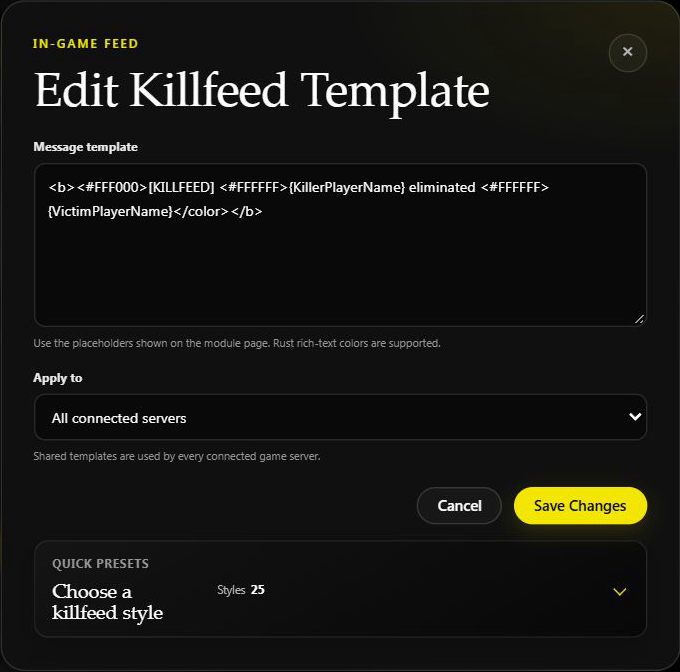
<b><#FFF000>[KILLFEED] <#FFFFFF>{KillerPlayerName} eliminated {VictimPlayerName}</color></b>
More Examples
<#FF3131>{KillerPlayerName} deleted {VictimPlayerName} | KD {KillerKD}
<#FFD700>{KillerPlayerName} claimed {VictimPlayerName} | Streak: {KillerCurrentStreak}
<#00FF88>{KillerPlayerName} dropped {VictimPlayerName} | PvP Kills: {KillerPvPKills}
<#1E90FF>{VictimPlayerName} got sent back to base by {KillerPlayerName}
<#FF8C00>{KillerPlayerName} turned {VictimPlayerName} into a loot bag | Best Streak: {KillerBestStreak}
<#B026FF>{KillerPlayerName} outplayed {VictimPlayerName} | PvP KD {KillerPvPKD}
<#39FF14>{KillerPlayerName} clapped {VictimPlayerName} | {KillerKills} kills / {KillerDeaths} deaths
<#00FFFF>{KillerPlayerName} won the fight against {VictimPlayerName} | KD {KillerKD} vs {VictimKD}
<#FF1493>{KillerPlayerName} ended {VictimPlayerName}'s streak | Victim Streak: {VictimCurrentStreak}
<#DC143C>{VictimPlayerName} got erased by {KillerPlayerName} | Killer Streak: {KillerCurrentStreak}
<#ADFF2F>{KillerPlayerName} farmed {VictimPlayerName} | Total Kills: {KillerKills}
<#FF4500>{KillerPlayerName} smoked {VictimPlayerName} | Killer KD: {KillerKD}
<#9400D3>{KillerPlayerName} humbled {VictimPlayerName} | Victim KD: {VictimKD}
<#00BFFF>{KillerPlayerName} shut down {VictimPlayerName} | Victim Best Streak: {VictimBestStreak}
<#F5F5F5>{KillerPlayerName} survived the fight. {VictimPlayerName} didn’t.
<#FF6B00>{KillerPlayerName} packed up {VictimPlayerName} | PvP KD {KillerPvPKD}
<#7CFC00>{KillerPlayerName} added {VictimPlayerName} to the scoreboard | Kills: {KillerKills}
<#40E0D0>{KillerPlayerName} won the duel vs {VictimPlayerName} | {KillerKD} KD warrior
<#FF00FF>{VictimPlayerName} ran into {KillerPlayerName} at the wrong time | Streak: {KillerCurrentStreak}
<#C0C0C0>{KillerPlayerName} took down {VictimPlayerName} | Wallet: {KillerWallet} {Currency}
<#FF5555>{KillerPlayerName} caught {VictimPlayerName} lacking | Kills: {KillerKills}
<#00FFA6>{KillerPlayerName} sent {VictimPlayerName} to the respawn screen | KD {KillerKD}
<#A855F7>{KillerPlayerName} broke {VictimPlayerName}'s momentum | Victim Streak: {VictimStreak}
<#FACC15>{KillerPlayerName} took the win over {VictimPlayerName} | Best Streak: {KillerBestStreak}
<#38BDF8>{VictimPlayerName} couldn’t escape {KillerPlayerName} | PvP KD {KillerPvPKD}
<#FB7185>{KillerPlayerName} cleaned up {VictimPlayerName} | Current Streak: {KillerCurrentStreak}
<#22C55E>{KillerPlayerName} made quick work of {VictimPlayerName} | PvP Kills: {KillerPvPKills}
<#E879F9>{KillerPlayerName} caught a body: {VictimPlayerName} | KD {KillerKD} vs {VictimKD}
<#F97316>{KillerPlayerName} owned the fight against {VictimPlayerName} | Deaths: {KillerDeaths}
<#14B8A6>{KillerPlayerName} removed {VictimPlayerName} from the battlefield | Wallet: {KillerWallet} {Currency}
Editing or Removing Templates
- Run
/gamefeed list. - Review the saved templates and note the template ID.
- Run
/gamefeed edit id:"<TEMPLATE_ID>"to open the edit modal. - Replace the template text and save.
- Give the change about a minute, then check the next normal kill.
- If a template is no longer needed, run
/gamefeed remove id:"<TEMPLATE_ID>".
TIPNotes
/gamefeed listshows one template per page.
PvE in Feed
Two switches control recognized non-player events in both Discord and Rust chat:
- Run
/settings server server:"<SERVER>". - Find PvE in Feed and EvE in Feed.
- With PvE off, recognized non-player events are hidden regardless of EvE.
- With PvE on and EvE off, players killing recognized scientists can appear; other non-player events remain hidden.
- Turn both on to include recognized animal and environmental events too. Generic or unidentified causes remain hidden.
PvE defaults to on; EvE defaults to off. The dashboard's Include PvE kills switch controls PvE only. See the settings table.
For eligible in-game PvE events, Helios prefers active templates containing a PvE stat placeholder, such as {VictimPvEDeaths} or {KillerPvEKills}. Without one, animal and environmental events use built-in themed messages. Scientist events can use ordinary templates. At least one active matching template is required for in-game killfeed output either way.
Common Issues
Problem
Killfeeds are not showing in-game.
Likely Cause
No matching template exists for that server, or the wrong server scope was used.
Fix
Run /gamefeed list, confirm a template exists, and make sure its scope matches the server where you are testing.
Prevention
Add one simple test template first before building multiple styled templates.
Problem
The wrong template keeps appearing on one server.
Likely Cause
A global template is still active, so it is being selected along with the server-specific one.
Fix
Pause the shared template on the dashboard, or edit/remove it if appropriate. Check its other servers first: a shared-template change affects them too.
Prevention
Plan global and server-specific scopes before bulk adding templates.
Problem
A placeholder shows up in chat as raw text.
Likely Cause
The placeholder was typed wrong or is not supported.
Fix
Compare it against /gamefeed help or the list on this page and correct the spelling exactly.
Prevention
Copy placeholders directly instead of typing them from memory.
Problem
Wallet values or stolen amounts are always 0.
Likely Cause
Economy data is unavailable for that guild or no money was transferred on that kill.
Fix
Test with a plain name-only template first, then verify your economy setup separately.
Prevention
Only use economy placeholders if you know that kill rewards and wallet tracking are active.
Tips / Best Practices
- Start with one plain-text template before adding styling.
- Keep one naming style across all servers so chat stays readable.
- Use global templates only for messages you truly want everywhere.
- Use server-specific templates when one server has its own branding or economy format.
- Check templates against normal new kills after editing; keep controlled tests on a testing server.
- Keep a copy of your best templates in staff notes for quick re-adding after cleanup.