Helios Rust Console Bot Documentation
/zone
Admin reference for /zone in Helios.
- Last updated
- Maintained by
- Helios RCE
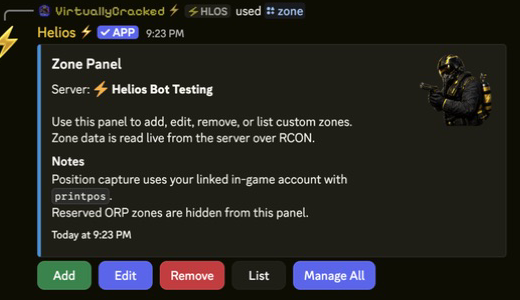
/zone
Overview
This page covers how to use /zone in Helios for server owners and admins.
Requirements
- Helios bot connected to at least one server in this guild.
- Discord permissions to run admin commands for this category.
- Correct server selected when the command supports
server:.
Setup Flow
- Run /zone for the selected server.
- Follow the panel prompts to create, edit, remove, list, or bulk-manage custom zones.
- Validate the affected zones before applying bulk changes.
Commands Covered
/zone server:"<SERVER>"
Example
/zone server:"<SERVER>"
Notes
- Most admin commands require Manage Server (ManageGuild).
- Panel-based commands are user-scoped; each admin should open their own panel session.
Manage All
The /zone panel includes Manage All for bulk changes across every non-ORP custom zone on the selected server.
Bulk controls include:
- Show Area
- Color
- Show Chat Message
- Allow PvP
- Allow PvE
ORP zones are always excluded. Automated non-ORP custom zones are included. If the current zones have mixed or unknown values, the first toggle turns that option On. Use Refresh to reload the latest combined state after changes.