Helios Rust Console Bot Documentation
/set premium-role
Choose the community-wide Discord role required for Premium Battle Pass rewards.
- Last reviewed
- Maintained by
- Helios RCE
Choose the Discord role required to claim Premium Battle Pass rewards. This is a shared setting for the whole Discord community.
It is not a Premium subscription, an in-game VIP grant, or permission to use every Premium bot feature. A role named Premium does not activate Helios Premium.
Before you start
You need Manage Server and Premium access. For the dashboard form, the open game server needs Premium.
Create a dedicated reward-access role, such as Battle Pass Premium. Give that role to eligible players through your own role-management or store setup. This setting only chooses which role Helios checks; it does not assign the role to anyone.
Do not give players an Administrator role just to unlock rewards.
Use the dashboard
- Open your game server in the dashboard.
- Choose Overview → Shared setup and admin tools → Premium Battle Pass Role → Configure.
- Choose your reward-access role.
- Choose Save Setting.
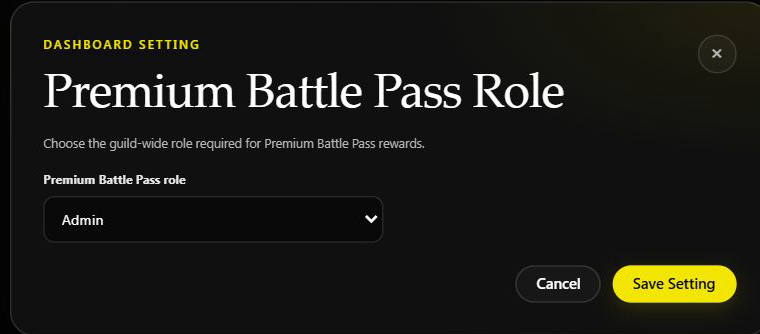
The testing community currently has Admin selected. This illustrates the form, not a recommended player role. No setting was changed.
Use Discord
/set premium-role role:@BattlePassPremium
Submitting saves the chosen role for the Discord community. There is no game-server option on this command.
Check reward access
Mark the relevant Battle Pass rewards as Premium-only. A player still needs to meet the reward's normal requirements, such as its level and claim rules, and hold the configured Discord role.
Without the role, Premium-only rewards are hidden or refused. If no role is configured, Helios asks an admin to configure it. Free rewards do not require this role.
Changing the selection changes which role is checked for future claims. It does not move members from the old role to the new one, revoke already delivered rewards, or reset progression.
Keep these systems separate
| System | What it controls |
|---|---|
| Helios Premium | Subscription access for game-server features |
| Premium Battle Pass role | Which Discord members can claim the Premium reward track |
| Custom Auth Roles | Discord roles matching confirmed in-game auth levels |
| Link roles | Roles for linked accounts and recorded consoles |
See Battle Pass for reward setup and claiming.