Helios Rust Console Bot Documentation
Player Tools
Find linked players, review activity and balance logs, grant support rewards, and reset a specific cooldown from the dashboard.
- Last reviewed
- Tested on
- Helios Bot Testing dashboard
- Maintained by
- Helios RCE
Handle common player-support requests from one dashboard page: find the right account, check its history, and make a focused adjustment. Premium is required for Player Tools.
Find the right player
- Open the dashboard, choose Manage Server → Player Tools.
- Expand Linked Players and use Find a linked player.
- Open the matching player and check their gamertag, platform, and Discord ID.
- Review Selected Server for activity on the game server you chose.
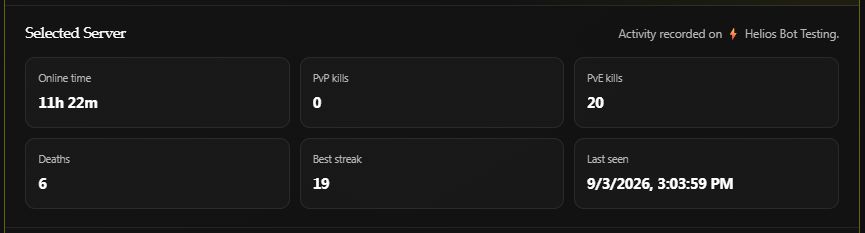
Recorded activity for the test account on Helios Bot Testing. Last seen is historical activity, not proof that the player is online now.
Account Progress, further down the page, shows community-wide wallet, safe pocket, Battle Pass level, and XP. Balance Logs shows the latest 20 balance changes; use /player logs in Discord for the player's log panel.
Example: a 500-coin support adjustment
After checking the player's logs and confirming the adjustment is needed:
- Under Player Management → Give Player → Money, enter
500in Amount. - Add a clear Reason, such as
Replacement for cancelled event reward. - Choose Give Money, check the player in the confirmation, then choose Confirm Action.
- Wait for success, then review Account Progress and Balance Logs.
This credits the player's wallet across the Discord community. It is not a separate balance for the currently selected game server. The example is instructional; no currency was granted while preparing this guide.
To remove currency, use Take From Player → Money and choose Wallet or Safe Pocket. Helios removes up to the entered amount from that balance.
Example: reset one kit-bind cooldown
If a player needs another attempt at a specific emote kit:
- Open their Cooldowns section.
- Under Emote Bind Cooldowns, choose the matching phrase, such as I need Stones.
- Choose Reset Selected, review the player and target, then confirm.
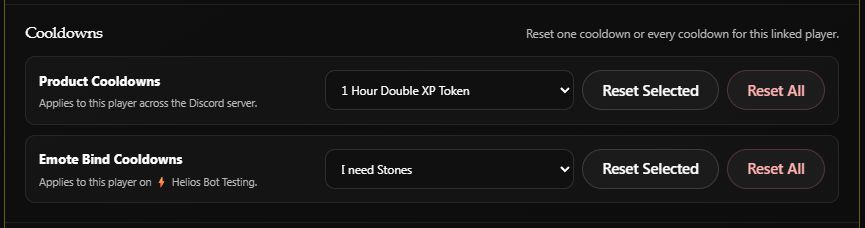
A selection example on Helios Bot Testing. No cooldown was reset for this screenshot.
| Reset type | Scope |
|---|---|
| Product Cooldowns | This player's product cooldowns across the Discord community |
| Emote Bind Cooldowns | This player's emote-bind cooldowns on the selected game server |
Use Reset Selected for a single target. Reset All clears every cooldown of that type for this player. These controls do not reset other players; product resets also leave server-wide product cooldowns alone.
Other support actions
| Action | Result |
|---|---|
| Give Kit | Delivers an existing live kit to the linked gamertag on the selected server |
| Give Killstreak | Grants a configured reward; Coins pay instantly, other types are banked claims |
| Give XP / Take XP | Adjusts community-wide Battle Pass progress |
| Give Bag Item | Adds a custom item to the player's Helios bag |
| Bag trash button | Removes the selected stored item after confirmation |
| Temp Ban | Applies a timed restriction to Game, ORP, or TP Home, with a reason |
| Unban Player | Clears the selected active temporary ban on this server |
For temporary bans, enter the duration in minutes and choose the correct Ban from type. For kit delivery, make sure the player is online on the selected server. See Killstreaks for how players collect those rewards.
Linking and online players
Link Player connects a Discord member to their game account. Unlink Player removes that account link from the Discord community, so verify the identity first. See player linking and unlinking.
If Online Players says Not set up, configure /panel players-add in Discord for this server. The dashboard uses that player-list snapshot and refreshes it every minute. An empty or historical activity record in Linked Players is not the live online list.