Helios Rust Console Bot Documentation
Helios Store Products & Categories
Build your Helios Store catalog — categories, every reward type, bundles, subscriptions, stock, and buyer-selectable upsizes.
- Last reviewed
- Maintained by
- Helios RCE
Everything you sell lives under Products in the Helios Store module. A product is a price plus a set of rewards; Helios grants those rewards automatically once the payment clears.
Categories
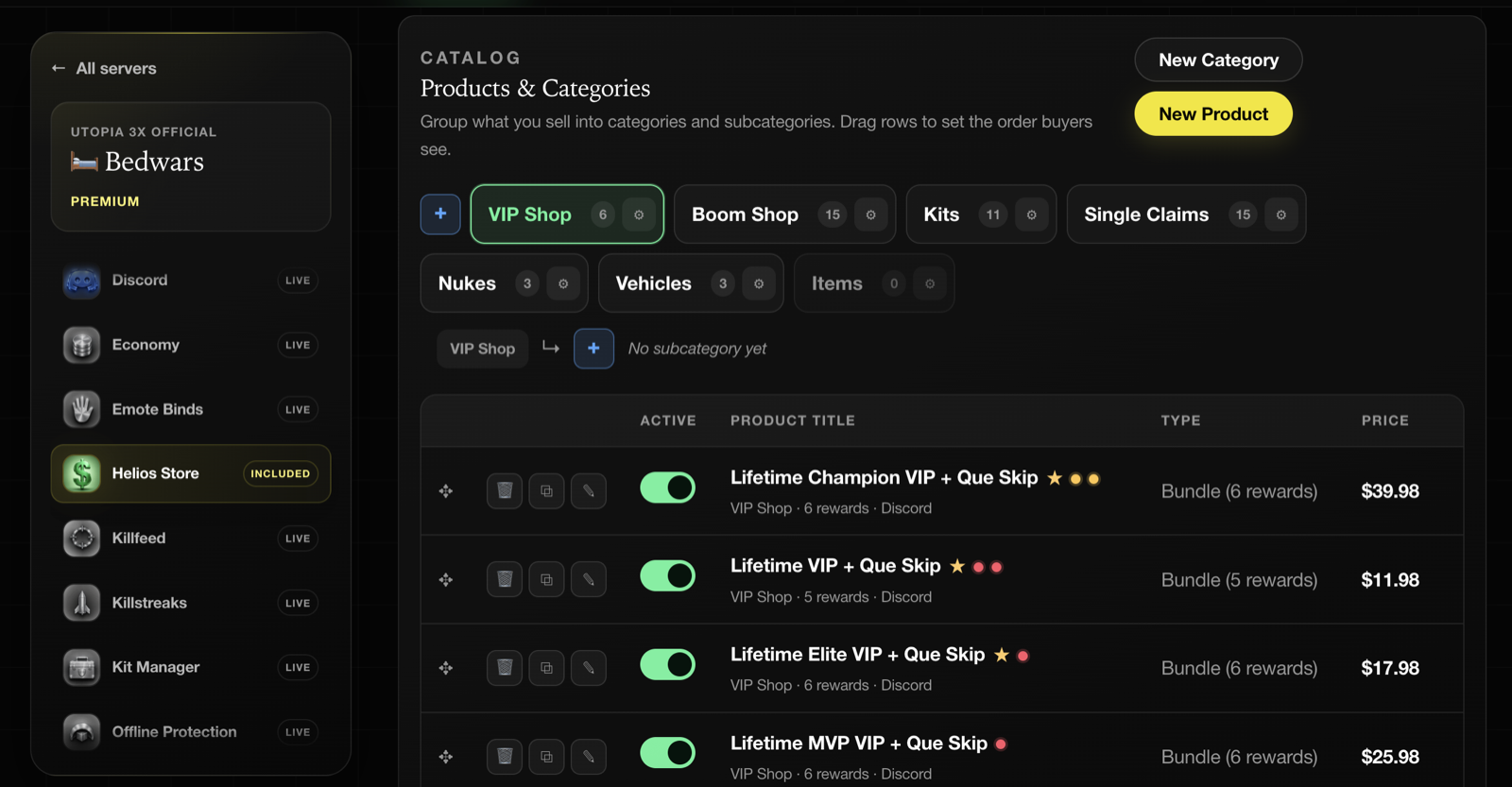
Categories are the tabs buyers browse. Click New Category to add one, and drag rows to set the order buyers see. The tree goes two levels deep — a category and its subcategories, no further.
Each category chip shows how many products it holds. Products left uncategorised still sell; they just show up under All products.
Share a product link
Open the product in your public store and copy its own page link. A product link uses the product’s name, description, and main image for its Discord preview. If there is no main image, Helios tries a gallery image, then the store’s preview image, banner, or logo.
Save a clear product image before sharing. If Discord keeps an older preview, check the public product page first; an already-posted embed can remain cached.
Adding a product
Click New Product. The dialog has two halves: what the buyer receives, and how the product is presented.
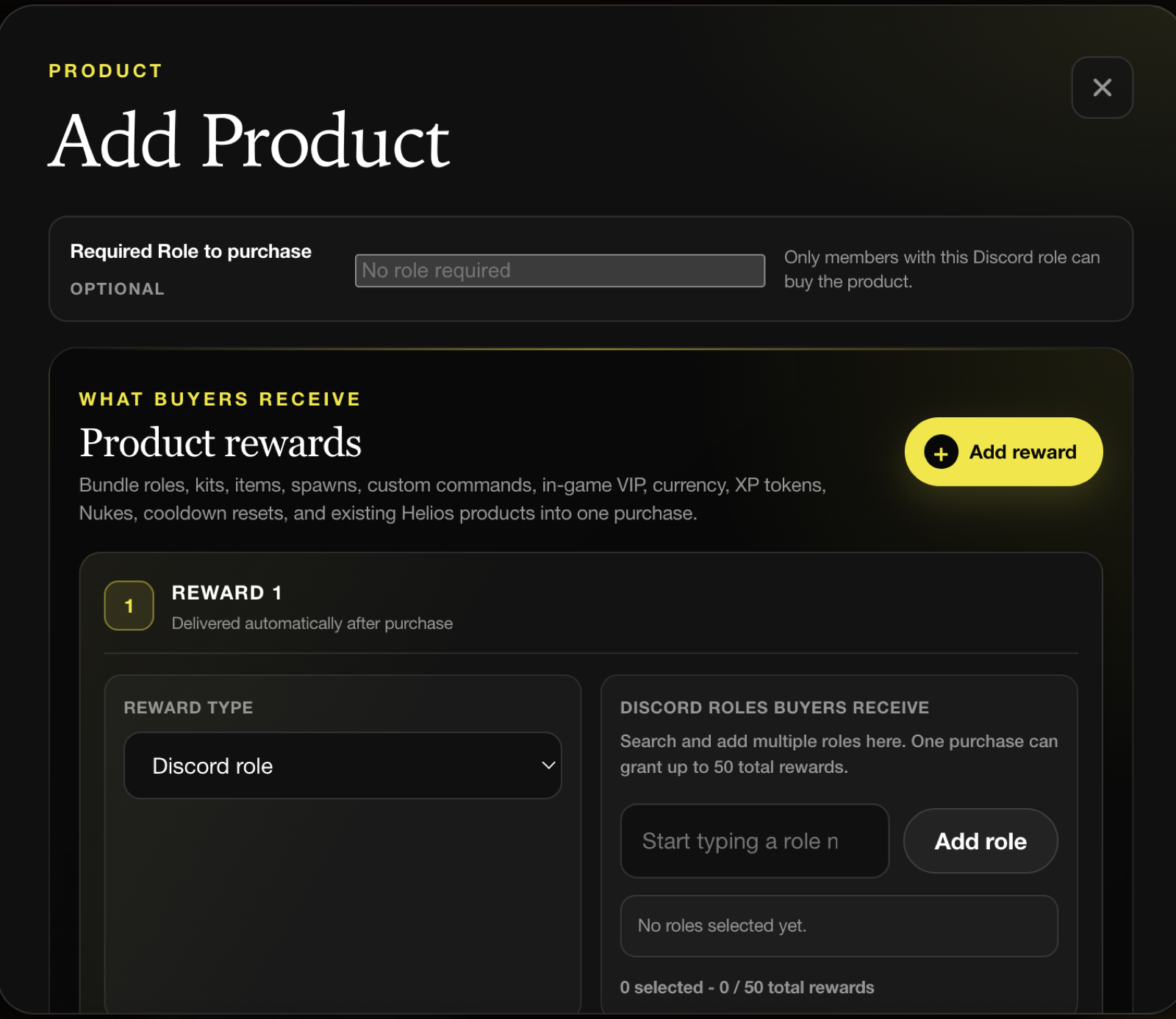
Reward types
A product can carry up to 50 rewards. Click Add reward for each one.
| Reward | What it grants | Delivery |
|---|---|---|
| Discord role | One or more Discord roles | Immediate |
| In-game kit | A Helios kit | Into /bag |
| Rust item | A Rust item and quantity | Into /bag |
| Spawn | A saved /easy binds spawn preset | Into /bag |
| Custom command | Your own RCON command sequence | Into /bag |
| VIP in Game | Runs your VIP flow on one server or all of them | Immediate |
| Gift Card | Store credit for your own store, DM'd to the buyer | Immediate |
| Extra /bag Slots | 1–100 permanent bag slots | Immediate |
| Existing Helios product | A product you already sell in /shop | Into /bag |
| In-game currency | Coins into the wallet | Immediate |
| Personal XP token | A timed personal XP multiplier | Into /bag |
| Nuke | A paid nuke drop | Posted immediately |
| Product cooldown reset | Clears the buyer's own product cooldowns | Immediate |
| Emote bind cooldown reset | Clears the buyer's own emote-bind cooldowns | Immediate |
INFONote
Kits, items, spawns, commands, existing Helios products, and XP tokens land in the buyer's /bag rather than being pushed over RCON at the moment of sale. The buyer redeems them when they are actually in game and have space, which is why a purchase never gets lost because someone was offline.
Which server a reward delivers on
Rewards that touch a game server — kits, Rust items, spawns, custom commands, existing Helios products, Nukes, and emote-bind cooldown resets — need a Delivered on server. Discord roles, currency, gift cards, and bag slots do not, because they apply across the whole Discord server.
If a product only contains server-bound rewards, you can also tick Let the buyer choose the delivery server, which is the right call when you run several servers off one store.
Restricting who can buy
Required Role to purchase limits a product to members holding a chosen Discord role — the lever for subscriber-only or returning-player pricing. Helios checks the signed-in buyer's current roles server-side before it creates an order, so the restriction cannot be clicked past.
Product details
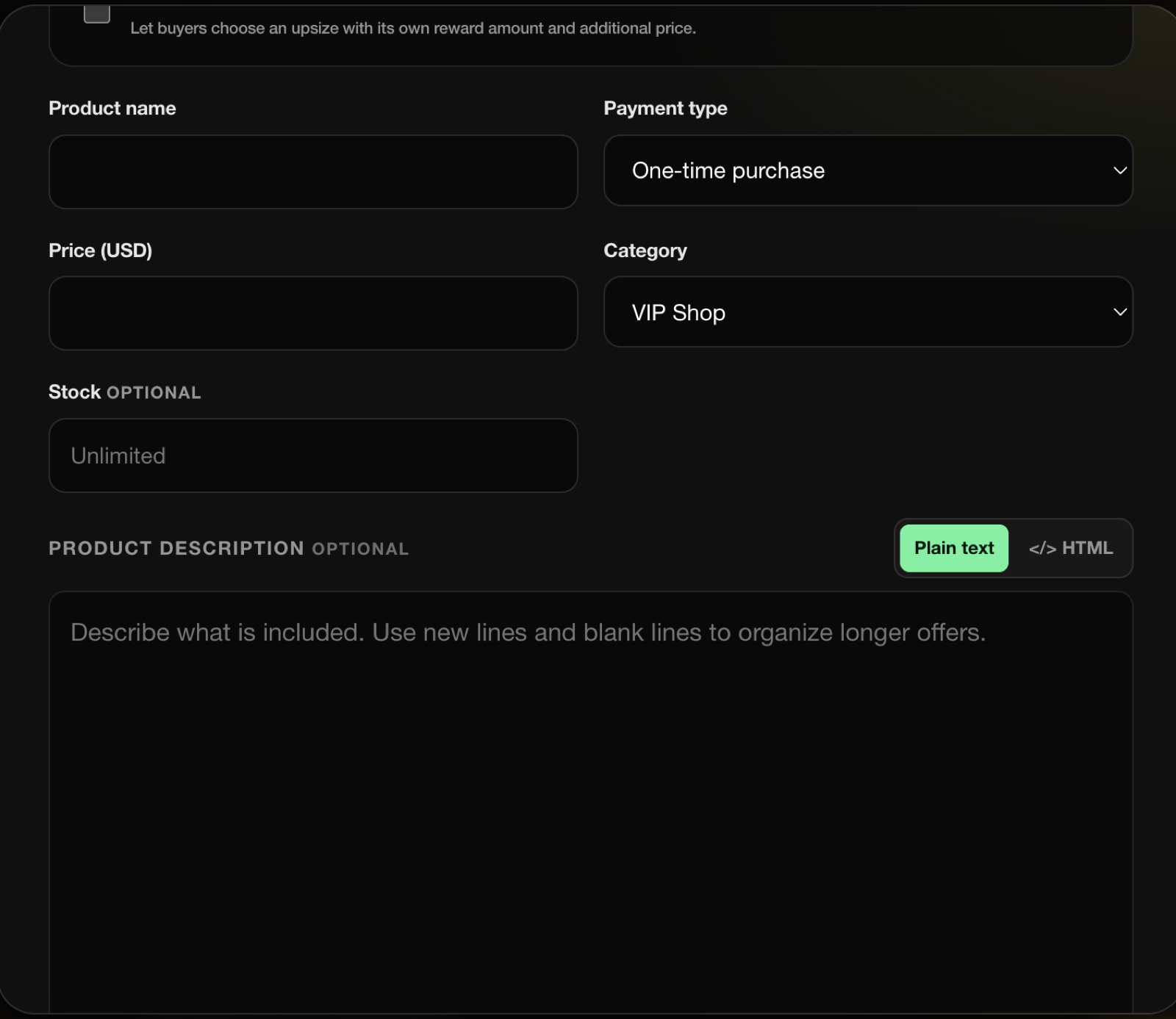
- Product name — up to 100 characters.
- Payment type — One-time purchase or Subscription.
- Price — in your store's base currency. Stripe enforces a minimum charge per currency (50¢ in USD, 30p in GBP).
- Category — where it appears in the storefront.
- Stock — optional. Leave it blank for unlimited. Stock is claimed when payment clears and returned if a paid order is refunded, so abandoned checkouts never drain it and two buyers can never claim the same last unit.
- Product description — plain text with basic Markdown, or full HTML. HTML is sanitized on save: scripts, embeds, forms, event handlers, unsafe URLs, and page-overlay CSS are stripped.
- Product image plus up to five additional images. JPG, PNG, WebP, or GIF, 5MB each.
- Let buyers choose quantity — up to 25 copies in one transaction, each granting the full reward set.
- DM after purchase — an optional message sent after fulfillment. Placeholders:
{username},{total_paid},{product_name},{quantity}. - Publish immediately and Feature on the home page.
- Outline colour and Highlight ring — per-product card styling on the storefront.
Subscriptions
Set Payment type to Subscription and pick a billing schedule: weekly, monthly, every 3 months, every 6 months, or yearly. The purchase rewards are always granted after the first payment.
Two follow-up actions are snapshotted onto each buyer's subscription at checkout:
- Renewal action — repeat the purchase rewards (the default), do nothing, or grant a different reward set.
- Expiration action — remove the roles granted at purchase (the default), do nothing, remove a different role, or grant/run a different reward set.
WARNImportant
Subscription products must be bought on their own. They cannot be mixed into a cart with one-time products. Coupon codes do not apply. Automatic product discounts can apply, and a gift card can reduce the first payment only. Later renewals use the saved payment method.
Fixed-term access and gifts
For a subscription product, choose whether the buyer should renew automatically or receive a fixed amount of access. A fixed-term purchase ends after the chosen period and does not renew by itself.
When you enable gifting, the buyer chooses another linked member of the same Discord server. The recipient cannot gift the product to themselves, must have linked their account with /link, and cannot already have overlapping access to that product. Helios sends the access and any follow-up rewards to the recipient, not the buyer.
Use gifting for a clear, one-off membership present. Use a recurring subscription when the buyer should keep access until they cancel.
Custom bundle options
Custom bundle options let a buyer pick an upsize on the product page — "5,000 coins" versus "25,000 coins" — with its own price. Up to 20 options per product.
Each option targets one scalable reward and replaces its amount. Scalable rewards are Extra /bag Slots, Rust item, in-game currency, Gift Card, and Nuke; you need at least one of them on the product before options become available.
The storefront only sends the option ID at checkout — Helios resolves the real amount and surcharge server-side, so the price cannot be edited in the browser.
Managing the catalog
Each row in the product table has four controls: drag to reorder, delete, duplicate, and open for editing. The toggle in the Active column publishes or unpublishes without deleting anything.
Duplicate is the fastest way to build a tier ladder — make the VIP product, duplicate it twice, and edit the prices and role sets.
INFONote
A product that has been ordered can be removed from the catalog without destroying its order history. Products with a pending checkout or a live subscription are protected until every such subscription has ended.
Tips
- Group by what a buyer wants, not by reward type. "Starter Pack" sells; "Kit Rewards" does not.
- Put your best product first in its category and tick Feature on the home page — the storefront gives featured products their own section.
- Use Stock for genuinely limited drops. Scarcity you cannot back up damages trust.
- Set a Required Role to purchase on anything you only want a subset of your community buying, rather than relying on people to be honest.
- Test one product end to end before you open the storefront, including checking that it lands in
/bag.
Common issues
A reward will not save
Discord role rewards need at least one role picked from the searchable list, and server-bound rewards need a Delivered on server. The dialog names the field it is unhappy with.
The buyer paid but nothing arrived in game
Check /bag. Kits, items, spawns, commands, and existing Helios products are delivered there by design and wait for the buyer to redeem them.
Custom bundle options are greyed out
The product has no scalable reward on it yet. Add an Extra /bag Slots, Rust item, in-game currency, Gift Card, or Nuke reward first.
I cannot delete a product
It has a pending checkout or a live subscription attached. Unpublish it with the Active toggle instead — it disappears from the storefront and the history stays intact.