Helios Rust Console Bot Documentation
Helios Store Pro
Cut the Helios fee to 3.5%, run your store on a domain you own, and set up automatic sales tax with Stripe Tax.
- Last reviewed
- Maintained by
- Helios RCE
Store Pro is an optional $8.99/month upgrade on top of Premium. It does two things: it lowers the Helios fee on every sale, and it lets your store run on a domain you own.
The fee maths
| Plan | Monthly cost | Helios fee per sale |
|---|---|---|
| Premium Store | Included with Premium | 5.5% |
| Store Pro | $8.99 | 3.5% |
Store Pro saves 2% per sale, so it pays for itself at roughly $450 of monthly sales. Below that, the included tier is cheaper; above it, Store Pro is.
Upgrade from the Upgrade to Store Pro button in the module header or on the plan card under Settings. The lower rate applies to every Premium game server in that Discord server, and active buyer subscriptions are updated so future renewals bill at the current tier.
If the Store Pro checkout offers Premium credit, Helios uses the available balance first and shows any Stripe remainder before you pay. The payment receipt keeps both amounts visible, so there is no guesswork about how the subscription was paid.
Read the availability notice under Account Settings → Manage credit first. If wallet-funded new subscription checkout is not enabled, contact support before relying on existing credit for a new Store Pro purchase. Existing eligible renewals can still use same-currency credit. Adding credit does not upgrade the store by itself.
The profile's Estimated next payments includes eligible Store Pro bills alongside Premium bills, in renewal-date order. It is an estimate, not a separate balance for each subscription. A confirmed wallet receipt shows Wallet used, Backup payment, and Wallet remaining (current). See Premium Credit for pending checkout credit and billing-review messages.
INFONote
Cancelling Store Pro does not close your store. The fee returns to 5.5% and the storefront falls back to its store.heliosrce.com/s/… address — a custom domain stops routing even if the hostname is still saved.
Custom domain
Open Advanced. Store Pro replaces store.heliosrce.com/s/your-store with an address you own.
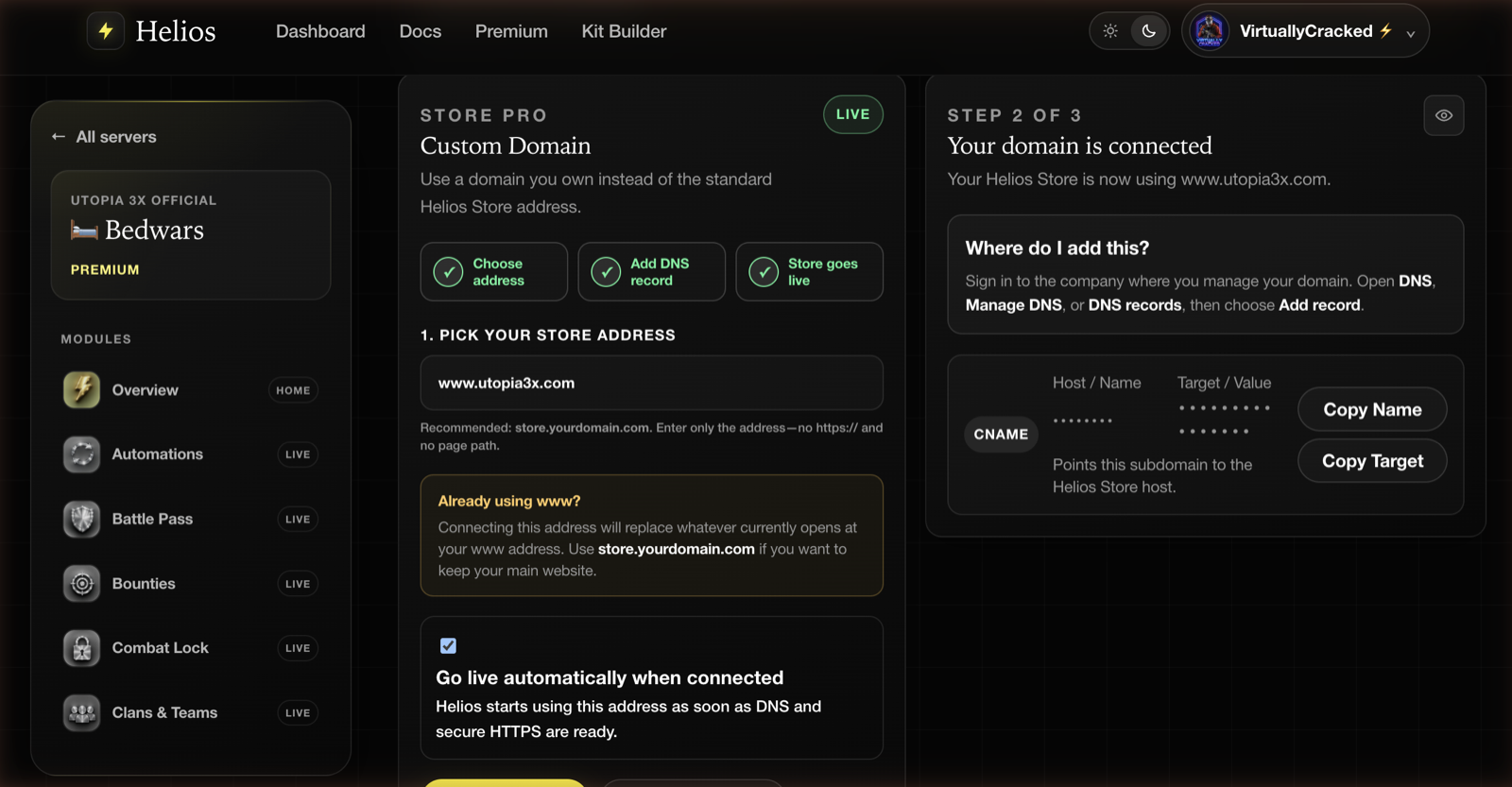
1. Pick your address
Enter the hostname only — no https:// and no path. store.yourdomain.com is the recommendation.
WARNImportant
Connecting a bare www.yourdomain.com replaces whatever currently opens there. If you already have a website on it, use store.yourdomain.com instead.
Go live automatically when connected makes Helios start serving the address the moment DNS and HTTPS are ready. Leave it on unless you are staging a launch.
2. Add the DNS record
Helios shows the exact record to create. Sign in wherever you manage your domain, open DNS, Manage DNS, or DNS records, and choose Add record. Copy Name and Copy Target put the two values on your clipboard.
3. Wait for it to go live
The three step chips at the top of the panel tick over as Helios verifies the record and issues a certificate. DNS propagation is normally minutes and occasionally hours — it is out of Helios's hands either way.
Once it is live, buyers sign in with Discord on your own domain, and the standard Helios address keeps working as a fallback.
Automatic tax
Also under Advanced. Helios uses Stripe Tax to calculate sales tax, VAT, or GST from the buyer's location.
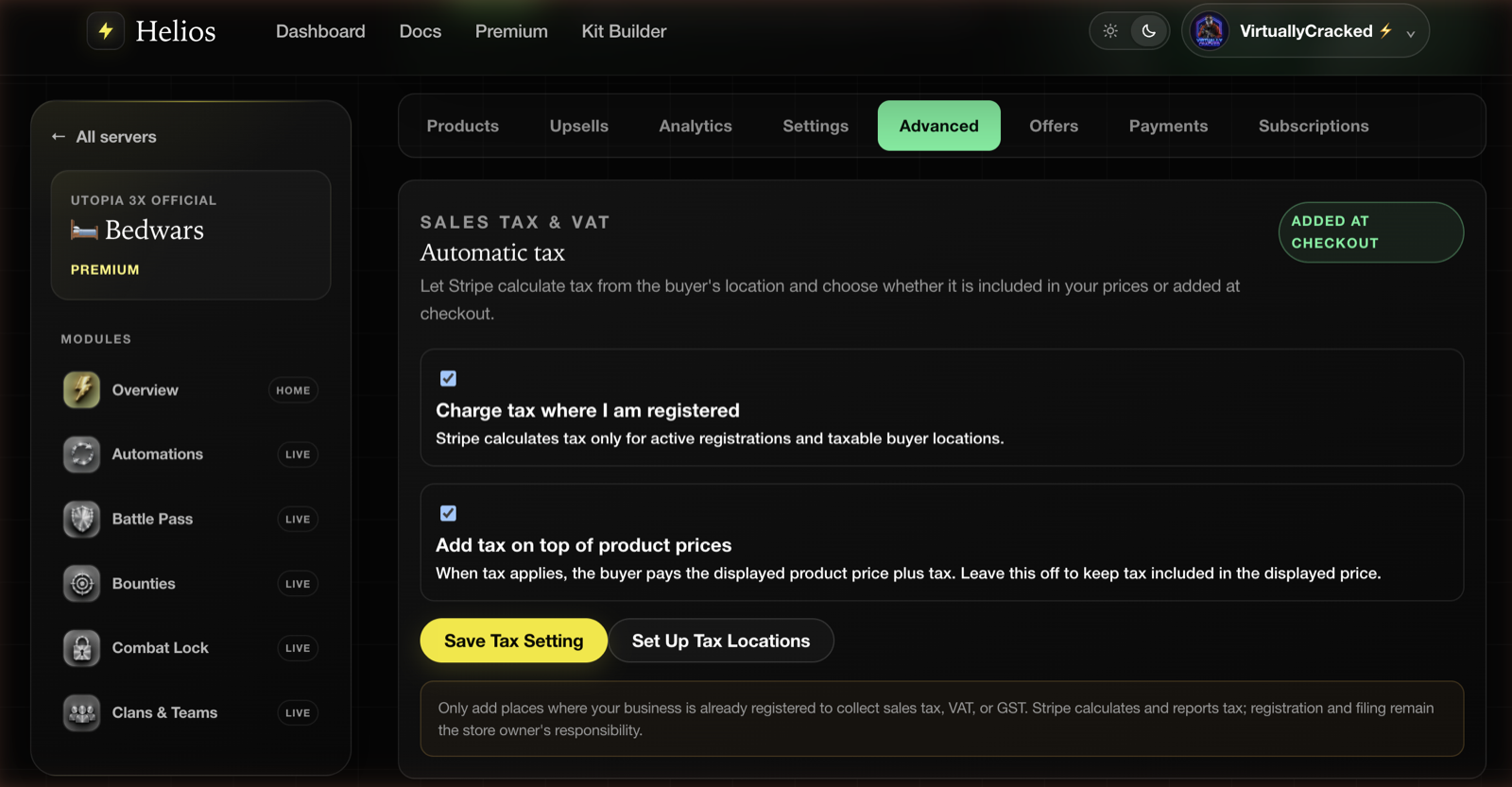
Two switches:
- Charge tax where I am registered — Stripe calculates tax only for your active registrations and taxable buyer locations.
- Add tax on top of product prices — when on, the buyer pays the displayed price plus tax. Leave it off to keep tax inside the price you show, which keeps your storefront prices clean and final.
Set Up Tax Locations opens Stripe's own registration controls. Add a location, then enable automatic tax.
WARNImportant
Adding a registration in Stripe does not register you with a tax authority, and it does not file anything. Direct charges make you the tax-liable merchant: Stripe calculates and reports, but registering, filing, remitting, and any Stripe Tax fees remain yours. Only add places where your business is already registered, and talk to an accountant before enabling this.
This is not tax advice, and Helios is not a tax adviser. If you are unsure whether you need to collect anything, that question belongs with a professional in your jurisdiction.
Is Store Pro worth it?
Work it out from your own numbers rather than the feature list:
- Under ~$450/month in sales and no domain of your own — stay on the included tier. The store is the same store.
- Over that, or you want the store on your community's domain — Store Pro.
- Running a store on a brand you are actively marketing — the domain alone usually justifies it, independent of the fee.
Common issues
My domain is not going live
Check the DNS record actually saved at your registrar and matches what Helios shows exactly, including any trailing dot your provider adds. Then give it time — propagation is not instant.
The custom domain stopped working
Store Pro billing lapsed, the storefront was closed, Stripe stopped accepting payments, or Premium expired. Any of those falls the store back to the standard address. Check the plan card and the Stripe Connect row under Settings.
My www address broke my website
Connecting www.yourdomain.com routes it to the store. Remove the domain here and point www back at your host, then reconnect the store on store.yourdomain.com instead.
Tax is not being added at checkout
You need at least one active registration in Stripe, plus Charge tax where I am registered enabled, plus a buyer in a location you are registered for. All three, or nothing is calculated.
The fee is still showing 5.5%
The Store Pro subscription has not been confirmed by Stripe yet. The plan card updates when the payment webhook lands.