Helios Rust Console Bot Documentation
Automated Gift Cards
Let Helios create Tip4Serv gift cards automatically with /t4s and the GIFTCARD parse — great for battle pass and treasure rewards.
- Last updated
- Maintained by
- Helios RCE
WARNImportant
Legacy page. Helios now includes its own web store with every Premium server, with automatic delivery and Stripe payouts to your own account. See Helios Store.
Tip4Serv still works with Helios, so everything below is still accurate — it is just no longer the recommended way to start selling.
Automated Gift Cards
Don't have a Tip4Serv store yet? Sign up here →
Overview
Helios can create Tip4Serv gift cards automatically and deliver the code to the player — for example as a battle pass reward, a treasure chest drop, or any command-style reward. Premium only.
Commands Covered
| Command | What It Does |
|---|---|
/t4s setup-gc | Save your store's private Tip4Serv API key (needs create-discounts permission) |
/t4s feed-dc | Set the Discord channel where gift-card logs are posted |
Setup Flow
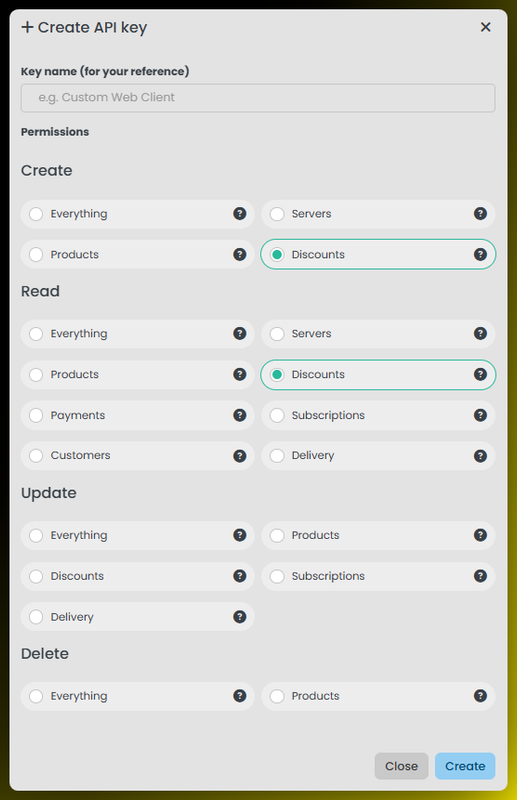
- In your Tip4Serv dashboard, create an API key with the create-discounts permission.
- Run
/t4s setup-gc key:and paste the key. Helios stores it encrypted. - Run
/t4s feed-dc channel:to choose where gift-card logs go. - Add the GIFTCARD parse anywhere command rewards are supported (battle pass
/level add,/treasure add, products, and so on).
GIFTCARD Parse
Format
{discord_id} [GIFTCARD] [{Amount}] [{Name}]
Optional extras (either order):
{discord_id} [GIFTCARD] [{Amount}] [{Name}] [{Expiration}] [{Currency}]
Breakdown
GIFTCARDtells Helios to create a Tip4Serv gift card through your API key.{Amount}is the gift-card credit, like10or9.99.{Name}is the gift-card name shown to the player.{Expiration}is optional, like7dor24h.{Currency}is an optional 3-letter code likeUSD.
Example
{discord_id} [GIFTCARD] [10] [Battle Pass Reward] [7d] [USD]
How to get your API Key
- Go to your Tip4Serv Dashboard
- Click on Developers -> API Keys
- Click on Create API Key
- Choose Discounts under Create & Read
- Do
/t4s setup-gcand paste in the Key - Next do
/t4s feed-dcand set it to an admin channel - Setup the Nuke Parses for the product in Tip4Serv
Notes
- The player receives the gift-card code; every created card is logged in your
/t4s feed-dcchannel. - Requires Premium and Administrator permission to configure.
- The API key is stored encrypted and is never shown again after setup.