Helios Rust Console Bot Documentation
Rust Console Autokit Setup Guide
Configure Rust Console autokits in Helios with bind triggers, role-aware rollout, and wipe-safe validation steps.
- Last updated
- Maintained by
- Helios RCE
Overview
Autokits streamline recurring item distribution when kit access and bind targets are controlled.
Requirements
- Connected server
Manage Serverpermission- Kit naming and role policy defined
Setup
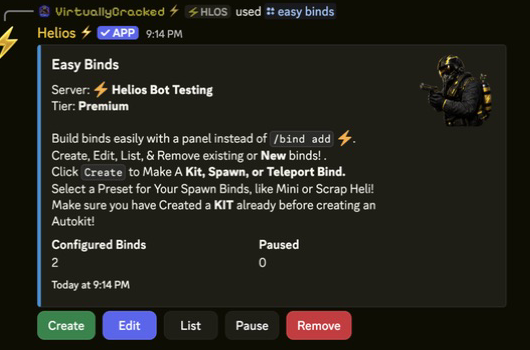
- Create bind workflows with
/bind. - Attach kit actions to the intended bind route.
- Validate role and link requirements with test accounts.
- Add spawn/teleport dependencies where needed.
- Re-test every bind after wipe or map changes.
Commands or Controls
/bind
/spawn
/tp home
/settings server
Example Use Case
Owner configures one linked-role autokit bind for new players and one VIP bind for supporter-specific kits.
Common Issues
Problem
Bind command exists but kit is not delivered.
Likely Cause
Bind target is stale or role/link requirements are unmet.
Fix
Recheck bind target validity and account-role prerequisites, then rerun a controlled test.
Tips / Best Practices
- Keep bind names and kit names standardized.
- Avoid mid-wipe kit policy shifts unless documented and owner-approved.
- Link this page from your staff onboarding channel.