Helios Rust Console Bot Documentation
How TP/Home Works for Rust Console Server Owners
Learn how TP/home should be configured in Helios for fair gameplay with role gates, cooldown policy, and post-wipe validation.
- Last updated
- Maintained by
- Helios RCE
What This Covers
- A policy-first approach to keep TP/home fair.
- Configuration sequence across delay, cooldown, and role gates.
- Validation and troubleshooting checkpoints for stable enforcement.
Policy-First Setup Model
- Define allowed TP/home behavior by player role.
- Decide cooldown and delay values before launch.
- Define abuse escalation and override rules.
Configuration Flow
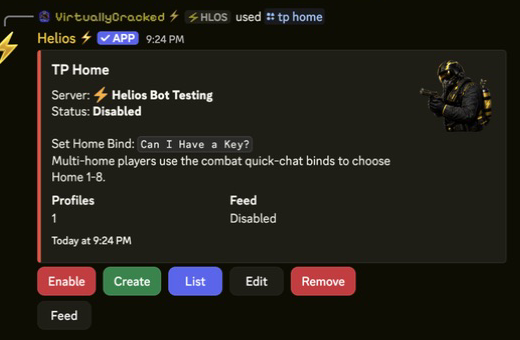
- Start with TP/Home Setup.
- Review controls in TP/Home Command Panel.
- Apply zone interactions with Zone Setup.
- Validate against event and wipe policy in Automation and Events.
Validation Checklist
- Teleport delay works as configured.
- Cooldown values are enforced by role.
- Restricted roles cannot bypass policy.
- Staff can trace abuse patterns in feed logs.
Troubleshooting Checkpoints
- TP is too permissive: increase cooldown and tighten role gates.
- TP fails for everyone: verify panel enablement and role requirements.
- Rules changed after wipe: rerun full TP/home smoke tests.
Related Guides
- Rust Console TP/Home Bot Page
- How to Create and Use Zones in Rust Console
- Common Rust Console Bot Setup Mistakes
Related Feature Pages
Next Steps
- Finalize role gates and cooldown policy with owner sign-off.
- Validate abuse controls with moderators before player rollout.
- Re-test TP/home behavior after each wipe cycle.