Helios Rust Console Bot Documentation
Kits vs Autokits on Rust Console: What Is the Difference?
Compare a saved Rust kit with the Helios Quick Chat bind that delivers it, including access, cooldowns, and failed claims.
- Last reviewed
- Maintained by
- Helios RCE
A kit is a named collection of Rust items. The autokit setup in these guides is an Emote Bind that gives that kit when a player sends its Quick Chat phrase.
| Saved kit | Emote Kit bind | |
|---|---|---|
| Defines | Which items the kit contains | How players request it, who qualifies, and how often |
| Managed in | Kit Manager | Emote Binds → Give a kit |
| Example | A kit named builder | I need Scrap gives builder once per player every 30 minutes |
| Can be reused | By supported binds, shops, and rewards | Each saved bind has its own trigger and settings |
| Gives items when saved | No | No — an eligible player must trigger the active bind |
A kit does not require a staff member to deliver every copy. Shops, rewards, and Emote Binds provide different delivery routes. Creating a Quick Chat bind does not also configure automatic join or respawn delivery.
See the connection
In Kit Manager, click a kit name to inspect where Helios uses it:
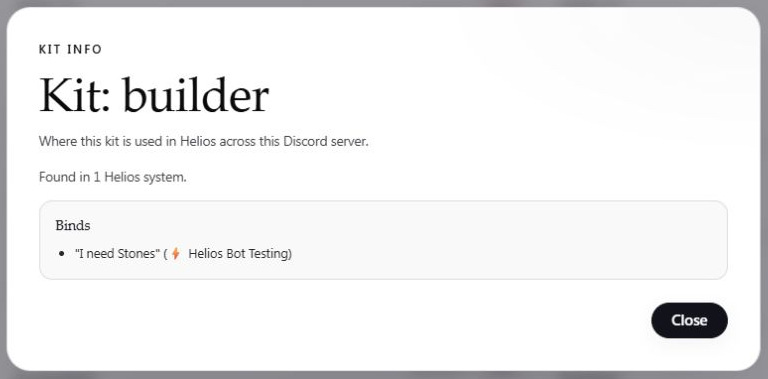
This result shows a saved reference to the kit. It does not prove a player has received the items, and it does not show the kit's contents.
To add a player claim, open Emote Binds → Create Emote Bind:
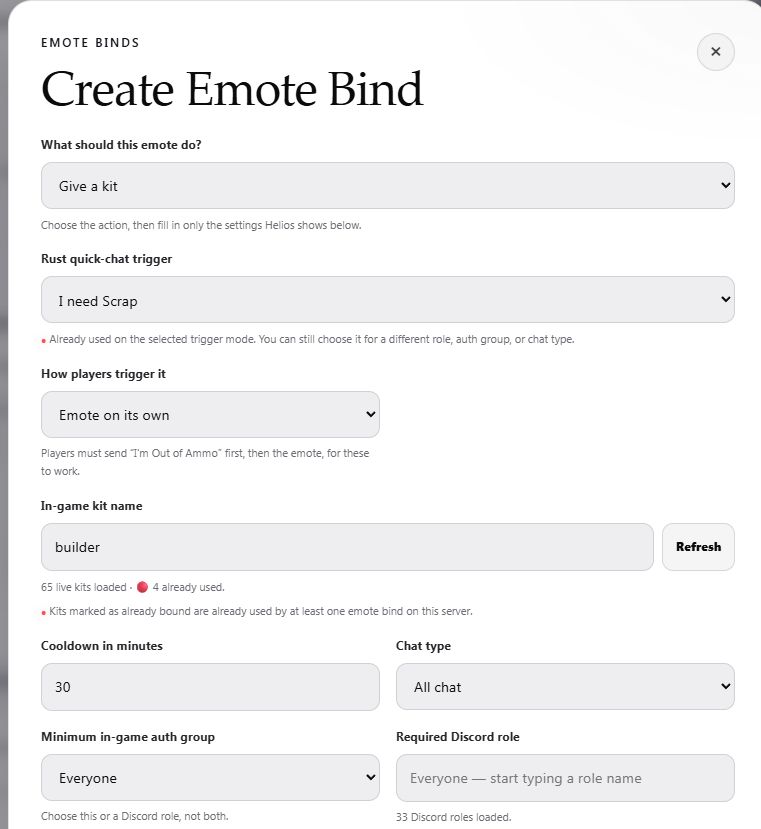
The kit name must match a kit on the selected game server. If you replace or delete a kit, review its usage first; saved delivery rules may still refer to its old name.
Choose the delivery route
- Players requesting a recurring starter or supporter kit: Autokit Setup.
- Players buying a kit: Shop & Economy.
- Winners receiving a kit: Giveaways.
- Staff building or reviewing kit definitions: Kit Manager.
For a failed claim, check the active bind, exact Quick Chat phrase, trigger mode, chat type, cooldown, and access rule. A Discord role restriction requires a linked account with that role; Rust auth is checked separately when that is the chosen rule. Use the Autokit troubleshooting table before granting another copy.