Helios Rust Console Bot Documentation
G-Portal Connection Guide
Host-specific Helios setup guide for G-Portal Rust Console servers, including server connection (WebRCON) validation and rollout checks.
- Last updated
- Maintained by
- Helios RCE
Prerequisites
- Helios already added to your Discord server
- One designated owner operations channel
- G-Portal server host, server connection port, and RCON Password confirmed from active server settings
- Owner/admin role boundaries already defined
Setup Workflow
- Complete Discord Roles & Channels if roles and channels are not finalized
- Add the server using
/server addwith current G-Portal values - Validate command execution with
/cmd send command: fps - Validate player tracking with
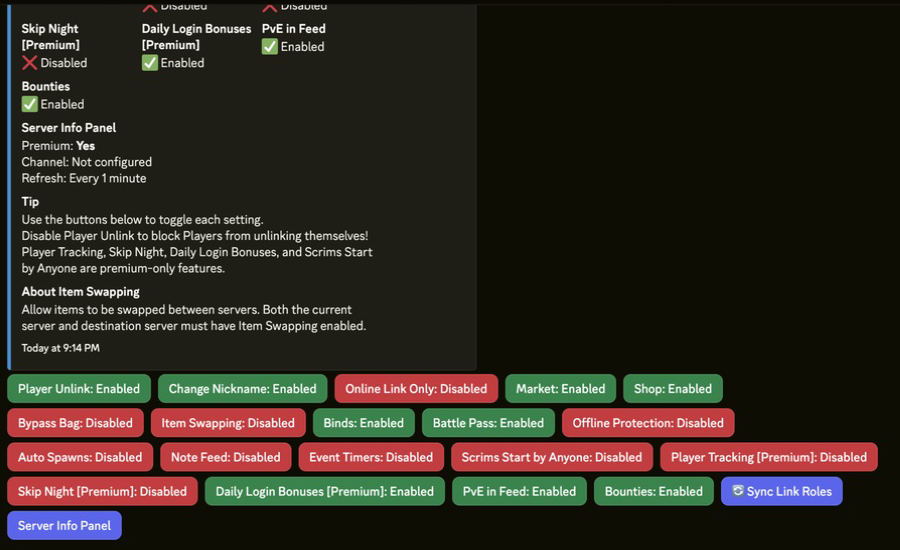
/whoson - Enable initial modules in
/settings serverafter command tests pass - Turn on killfeed and admin alerts first for staff visibility
Commands or Controls
/server add
/server list
/server edit
/setup
/cmd send command:"fps"
/whoson
/settings server
Example Validation Sequence
/server add name:"EU Main" ip:"<GPORTAL_IP>" rcon_port:28016 rcon_password:"<RCON_PASSWORD>"
/server list
/cmd send command:"fps" server:"EU Main"
/whoson server:"EU Main"
/settings server server:"EU Main"
Common Issues
Problem
/cmd send fails right after adding the server.
Likely Cause
Host, port, or password mismatch.
Fix
Use /server edit, re-check G-Portal values, and run the same validation sequence again.
Problem
Commands work intermittently after restart windows.
Likely Cause
Server is in a host-side restart or maintenance cycle.
Fix
Wait for server availability, then re-run /cmd send and /whoson before re-enabling module rollouts.
Tips / Best Practices
- Keep server naming consistent by region and mode.
- Save a simple internal checklist after first successful setup and reuse it for additional servers.
- Re-run health checks after wipe, host migration, or password rotation.