Helios Rust Console Bot Documentation
Nitrado Connection Guide
Host-specific Helios setup guide for Nitrado Rust Console servers, including connection validation and rollout guardrails.
- Last updated
- Maintained by
- Helios RCE
Prerequisites
- Helios bot invited to your Discord server
- Verified owner/admin roles and private operations channel
- Current Nitrado host, server connection port, and RCON Password
- One test server selected for first rollout
Setup Workflow
- Confirm role and permission boundaries in Discord Roles & Channels.
- Add your Nitrado server with
/server add. - Validate command execution using
/cmd send command:"fps". - Validate polling output using
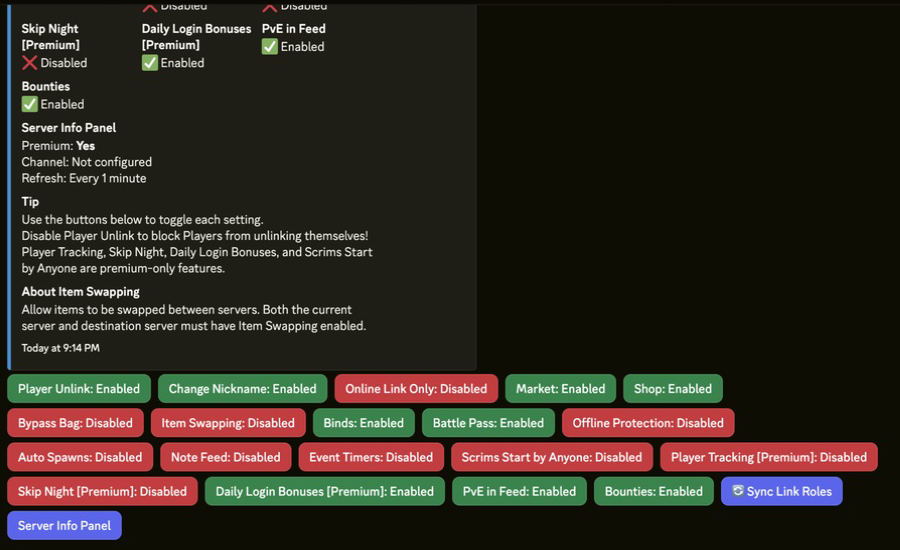
/whoson. - Apply module toggles in
/settings serveronly after validation succeeds. - Roll out additional modules in phases after staff smoke tests.
Commands or Controls
/server add
/server list
/server edit
/cmd send command:"fps"
/whoson
/settings server
Example Validation Sequence
/server add name:"US Weekly" ip:"<NITRADO_IP>" rcon_port:28016 rcon_password:"<RCON_PASSWORD>"
/server list
/cmd send command:"fps" server:"US Weekly"
/whoson server:"US Weekly"
/settings server server:"US Weekly"
Common Issues
Problem
/whoson returns no response for a connected server.
Likely Cause
Server entry is stale or target server is restarting.
Fix
Confirm server status in Nitrado, then re-run /server list, /cmd send, and /whoson.
Problem
Staff run commands against the wrong server profile.
Likely Cause
Inconsistent naming standards across entries.
Fix
Rename server entries with region/mode naming and keep a simple runbook in your ops channel.
Tips / Best Practices
- Validate one server completely before adding additional Nitrado servers.
- Log every settings change in one admin channel during launch week.
- Re-test connection health after wipes, password changes, or host-side maintenance.