Helios Rust Console Bot Documentation
TP Home and Zones Setup
Practical setup flow for TP Home policy, zone controls, and ORP behavior.
- Last reviewed
- Maintained by
- Helios RCE
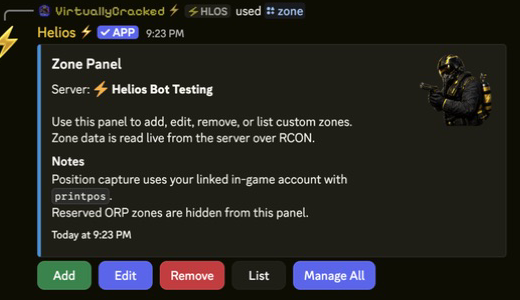
Setup flow
- Configure TP Home access and cooldowns.
- Plan custom zone rules, including position, size, and each damage/building switch.
- Configure ORP separately if used.
- Read the saved settings first. Keep deliberate gameplay tests on a separate testing server.
These are separate systems: a custom zone does not teleport players, create homes, choose spawn points, or grant ORP. Zone rules do not restrict entry by Discord role.
Core commands
/tp home/zone server:"<SERVER>"— Free Discord custom-zone panel; Manage Server required. The website editor requires Premium./orp settings(premium),/orp list(premium),/orp wipe(premium)/spawn add(premium),/spawn list(premium)
Validation checklist
- Teleport access follows role policy.
- Zone behavior matches intended restrictions.
- ORP actions are logged and controlled.
Editing safely
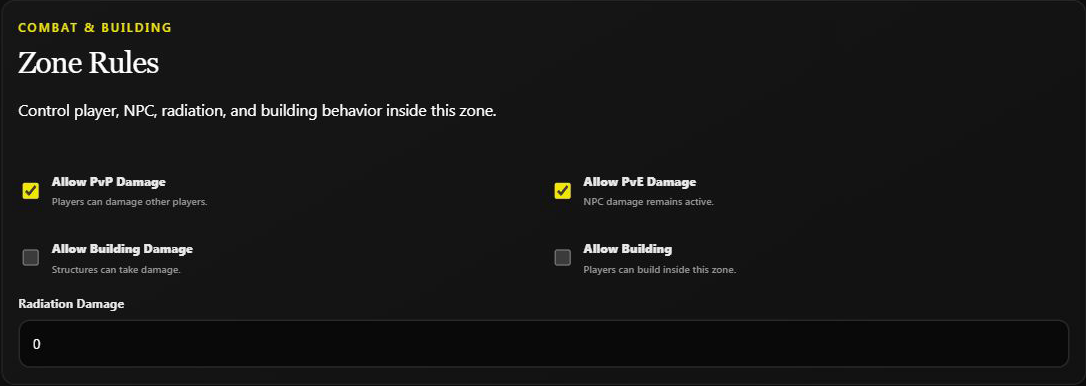
- Discord Add: controls edit a draft until Create Zone.
- Discord Edit: submitted fields and toggles apply immediately. Back does not undo them.
- Dashboard fields: click Save Zone to apply edits. Enabled/Disabled applies immediately on its own.
- Manage All: includes automated non-ORP zones, not just the zone currently open. Record old values first; bulk toggling does not restore individual settings.
Use the zone walkthrough for screenshots and practical examples for rule choices. After a wipe, check the live list and new map positions rather than assuming old zones are still in place.