Helios Rust Console Bot Documentation
Discord Killfeed
Add, check, and safely remove Discord killfeed destinations with /dcfeed.
- Last reviewed
- Maintained by
- Helios RCE
Use /dcfeed for kills sent to Discord, not the lines shown inside Rust. You need Manage Server in Discord and a connected game server. Helios needs permission to view the destination, send messages, and embed links.
For the full dashboard walkthrough, see Killfeed in Discord.
Check what is already set up
/dcfeed list
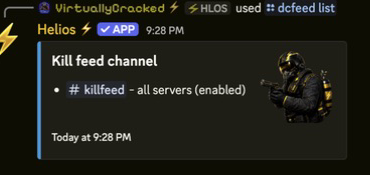
Read each channel's server scope and enabled/disabled status before adding anything. A shared destination receives kills from every connected game server in this Discord community.
Add one server's feed
/dcfeed add channel:#killfeed server:"<SERVER>"
Choose your actual channel and a server from Discord's suggestions. Check both in the confirmation. Leave server: blank only when you deliberately want all connected servers.
You can do the same thing under Dashboard → Killfeed → Discord Channels → Add Channel:
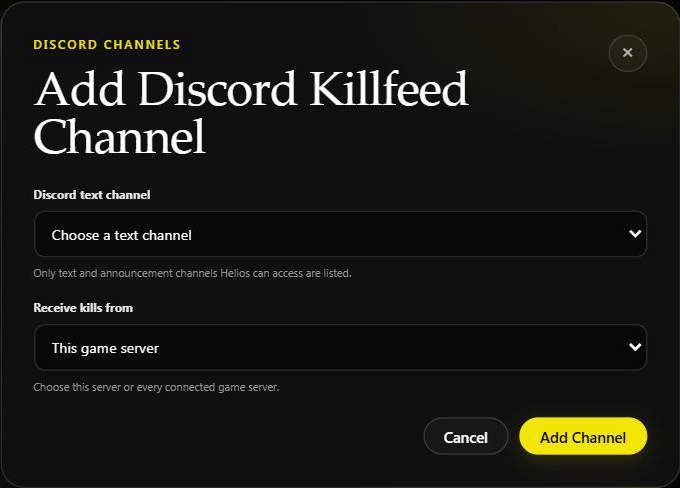
Give the change about a minute, then watch for the next new kill. Adding a destination does not copy old kills into the channel.
Pause or remove a destination
Use Pause on its dashboard card for a temporary stop; Resume turns it back on. To remove just one server's destination in Discord:
/dcfeed remove channel:#killfeed server:"<SERVER>"
WARNDo not leave the server blank accidentally
Removing without server: removes every killfeed configuration for the chosen channel, including server-only destinations. Run /dcfeed list first. Removing a destination does not delete the Discord channel or past messages.
The dashboard card has no scope editor. To replace a shared route with a server-only one, add the intended server-only destination and pause or remove the shared destination after checking its other users.
If it stays quiet
Check the server connection, destination status, channel permissions, and the PvE/EvE settings. Use Killfeed troubleshooting before adding duplicate destinations.