Helios Rust Console Bot Documentation
ORP Zone Colors & States
Understand when an ORP is online, pending, or protected.
- Last reviewed
- Maintained by
- Helios RCE
Open Dashboard → Offline Protection or /orp settings to choose the online and protected colors. Save your changes and allow existing zones time to update.
| State | What it means |
|---|---|
| Online | At least one tracked member is online; offline protection is not active. |
| Pending | The tracked group is offline and the activation delay is counting down. |
| Protected | The activation delay has ended and protection is active. |
Helios changes the state automatically. You do not need to switch colors when a player logs in or out. Use the zone status and timers to check protection; color alone is only a visual aid.
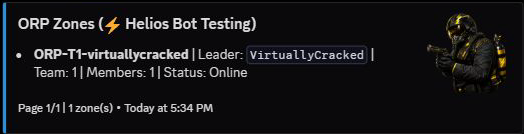
Online means the base is not receiving offline protection. This is a saved command result; run /orp list again for an updated status.
Protected ORPs allow PvP and block building damage. Whether players can build there depends on the Allow Building setting. For placement, tracking, dynamic sizing, and timers, see the Offline Protection guide.
Changing colors or other zone settings does not change who is online or skip the activation delay. Saving updates existing zones in their current state. Read the confirmation result, and use Retry Zone Updates in the dashboard if any live updates could not be confirmed.